AFP Reference#
Overview#
This document describes the Apple Filing Protocol (AFP) commands, data types and constants that can be used to communicate with an AFP file server. AFP allows users of multiple computers to share files easily and efficiently over a network.
In this protocol reference, references to a string type indicate a
Pascal string. The first byte of a Pascal string indicates the string
length (0-255), and is followed by up to 255 bytes of text. Pascal
strings are not null-terminated.
Note: All AFP data is transmitted in big endian format.
For conceptual information, along with a complete list of differences between various AFP protocol versions, see the companion programming guide.
Functions by Task#
This specification is a list of commands that are part of the Apple
Filing Protocol wire protocol. These are primarily of interest to
developers writing AFP client or server software. These are not
commands that can be entered from a Terminal prompt.
AFP Protocol Commands#
These commands are sent at the AFP layer. This layer sits on top of the DSI layer. The DSI layer commands are described in “DSI Transport Layer Commands.”
FPAccessFPAddAPPLFPAddCommentFPAddIconFPByteRangeLockFPByteRangeLockExtFPCatSearchFPCatSearchExtFPChangePasswordFPCloseDirFPCloseDTFPCloseForkFPCloseVolFPCopyFileFPCreateDirFPCreateFileFPCreateIDFPDeleteFPDeleteIDFPDisconnectOldSessionFPEnumerateFPEnumerateExtFPEnumerateExt2FPExchangeFilesFPFlushFPFlushForkFPGetACLFPGetAPPLFPGetAuthMethodsFPGetCommentFPGetExtAttrFPGetFileDirParmsFPGetForkParmsFPGetIconFPGetIconInfoFPGetSessionTokenFPGetSrvrInfoFPGetSrvrMsgFPGetSrvrParmsFPGetUserInfoFPGetVolParmsFPListExtAttrsFPLoginFPLoginContFPLoginExtFPLogoutFPMapIDFPMapNameFPMoveAndRenameFPOpenDirFPOpenDTFPOpenForkFPOpenVolFPReadFPReadExtFPRemoveAPPLFPRemoveCommentFPRemoveExtAttrFPRenameFPResolveIDFPSetACLFPSetDirParmsFPSetExtAttrFPSetFileDirParmsFPSetFileParmsFPSetForkParmsFPSetVolParmsFPSpotlightRPCFPSyncDirFPSyncForkFPWriteFPWriteExtFPZzzzz
DSI Transport Layer Commands#
DSIOpenSessionDSICommandDSIWriteDSIAttentionDSITickleDSICloseSessionDSIGetStatus
Functions#
DSIAttention#
Sent by the server to notify the client of a status change.
uint8_t flags;
uint8_t command;
uint16_t requestID;
union {
   uint32_t errorCode;
   uint32_t writeOffset;
};
uint32_t totalDataLength;
uint32_t reserved;
uint8_t attentionPayload[];Parameters#
flags
Indicates whether the packet is a request or reply.
0x00= request0x01= reply
command
The command code (8).
requestID
The request ID. See DSIHeader for more information.
writeOffset
Set to zero (0).
errorCode
On response, the error code that occurred.
totalDataLength
Set to the length of the optionPayload data blob.
reserved
Reserved. Set to zero (0).
attentionPayload
The packet payload—a variable-length block of option data in the format
described in the discussion below.
Discussion#
The AFP server uses standard data stream packets to send DSIAttention
packets to the client. The attention code is stored as part of the data
in the DSI packet. The size of the attention code and any other
attention data cannot be larger than the size specified by the attention
quantum when the client opened the session. The default attention
quantum size is 2. See “AFPUserBytes Definitions” for more information.
DSICloseSession#
Closes a DSI session.
   uint8_t flags;
   uint8_t command;
   uint16_t requestID;
   union {
      uint32_t errorCode;
      uint32_t writeOffset;
   };
   uint32_t totalDataLength;
uint32_t reserved;Parameters#
flags
Always zero (0) to indicate that it contains a request. The client
does not wait for a reply.
command
The command code (1).
requestID
The request ID. See DSIHeader for more
information.
writeOffset
Set to zero (0).
errorCode
On response, the error code that occurred.
totalDataLength
Set to zero (0).
reserved
Reserved. Set to zero (0).
Discussion#
To close a session, an AFP client or server sends a DSICloseSession
command request. Without waiting for a reply, the sender of the
DSICloseSession command closes the AFP session and reclaims all of the
resources allocated to the session. Then it tears down the data stream
connection.
Note: The AFPLogout command does not close the session.
DSICommand#
Passes an AFP protocol request to the server.
uint8_t flags;
uint8_t command;
uint16_t requestID;
union {
   uint32_t errorCode;
   uint32_t writeOffset;
};
uint32_t totalDataLength;
uint32_t reserved;
uint8_t afpRequestPayload[];Parameters#
flags
Indicates whether the packet is a request or reply.
0x00= request0x01= reply
command
The command code (2).
requestID
The request ID. See DSIHeader for more
information.
writeOffset
Set to zero (0).
errorCode
On response, the error code that occurred.
totalDataLength
Set to the length of the AFP request payload.
reserved
Reserved. Set to zero (0).
afpRequestPayload
The packet payload—a variable-length block of option data containing an
AFP request.
Discussion#
Once the client opens a DSI session, the DSI is ready to accept and
process DSICommand requests from the client. When it receives a
DSICommand request, the DSI removes the header, saves the request
context in its internal state, and passes the data (an AFP request) to
the AFP server.
When the DSI receives a reply, it uses the command and requestID fields in the DSI header of the reply to match the reply with its corresponding request and request context in order to send the reply to the client. Once the DSI sends the reply to the client, the DSI reclaims storage allocated for the request context.
Note: For the FPWrite, FPWriteExt, and FPAddIcon AFP commands,
use DSIWrite instead.
DSIGetStatus#
Passes an AFP FPGetSrvrInfo request to the server.
uint8_t flags;
uint8_t command;
uint16_t requestID;
union {
   uint32_t errorCode;
   uint32_t writeOffset;
};
uint32_t totalDataLength;
uint32_t reserved;Parameters#
flags
Indicates whether the packet is a request or reply.
0x00= request0x01= reply
command
The command code (3).
requestID
The request ID. See DSIHeader for more
information.
writeOffset
Set to zero (0).
errorCode
On response, the error code that occurred.
totalDataLength
Set to the length of the statusPayload data blob.
reserved
Reserved. Set to zero (0).
Discussion#
After the command header above, the DSI packet contains a payload
consisting of the FPGetSrvrInfo request or response
packet.
In the context of data stream communication, the client must establish a
session with the server in order to exchange information with it, but in
the context of ASP, a client can send an ASPGetStatus command to the
server without establishing a session. To support ASPGetStatus, the
AFP server supports the DSIGetStatus command on its listening port.
To obtain ASP status information, the client must establish a connection
on the server’s listening port. The client then sends a DSIGetStatus
command to the server. The server then returns the status information to
the client and immediately tears down the connection.
DSIOpenSession#
Opens a DSI session.
uint8_t flags;
uint8_t command;
uint16_t requestID;
union {
   uint32_t errorCode;
   uint32_t writeOffset;
};
uint32_t totalDataLength;
uint32_t reserved;
struct optionsPayload {
   uint8_t optionType;
   uint8_t optionLength;
   uint8_t optionData[];
} Options[];Parameters#
flags
Indicates whether the packet is a request or reply.
0x00= request0x01= reply
command
The command code (4).
requestID
The request ID. See DSIHeader for more
information.
writeOffset
Set to zero (0).
errorCode
On response, the error code that occurred.
totalDataLength
Set to the length of the optionPayload data blob.
reserved
Reserved. Set to zero (0).
optionsPayload
The packet payload—a variable-length block of option data in the format
described below.
Discussion#
Usually, the DSIOpenSession command request is the first request
issued by the client after it establishes a connection with an AFP
server. (The client can also send a DSIGetStatus command request.
In this case, the AFP server immediately tears down the connection after
delivering the requested status information.) The DSIOpenSession
command request opens a DSI session and delivers the client’s initial
request ID.
The data portion of a DSIOpenSession packet may contain options
defined by the client (request) or server (reply). The options must
conform to the format shown in Figure 1.
Figure 1 AFP DSIOpenSession option format

Table 1 describes each field in the option portion of the DSIOpenSession packet.
Table 1 Fields in the option portion of the DSIOpenSession packet
| Field | Purpose |
|---|---|
optionType | An unsigned 8-bit value indicating the type of information contained by the optionData field. Two types are defined: enum { kRequestQuanta = 0x00, kServerReplayCacheSize = 0x02 }; 0x00 = server request quantum. Sent by the server to the client to indicate that the optionData field contains the size of the largest request packet the server can accept. The option length is four bytes. 0x02 = maximum replay cache size supported. Sent by the server to the client to indicate the maximum number of elements that the server replay cache supports. The option length is four bytes. |
optionLength | An unsigned 8-bit value containing the length of the variable-length optionData field that follows. |
optionData | A variable-length value sent in network byte order (most significant byte first) representing the number of bytes the server and the client can accept in request and attention packets, respectively, but not including the length of the DSI header and the AFP command. The length of the Option field is variable, but for maximum performance, it should be a multiple of 4 bytes. |
DSITickle#
Notifies the server that the client is still alive or vice versa.
uint8_t flags;
uint8_t command;
uint16_t requestID;
union {
   uint32_t errorCode;
   uint32_t writeOffset;
};
uint32_t totalDataLength;
uint32_t reserved;Parameters#
flags
Indicates whether the packet is a request or reply. Always zero (0)
because a Tickle does not require a reply.
command
The command code (5).
requestID
The request ID. See DSIHeader for more
information.
writeOffset
Set to zero (0).
errorCode
On response, the error code that occurred.
totalDataLength
Set to the zero (0).
reserved
Reserved. Set to zero (0).
Discussion#
The DISTickle command provides a way for AFP servers and clients to
detect time-outs caused by the abnormal termination of DSI sessions and
data stream connections. By default, an AFP server sends a DSITickle
command request packet every 30 seconds to the client if the AFP server
has not sent any other data to the client in the previous 30 seconds.
Likewise, the client sends a DSITickle command request packet every 30
seconds to the client if the client server has not sent any other data
to the AFP server in the previous 30 seconds.
If an AFP server does not receive any data from a client for two
minutes, the AFP server terminates the session with the client.
Likewise, the client terminates the session with the AFP server if the
client does not receive any data from the server for two minutes.
Instead of using a timer to determine when to send a DSITickle
command, many client implementations send a DSITickle command whenever
they receive a DSITickle command from the AFP server.
DSIWrite#
Passes an AFP FPWrite, FPWriteExt, or FPAddIcon request to the server.
uint8_t flags;
uint8_t command;
uint16_t requestID;
union {
   uint32_t errorCode;
   uint32_t writeOffset;
};
uint32_t totalDataLength;
uint32_t reserved;
uint8_t afpRequestPayload[];Parameters#
flags
Indicates whether the packet is a request or reply.
0x00= request0x01= reply
command
The command code (6).
requestID
The request ID. See DSIHeader for more information.
writeOffset
Set to the number of bytes in the packet representing AFP command
information. The server uses this information to collect the AFP command
part of the packet before it accepts the actual data to write.
For example, when a client sends an FPWrite command to write data on the
server, the enclosed data offset should be 12.
errorCode
On response, the error code that occurred.
totalDataLength
Set to the length of the AFP request payload.
reserved
Reserved. Set to zero (0).
afpRequestPayload
The packet payload—a variable-length block of option data containing an
AFP request.
Discussion#
The DSIWrite command request contains an FPWrite, FPWriteExt, or
FPAddIcon request and the associated data.
The amount of data to be written may be up to the size of the
server request quantum described earlier in DSIOpenSession.
The AFP server may or may not be ready to accept the data, so the DSI only forwards the AFP request portion to the AFP server, using the enclosed data offset in the DSI header to determine the length of the AFP header.
Once it processes the header and determines that the client has the privileges required to write the data, the AFP server retrieves the data to be written from the DSI. Once the AFP server declines the request or the DSI finds that all of the data has been written, the DSI disposes of the data and reclaims the storage associated with it.
FPAccess#
Checks for permission to access a file or directory on a volume for which ACLs are enabled.
uint8_t CommandCode
uint8_t Pad
int16_t VolumeID
int32_t DirectoryID
uint16_t Bitmap
16 bytes UUID
int32_t ReqAccess
uint8_t Pathtype
string PathnameParameters#
CommandCodekFPAccess (75).
Pad
Pad byte.
VolumeID
Volume identifier.
DirectoryID
Directory identifier.
Bitmap
Reserved.
UUID
Universally Unique Identifier (UUID) of the process sending this
command.
ReqAccess
Requested access. For definitions, see “ACL Access Rights.”
PathType
Type of names in Pathname. See “Path Type Constants” for possible values.
Pathname
Pathname to the file or directory for which access is being requested.
Pathname is a string if it contains Short or Long Names or an AFPName
if it contains a UTF-8–encoded path. See the Character Encoding section
of “Apple Filing Protocol Concepts” in Apple Filing Protocol Programming Guide for
additional details about the UTF-8 encoding used by AFP.
ResultkFPNoErr if access is allowed. See Table 3 for other possible result codes.
Discussion#
The request is sent to the server, which determines whether to grant access.
Support for this command, as well as FPGetACL and FPSetACL is required
in order to support access control lists (ACLs).
Support for UTF-8 and UUIDs is also required in order to support ACLs.
See the Character Encoding section of
“Apple Filing Protocol Concepts” in Apple Filing Protocol Programming Guide for
additional details about the UTF-8 encoding used by AFP.
Table 2 lists the result codes for the FPAccess command.
| Result code | Explanation |
|---|---|
kFPAccessDenied | User does not have the access privileges required to request access to the file or directory. |
kFPMiscErr | Non-AFP error occurred. |
kFPObjectNotFound | Input parameters do not point to an existing file or directory. |
kFPParamErr | A parameter is invalid. |
Table 2 Result codes for the FPAccess command
Figure 2 shows the request block for the FPAccess command.
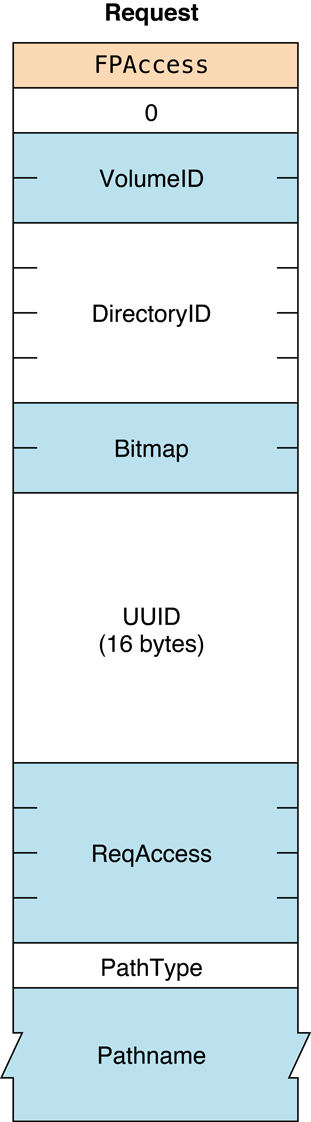
Figure 2 Request block for the FPAccess command
Version Notes#
Introduced in AFP 3.2.
FPAddAPPL#
Adds an APPL mapping to the Desktop database.
uint8_t CommandCode
uint8_t Pad
int16_t DTRefNum
int32_t DirectoryID
int32_t FileCreator
int32_t ApplTag
uint8_t PathType
string PathnameParameters#
CommandCodekFPAddAPPL (53).
Pad
Pad byte.
DTRefNum
Desktop database reference number.
DirectoryID
Ancestor Directory ID.
FileCreator
File creator of the application corresponding to the APPL mapping being
added.
ApplTag
User-defined tag stored with the APPL mapping.
PathType
Type of names in Pathname. See “Path Type Constants” for possible values.
Pathname
Pathname to the application corresponding to the APPL mapping being
added. Pathname is a string if it contains Short or Long Names or an
AFPName if it contains a UTF-8–encoded path. See the Character Encoding
section of “Apple Filing Protocol Concepts” in Apple Filing Protocol Programming Guide for
additional details about the UTF-8 encoding used by AFP.
ResultkFPNoErr if no error occurred. See Table 3 for other possible
result codes.
Reply block
None.
Discussion#
This command adds the specified mapping to the volume’s Desktop database, including the application’s location, and file creator. If an APPL mapping for the same application (same filename, same directory, and same file creator) already exists, the mapping is replaced.
The user must have search or write privileges to all ancestors except the application’s parent directory, as well as write access to the parent directory.
There may be more than one application in the Desktop database’s list of
APPL mappings for a given file creator. To distinguish among them, the
ApplTag parameter is stored with each APPL mapping. The tag
information may be used to decide among these multiple applications and
is not interpreted by the Desktop database.
The user must have previously called
FPOpenDT for the corresponding volume.
In addition, the application must be present in the specified directory
before this command is sent.
Table 3 lists the result codes for the FPAddAPPL command.
| Result code | Explanation |
|---|---|
kFPAccessDenied | User does not have the access privileges required to add an APPL mapping. |
kFPMiscErr | Non-AFP error occurred. |
kFPObjectNotFound | Input parameters do not point to an existing file. |
kFPObjectTypeErr | Input parameters point to a directory. |
kFPParamErr | Session reference or Desktop database reference number is unknown; pathname is invalid. |
Table 3 Result codes for the FPAddAPPL command
Figure 3 shows the request block for the FPAddAPPL command.
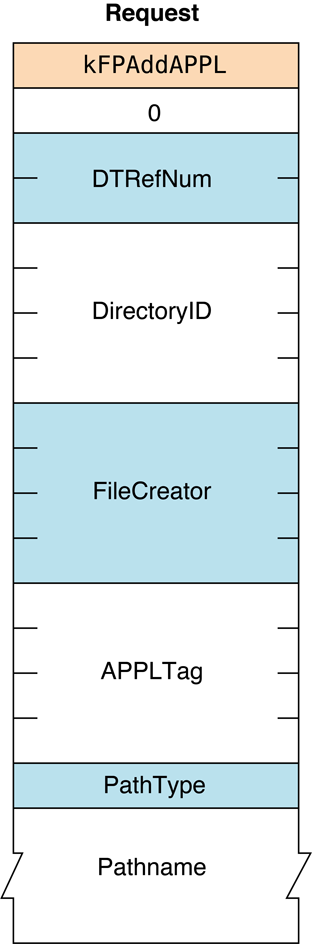
Figure 3 Request block for the FPAddAPPL command
Availability#
- Deprecated. The Desktop Database Manager no longer exists in Mac OS v.10.6 and later.
FPAddComment#
Adds a comment for a file or directory to a volume’s Desktop database.
uint8_t CommandCode
uint8_t Pad
int16_t DTRefNum
int32_t DirectoryID
uint8_t PathType
string Pathname
string CommentParameters#
CommandCodekFPAddComment (56).
Pad
Pad byte.
DTRefNum
Desktop database reference number.
DirectoryID
Ancestor Directory ID.
PathType
Type of name in Pathname. See “Path Type Constants”
for possible values.
Pathname
Pathname to the file or directory with which the comment is to be
associated. Pathname is a string if it contains Short or Long Names or
an AFPName if it contains a UTF-8–encoded path. See the Character
Encoding section of “Apple Filing Protocol Concepts” in Apple Filing Protocol Programming Guide for
additional details about the UTF-8 encoding used by AFP.
Comment
Comment data to be associated with the specified file or directory.
ResultkFPNoErr if no error occurred. See Table 4 for other possible
result codes.
ReplyBlock
None.
Discussion#
This command stores the comment data in the Desktop database and associates the comment with the specified file or directory. If the comment is longer than 199 bytes, the comment is truncated to 199 bytes without returning an error.
To add a comment to a directory that is not empty, the user needs search access to all ancestors including the directory’s parent directory, as well as write access to the parent directory. To add a comment to an empty directory, the user needs search or write access to all ancestors except the directory’s parent directory, as well as write access to the parent directory.
To add a comment to a file that is not empty, the user needs search access to all ancestors except the file’s parent directory, as well as read and write access to the parent directory. To add a comment to an empty file, the user needs search or write access to all ancestors except the files’s parent directory, as well as write access to the parent directory.
The user must have previously called FPOpenDT for the corresponding volume.
In addition, the specified file or directory must be present in the
specified directory before this command is sent.
Table 4 lists the result codes for the FPAddComment command.
| Result code | Explanation |
|---|---|
kFPAccessDenied | User does not have the access privileges required to add a comment. |
kFPObjectNotFound | Input parameters do not point to an existing file or directory. |
kFPMiscErr | Non-AFP error occurred. |
Community Archive Annotation.
The kFPParamErr result code below is taken from the AFP 3.0 Reference (January 2001).
This result code is not documented in the AFP 3.1 Reference or later,
but its omission appears to be an error.
| Result code | Explanation |
|---|---|
kFPParamErr | Session reference or Desktop database reference number is unknown; pathname is invalid. |
Table 4 Result codes for the FPAddComment command
Figure 4 shows the request block for the FPAddComment command.
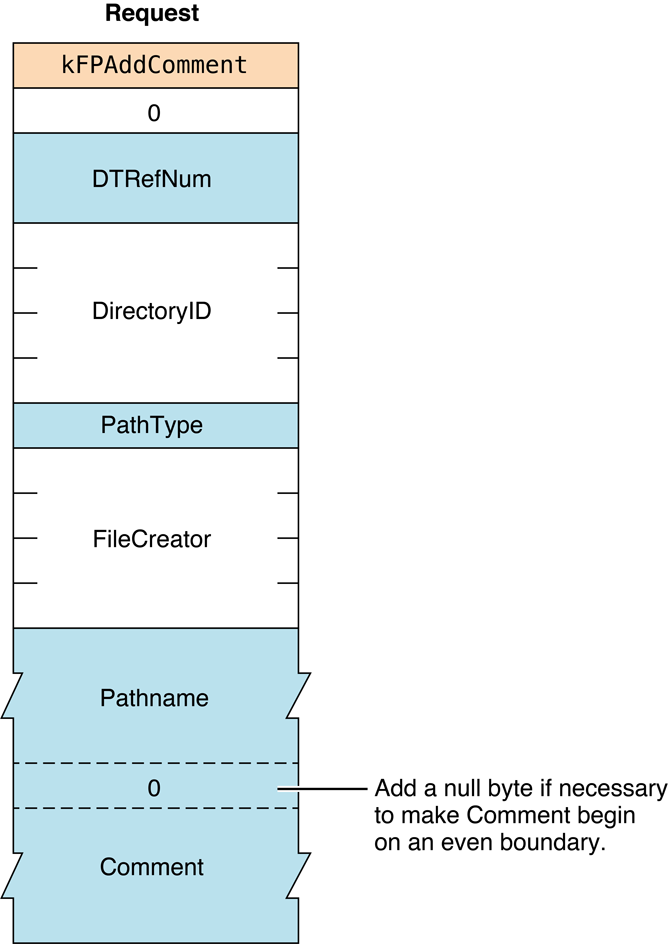
Figure 4 Request block for the FPAddComment command
Availability#
- Deprecated. The Desktop Database Manager no longer exists in Mac OS v.10.6 and later.
FPAddIcon#
Adds an icon bitmap to a volume’s Desktop database.
uint8_t CommandCode
uint8_t Pad
int16_t DTRefNum
int32_t FileCreator
int32_t FileType
uint8_t IconType
uint8_t Pad
int32_t IconTag
int16_t BitmapSizeParameters#
CommandCodekFPAddIcon (192).
Pad
Pad byte.
DTRefNum
Desktop database reference number.
FileCreator
File creator associated with the icon that is to be added.
FileType
File type associated with the icon that is to be added.
IconType
Type of icon that is to be added.
Pad
Pad byte.
IconTag
Tag information to be stored with the icon.
BitmapSize
Size of the bitmap for this icon.
ResultkFPNoErr if no error occurred, kFPParamErr if the session reference
number or the Desktop database reference number is unknown or if the
pathname is invalid, kFPIconTypeError if the new icon’s size
is different from the size of the existing icon, or
kFPMiscErr if an error occurred that is not specific to AFP.
ReplyBlock
None.
Discussion#
This command adds the icon for the specified file creator and icon type
to the Desktop database and associates the tag information with the
icon. If an icon of the same file creator and icon type already exists
in the database, the icon is replaced. However, if the new icon’s size
is different from the old icon, the server returns a
kFPIconTypeError result code.
The user must have previously called
FPOpenDT for the corresponding volume.
Figure 5 shows the request block for the FPAddIcon command.
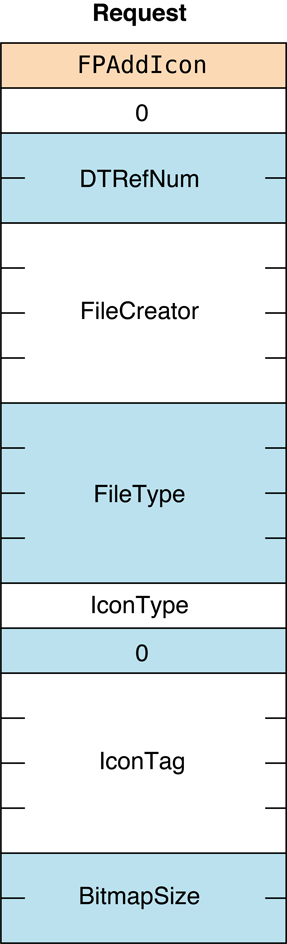
Figure 5 Request block for the FPAddIcon command
Availability#
- Deprecated. The Desktop Database Manager no longer exists in Mac OS v.10.6 and later.
FPByteRangeLock#
Locks or unlocks a specified range of bytes within an open fork.
uint8_t CommandCode
uint8_t Flags
int16_t OForkRefNum
int32_t Offset
int32_t LengthParameters#
CommandCodekFPByteRangeLock (1).
Pad
Pad byte.
DTRefNum
Bit 0 is the LockUnlock bit, where 0 indicates lock and 1 indicates
unlock. Bit 7 is the StartEndFlag bit, where 0 indicates that Offset
is relative to the beginning of the fork and 1 indicates that Offset
is relative to the end of the fork. The StartEndFlag bit is only used
when locking a range.
OForkRefNum
Open fork reference number.
Offset
Offset to the first byte of the range to be locked or unlocked (can be
negative if the StartEndFlag bit is set to 1).
Length
Number of bytes to be locked or unlocked (a signed, positive int32_t;
cannot be negative except for the special value $FFFFFFFF).
ResultkFPNoErr if no error occurred. See Table 5 for possible result codes.
ReplyBlock
If the result code is kFPNoErr and the reply is for an attempt
to lock or unlock a range, the server returns a reply block. The reply
block consists of an int32_t, called RangeStart, containing the
number of the first byte of the range that was locked.
Discussion#
This command locks and unlocks the specified range of bytes within an open fork for use by a user application. When locking a range, the server returns the number of the first locked byte.
Bytes are numbered from 0 to $7FFFFFFF. The latter value is the maximum size of the fork. The end of fork is one more than the number of the last byte in the fork.
If no user holds a lock on any part of the requested range, the server
locks the range specified by this command. A user can hold multiple
locks within the same open fork, up to a server-specific limit. Locks
cannot overlap. A locked range can start or extend past the end of fork;
this does not move the end of fork or prevent another user from writing
to the fork past the locked range. Setting Offset to zero, the
StartEndFlag bit to zero (start), and Length to $FFFFFFFF locks the
entire fork to the maximum size of the fork. Setting Offset to a value
other than zero, the StartEndFlag bit to zero, and Length to
$FFFFFFFF locks a range beginning at Offset and extending to the
maximum size of the fork.
Setting the StartEndFlag bit to 1 (end) allows a lock to be offset
relative to the end of the fork. This enables a user to set a lock when
the user does not know the exact end of the fork, as can happen when
multiple writers are concurrently modifying the fork. The server returns
the number of the first locked byte.
Lock conflicts are determined by the value of OForkRefNum. That is, if
a fork is opened twice, the two open fork reference numbers are
considered two different “users” regardless of whether they were opened
for the same or different sessions.
All locks held by a user are unlocked when the user closes the fork.
Unlocking a range makes it available to other users for reading and
writing. The server returns a result code of
kFPRangeNotLocked if a user tries to
unlock a range that was locked by another user or that was not locked at
all.
To unlock a range, the StartEndFlag bit must be set to zero (start),
Length must match the size of the range that was locked, and Offset
must match the number of the first byte in the locked range. If the
range was locked with the StartEndFlag bit set to zero (start), use
the same value of Offset to unlock the range that was used to lock the
range. If the range was locked with the StartEndFlag bit set to 1
(end), set Offset to the value of RangeStart that was returned by
the server. You cannot unlock part of range.
OS X supports memory-mapped files, but byte range locks should not be used in conjunction with them.
Table 5 lists the result codes for the FPByteRangeLock command.
| Result code | Explanation |
|---|---|
kFPLockErr | Some or all of the requested range is locked by another user. |
kFPMiscErr | Non-AFP error occurred. |
kFPNoMoreLocks | Server’s maximum lock count has been reached. |
kFPParamErr | Session reference number or open fork reference number is unknown; a combination of the StartEndFlag bit and Offset specifies a range that starts before byte zero. |
kFPRangeNotLocked | User tried to unlock a range that is locked by another user or that is not locked at all. |
kFPRangeOverlap | User tried to lock some or all of a range that the user has already locked. |
Table 5 Result codes for the FPByteRangeLock command
Figure 6 shows the request
and reply blocks for the FPByteRangeLock command.
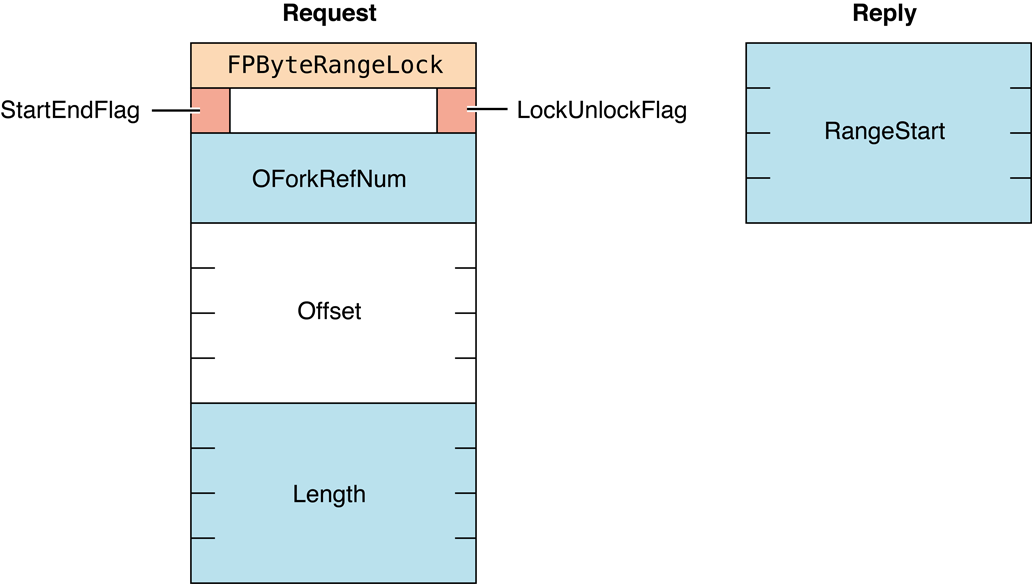
Figure 6 Request and reply blocks for the
FPByteRangeLock command
Availability#
- Deprecated in AFP 3.x. Use
FPByteRangeLockExtinstead.
FPByteRangeLockExt#
Locks or unlocks a specified range of bytes within an open fork.
uint8_t CommandCode
uint8_t Flags
int16_t OForkRefNum
int64_t Offset
int64_t LengthParameters#
CommandCodekFPByteRangeLockExt (59).
Pad
Pad byte.
Flags
Bit 0 is the LockUnlock bit, where 0 indicates lock and 1 indicates
unlock. Bit 7 is the StartEndFlag bit, where 0 indicates that Offset
is relative to the beginning of the fork and 1 indicates that Offset
is relative to the end of the fork. The StartEndFlag bit is only used
when locking a range.
OForkRefNum
Open fork reference number.
Offset
Offset to the first byte of the range to be locked or unlocked (can be
negative if the StartEndFlag bit is set to 1).
Length
Number of bytes to be locked or unlocked (a signed, positive int32_t;
cannot be negative except for the special value $FFFFFFFFFFFFFFFF).
ResultkFPNoErr if no error occurred. See Table 6 for possible
result codes.
ReplyBlock
If the result code is kFPNoErr and the reply is for an attempt
to lock or unlock a range, the server returns a reply block. The reply
block consists of an int32_t called RangeStart containing the number
of the first byte of the range that was locked.
Discussion#
This command locks and unlocks the specified range of bytes within an open fork for use by a user application. When locking a range, the server returns the number of the locked byte.
The FPByteRangeLockExt command differs from the FPByteRangeLock
command in that the FPByteRangeLockExt command is prepared to handle
large values that may be required for locking ranges for volumes larger
than 4 GB in size.
Bytes are numbered starting from 0. The end of fork is one more than the number of the last byte in the fork.
If no user holds a lock on any part of the requested range, the server locks the range specified by this command. A user can hold multiple locks within the same open fork, up to a server-specific limit. Locks cannot overlap. A locked range can start or extend past the end of the fork; this does not move the end of the fork or prevent another user from writing to the fork past the locked range.
Setting Offset to zero, the StartEndFlag bit to zero (start), and
Length to 0xFFFFFFFFFFFFFFFF locks the entire fork to the maximum
size of the fork.
Specifying an offset other than zero, the StartEndFlag bit to zero
(start), and Length to 0xFFFFFFFFFFFFFFFF locks a range beginning at
Offset and extending to the maximum size of the fork.
Setting the StartEndFlag bit to 1 (end) allows a lock to be offset
relative to the end of the fork. This enables a user to set a lock when
the user does not know the exact end of the fork, as can happen when
multiple writers are concurrently modifying the fork. The server returns
the number of the first locked byte.
Lock conflicts are determined by the value of OForkRefNum. That is, if
a fork is opened twice, the two open fork reference numbers are
considered two different “users” regardless of whether they were opened
for the same or different sessions.
All locks held by a user are unlocked when the user closes the fork.
Unlocking a range makes it available to other users for reading and
writing. The server returns a result code of
kFPRangeNotLocked if a user tries to
unlock a range that was locked by another user or that was not locked at
all.
To unlock a range, the StartEndFlag bit must be set to zero (start),
Length must match the size of the range that was locked, and Offset
must match the number of the first byte in the locked range. If the
range was locked with StartEndFlag set to zero (start), use the same
value of Offset to unlock the range that was used to lock the range.
If the range was locked with the StartEndFlag bit set to 1 (end), set
Offset to the value of RangeStart that was returned by the server.
You cannot unlock part of range.
OS X supports memory-mapped files, but byte range locks should not be used in conjunction with them.
Table 6 lists the result codes for the FPByteRangeLockExt command.
| Result code | Explanation |
|---|---|
kFPLockErr | Some or all of the requested range is locked by another user. |
kFPMiscErr | Non-AFP error occurred. |
kFPNoMoreLocks | Server’s maximum lock count has been reached. |
kFPParamErr | Open fork reference number is unknown; a combination of the StartEndFlag bit and Offset parameters specifies a range that starts before byte zero. |
kFPRangeOverlap | User tried to lock some or all of a range that the user has already locked. |
kFPRangeNotLocked | User tried to unlock a range that is locked by another user or that is not locked at all. |
Table 6 Result codes for the FPByteRangeLockExt command
Figure 7 shows the request
and reply blocks for the FPByteRangeLockExt command.
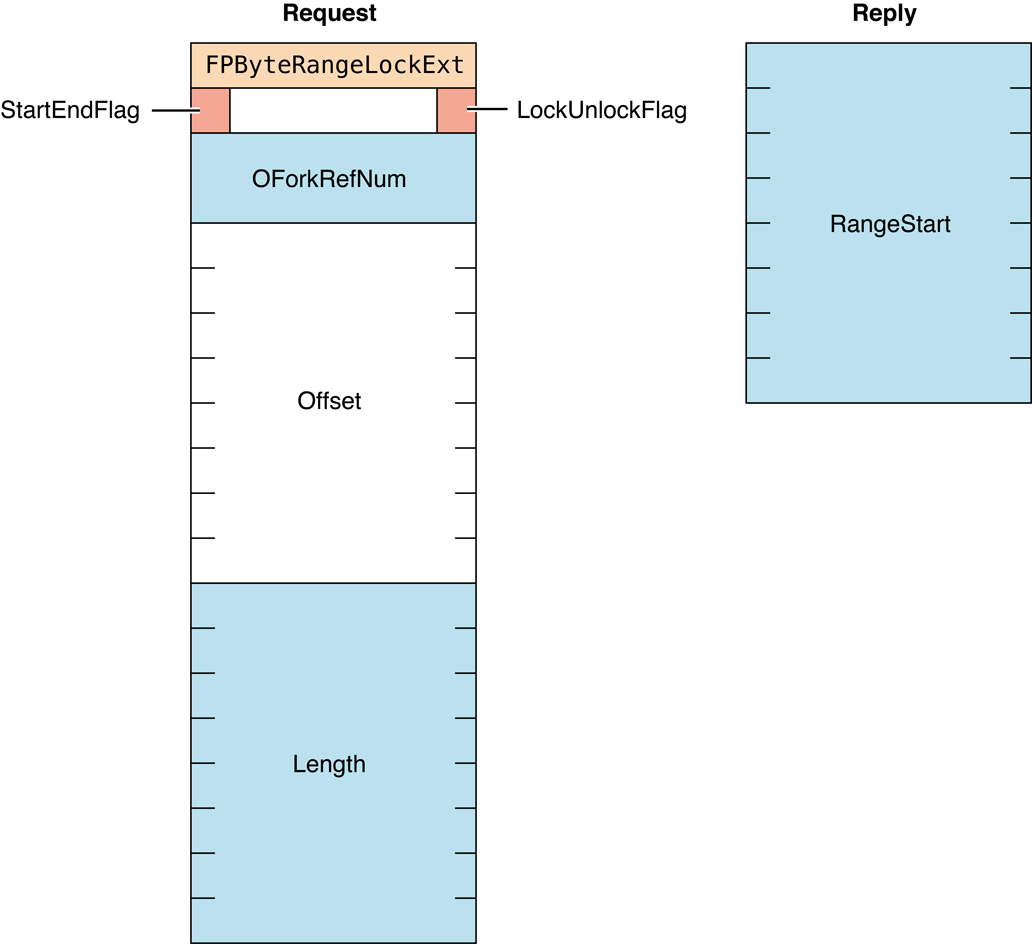
Figure 7 Request and reply blocks for the
FPByteRangeLockExt command
FPCatSearch#
Searches a volume for files and directories that match specified criteria.
uint8_t CommandCode
uint8_t Pad
int16_t VolumeID
int32_t ReqMatches
int32_t Reserved
16 bytes CatalogPosition
int16_t FileRsltBitmap
int16_t DirectoryRsltBitmap
int32_t ReqBitmap
Specification1
Specification2
unsigned char LengthParameters#
CommandCodekFPCatSearch (43).
Pad
Pad byte.
VolumeID
The ID of the volume to search.
Reserved
Reserved; must be zero.
ReqMatches
The maximum number of matches to return.
CatalogPosition
Current position in the catalog.
FileRsltBitmap
File bitmap describing the file parameters to get or null to get
directory parameters only. Set the bit that corresponds to each desired
parameter. This bitmap is the same as the FileBitmap parameter of the
FPGetFileDirParms command
with some restrictions described in the Discussion section. For bit
definitions for this bitmap, see “File and Directory Bitmap.”
DirectoryRsltBitmap
Directory bitmap describing the directory parameters to get or null to
get file parameters only. Set the bit that corresponds to each desired
parameter. This bitmap is the same as the DirectoryBitmap parameter of
the FPGetFileDirParms command
with some restrictions described in the Discussion section. For bit
definitions for this bitmap, see “File and Directory Bitmap.”
ReqBitmap
Directory and file parameters that are to be searched. For directory
parameters only, see Figure 8. For file parameters only, see Figure 9.
For directory and file parameters, see Figure 10.
Specification1
Search criteria lower bounds and values.
Specification2
Optional search criteria upper bounds and masks.
Length
Length of this request block.
ResultkFPNoErr if no error occurred. See Table 7 for possible
result codes.
ReplyBlock
If the result code is kFPNoErr, the server returns a reply block.
See Table 8 for the format of the reply block.
Discussion#
This command searches a volume for files and directories that match the
specified criteria and returns an array of records that describe the
matches that were found. The criteria can include most parameters in the
file bitmap, the directory bitmap, or both bitmaps, that are defined for
the FPGetFileDirParms
command. Parameters for the matching files and directories are returned.
These parameters can also be any of those specified by the
FPGetFileDirParms command.
The first word of the CatalogPosition parameter specifies whether the
parameter denotes an actual catalog position or a hint. If the first
word is zero, the search starts at the beginning of the volume. If the
first word is non-zero, CatalogPosition is a actual catalog position
and the search starts with this entry.
The Specification1 and Specification2 parameters are used together
to specify the search parameters. These parameters are packed in the
same order as the bits in ReqBitmap. All variable-length parameters
(such as those containing names) are put at the end of each
specification record. An offset is stored in the specification
parameters to indicate where the actual variable-length parameter is
located. This offset is measured from the start of the specification
parameters (not including the length and filler bytes). Results are
packed in the same way.
The fields in Specification1 and Specification2 have different uses:
In the name field,
Specification1holds the target string;Specification2must always have a null name field.In all date and length fields,
Specification1holds the lowest value in the target range andSpecification2holds the highest value in the target range.In file attributes and Finder Info fields,
Specification1holds the target value andSpecification2holds the bitwise mask that specifies which bits in that field inSpecification1are relevant to the current search.
This command returns a result code of
kFPEOFErr only when it has reached the
end of the volume directory tree. For example, if the client requests
ten matches, the server may return only four matches, without returning
an error. The client should then send a request for six (ten minus four)
more matches, using the same CatalogPosition value that was received
in the previous reply. This process continues until the originally
requested matches are received or a kFPEOFErr is returned.
If this command returns a result code of kFPCatalogChanged,
the client cannot continue the search.
The client must restart the search by setting the
first word of CatalogPosition to zero.
This command returns parameters for files, directories or both,
depending on the value of the FileRsltBitmap and DirectoryRsltBitmap
parameters. If FileRsltBitmap is null, this command assumes that you
are not searching for files. Likewise, if DirectoryRsltBitmap is null,
this command assumes that you are not searching for directories. If both
parameters are non-zero, this command searches for files and
directories. Note that if you are searching for both files and
directories, certain restrictions apply with regard to the parameters
that are searched. The rest of this section describes these
restrictions.
The ReqBitmap parameter specifies the directory and file parameters to
be searched. The low-order word of ReqBitmap is the same as low-order
word of the file bitmap and the directory bitmap used by the
FPGetFileDirParms command,
with the exception of the Short Name parameter, which cannot be
searched. The high bit of the high-order word of ReqBitmap indicates
whether the search should match on full names or partial names (0 = full
name, 1 = partial name). There is no equivalent to the fsSBNegate bit
used by the Macintosh File Manager’s PBCatSearch function.
Figure 8 shows parameters this command can search when it is searching directories only.
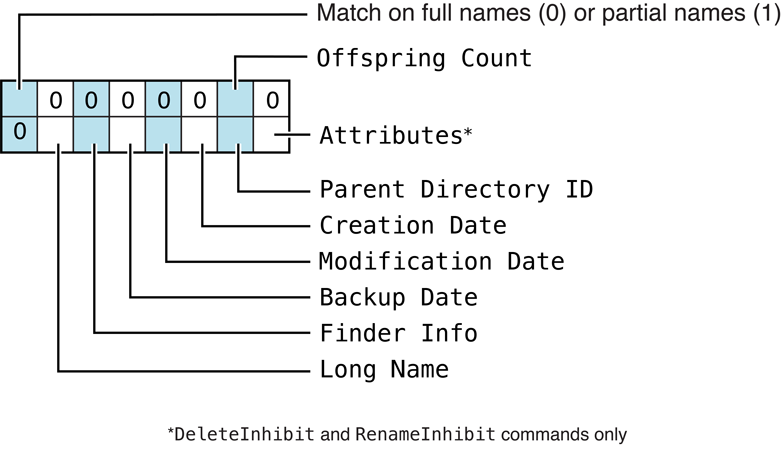
Figure 8 Parameters FPCatSearch searches when searching directories
only
Figure 9 shows parameters this command can search when it is searching files only.
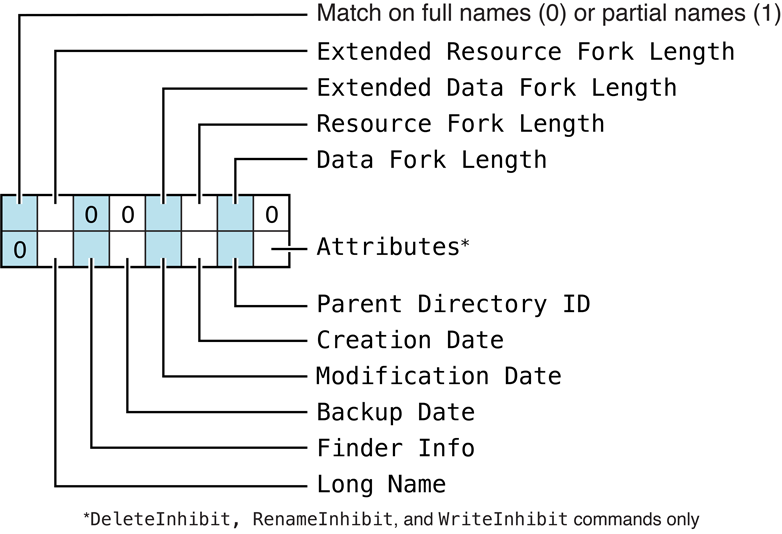
Figure 9 Parameters FPCatSearch searches when searching files only
Figure 10 shows parameters this command can search when it is searching both directories and files.
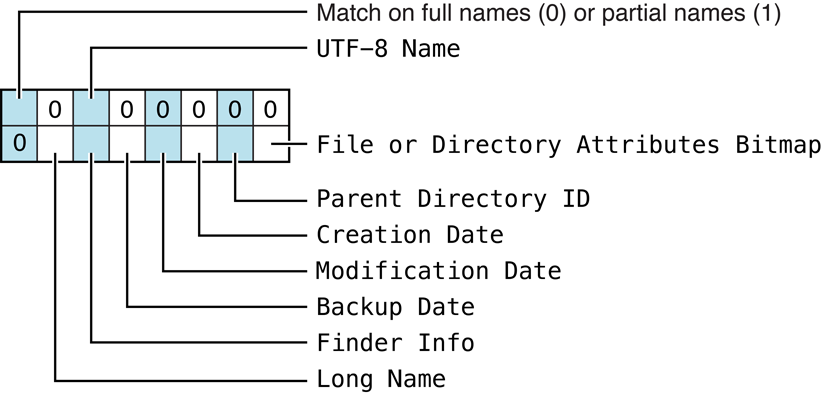
Figure 10 Parameters FPCatSearch searches when searching directories
and filesBefore sending this command, the user must call
FPOpenVol for the volume that is to be searched.
To return all files and directories that match the specified criteria, the user must have Read Only or Read & Write privileges for all directories. This command skips directories for which the user does not have Read Only or Read & Write privileges.
Table 7 lists the result codes for the FPCatSearch command.
| Result code | Explanation |
|---|---|
kFPCallNotSupported | Server does not support this command. |
kFPCatalogChanged | Catalog has changed and CatalogPosition may be invalid. No matches were returned. |
kFPEOFErr | No more matches. |
kFPMiscErr | Non-AFP error occurred. |
kFPParamErr | Session reference number, Volume ID, or pathname type is unknown; pathname is null or bad. |
Table 7 Result codes for the FPCatSearch command
Table 8 describes the reply block for the FPCatSearch command.
| Name and size | Data |
|---|---|
CatalogPosition (16 bytes) | Current position in the catalog. |
FileRsltBitmap (int16_t) | Copy of the input bitmap. |
DirectoryRsltBitmap (int16_t) | Copy of the input bitmap. |
ActualCount (uint8_t) | Number of ResultsRecord structures that follow. |
Zero or more ResultsRecord structures | Array of ResultsRecord structures describing the matches that were found and having the following structure: StructLength (uint8_t)—Unsigned length of this structure, not including this byte or the byte for the FileDir bit (but including the one-byte pad if applicable). FileDir (bit 7 of a one-byte value)—Whether the record is for a file (0) or directory (1). OffspringParameters— The matching Long Name, Parent Directory ID, or both with a trailing null byte if necessary to make the entire structure end on an even boundary. |
Table 8 Reply block for the FPCatSearch command
Figure 11 shows the request and reply
blocks for the FPCatSearch command.
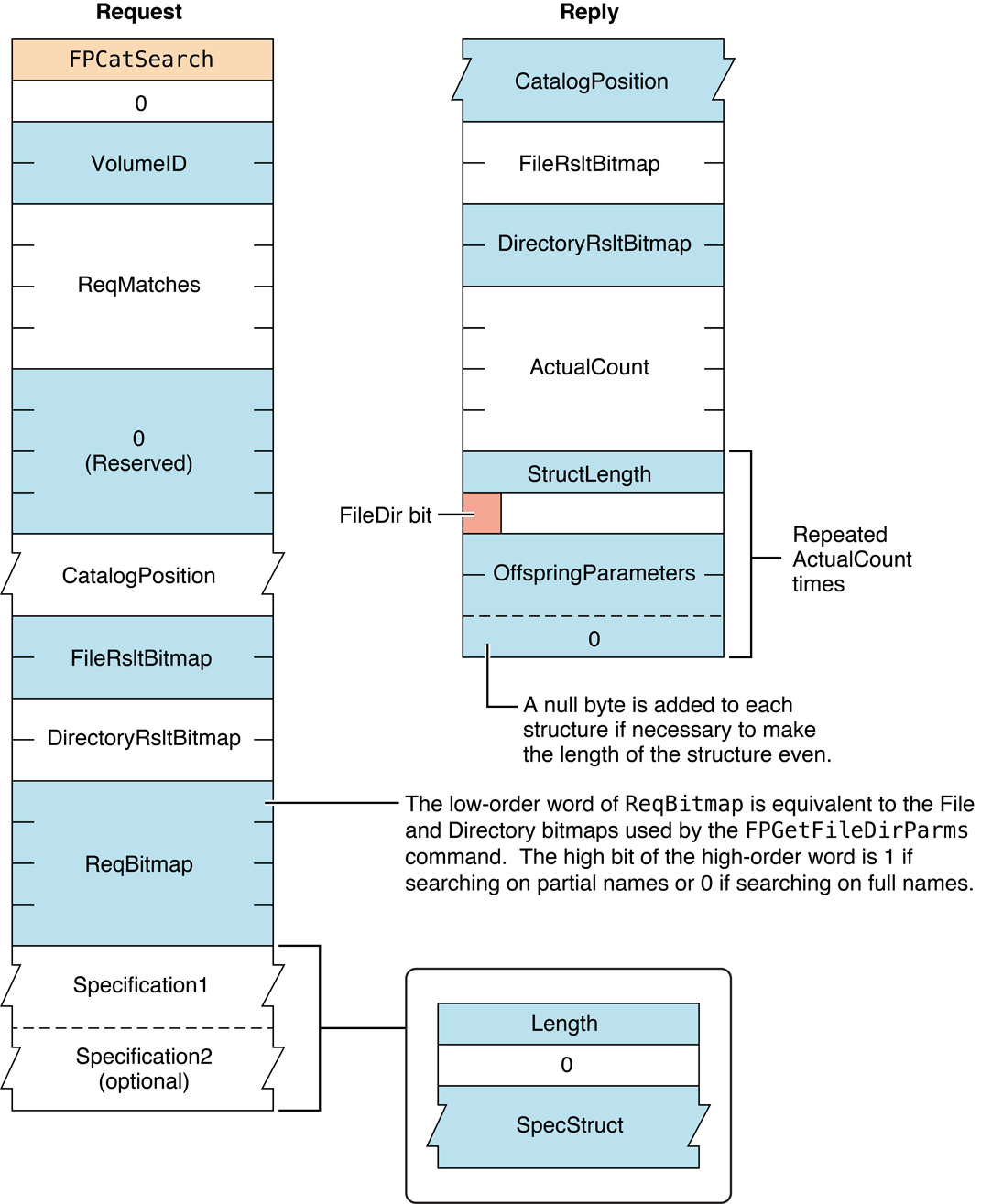
Figure 11 Request and reply blocks for the FPCatSearch command
Availability#
- Deprecated in AFP 3.x. Use
FPCatSearchExtinstead.
FPCatSearchExt#
Searches a volume for files and directories that match specified criteria.
uint8_t CommandCode
uint8_t Pad
int16_t VolumeID
int32_t ReqMatches
int32_t Reserved
16 bytes CatalogPosition
int16_t FileRsltBitmap
int16_t DirectoryRsltBitmap
int32_t ReqBitmap
Specification1
Specification2
unsigned char LengthParameters#
CommandCodekFPCatSearchExt (67).
Pad
Pad byte.
VolumeID
Volume ID.
ReqMatches
Maximum number of matches to return.
Reserved
Reserved; must be zero.
CatalogPosition
Current position in the catalog.
FileRsltBitmap
Bitmap describing the file parameters to get or null to get directory
parameters only. Set the bit that corresponds to each desired parameter.
This bitmap is the same as the FileBitmap parameter of the
FPGetFileDirParms command
with some restrictions described later in this section. For bit
definitions for this bitmap, see “File and Directory Bitmap.”
DirectoryRsltBitmap
Bitmap describing the directory parameters to get or null to get file
parameters only. Set the bit that corresponds to each desired parameter.
This bitmap is the same as the DirectoryBitmap parameter of the
FPGetFileDirParms command
with some restrictions described later in this section. For bit
definitions for this bitmap, see “File and Directory Bitmap.”
ReqBitmap
Directory and file parameters that are to be searched.
For directory parameters, see Figure 12. For file parameters, see Figure 13.
For directory and file parameters, see Figure 14.
Specification1
Search criteria lower bounds and values.
Specification2
Optional search criteria upper bounds and masks.
Length
Length of this request block.
ResultkFPNoErr if no error occurred. See Table 9 for possible
result codes.
ReplyBlock
If the result code is kFPNoErr, the server returns a reply block.
See Table 10 for the format of the reply block.
Discussion#
This command searches a volume for files and directories that match the specified criteria and returns an array of records that describe the matches that were found.
This command differs from the FPCatSearch command in that
FPCatSearchExt is prepared to handle longer search results that can
occur when searching volumes that are more than 4 GB in size.
The criteria can include most parameters in the file bitmap, the
directory bitmap, or both bitmaps, that are defined for the
FPGetFileDirParms command.
Parameters for the matching files and directories are returned. These
parameters can also be any of those specified by the FPGetFileDirParms
command.
The first word of the CatalogPosition parameter specifies whether the
parameter denotes an actual catalog position or a hint. If the first
word is zero, the search starts at the beginning of the volume. If the
first word is non-zero, CatalogPosition is an actual catalog position
and the search starts with this entry.
The Specification1 and Specification2 parameters are used together
to specify the search parameters. These parameters are packed in the
same order as the bits in the ReqBitmap. All variable-length
parameters (such as those containing names) are put at the end of each
specification record. An offset is stored in the specification
parameters to indicate where the actual variable-length parameter is
located. This offset is measured from the start of the specification
parameters (not including the length and filler bytes). Results are
packed in the same way.
The fields in Specification1 and Specification2 have different uses:
In the name field,
Specification1holds the target string;Specification2must always have a null name field.In all date and length fields,
Specification1holds the lowest value in the target range andSpecification2holds the highest value in the target range.In Attributes and Finder Info fields,
Specification1holds the target value andSpecification2holds the bitwise mask that specifies which bits in that field inSpecification1are relevant to the current search.
This command returns a result code of
kFPEOFErr only when it has reached the
end of the volume directory tree. For example, if the client requests
ten matches, the server may return only four matches, without returning
an error. The client should then send a request for six (ten minus four)
more matches, using the same CatalogPosition value that was received
in the previous reply. This process continues until the originally
requested matches are received or a result code of
kFPEOFErr is returned. If this command returns a result code of
kFPCatalogChanged, the client cannot
continue the search. The client must restart the search by setting the
first word of CatalogPosition to zero.
This command returns parameters for files, directories or both,
depending on the value of the FileRsltBitmap and DirectoryRsltBitmap
parameters. If FileRsltBitmap is null, this command assumes that you
are not searching for files. Likewise, if DirectoryRsltBitmap is null,
this command assumes that you are not searching for directories. If both
parameters are non-zero, this command searches for files and
directories. Note that if you are searching for both files and
directories, certain restrictions apply with regard to the parameters
that are searched. The rest of this section describes these
restrictions.
The ReqBitmap parameter specifies the directory and file parameters to
be searched. The low-order word of ReqBitmap is the same as low-order
word of the file bitmap and the directory bitmap in
FPGetFileDirParms, with the
exception of the Short Name parameter, which cannot be searched. The
high bit of the high-order word of ReqBitmap indicates whether the
search should match on full names or partial names (0 = full name, 1 =
partial name). There is no equivalent to the fsSBNegate bit used by the
Macintosh File Manager’s PBCatSearch function.
Figure 12 shows parameters this command can search when it is searching directories only.
Figure 12 Parameters
FPCatSearchExt searches when searching directories
onlyFigure 9 shows parameters
this command can search when it is searching files only.
Figure 13 Parameters FPCatSearchExt searches when searching files
onlyFigure 10 shows parameters
this command can search when it is searching both directories and files.
Figure 14 Parameters
FPCatSearchExt searches when searching directories and
filesBefore sending this command, the user must call
FPOpenVol for the volume that is to
be searched.
To return all files and directories that match the specified criteria, the user must have Read Only or Read & Write privileges for all directories. This command skips directories for which the user does not have Read Only or Read & Write privileges.
Table 9 lists the result codes for the FPCatSearchExt command.
| Result code | Explanation |
|---|---|
kFPCallNotSupported | Server does not support this command. |
kFPCatalogChanged | Catalog has changed and CatalogPosition may be invalid. No matches were returned. |
kFPEOFErr | No more matches. |
kFPMiscErr | Non-AFP error occurred. |
kFPParamErr | Session reference number, Volume ID, or pathname type is unknown; pathname is null or bad. |
Table 9 Result codes for the FPCatSearchExt command
Table 10 describes the reply block for the FPCatSearchExt command.
Table 10 Reply block for the FPCatSearchExt command
| Name and size | Data |
|---|---|
CatalogPosition (16 bytes) | Current position in the catalog. |
FileRsltBitmap (int16_t) | Copy of the input bitmap. |
DirectoryRsltBitmap (int16_t) | Copy of the input bitmap. |
ActualCount (int16_t) | Number of ResultsRecord structures that follow. |
Zero or more ResultsRecord structures | Array of ResultsRecord structures describing the matches that were found and having the following structure: StructLength (uint16_t)—Unsigned length of this structure, not including the length bytes, the byte for the FileDir bit, or the following pad byte. FileDir (bit 7 of a one-byte value)—Whether the record is for a file (0) or directory (1). Results— The matching Long Name, Parent Directory ID, or both with a trailing null byte if necessary to make the entire structure end on an even boundary. |
Figure 15 shows the request and reply blocks for the FPCatSearchExt command.
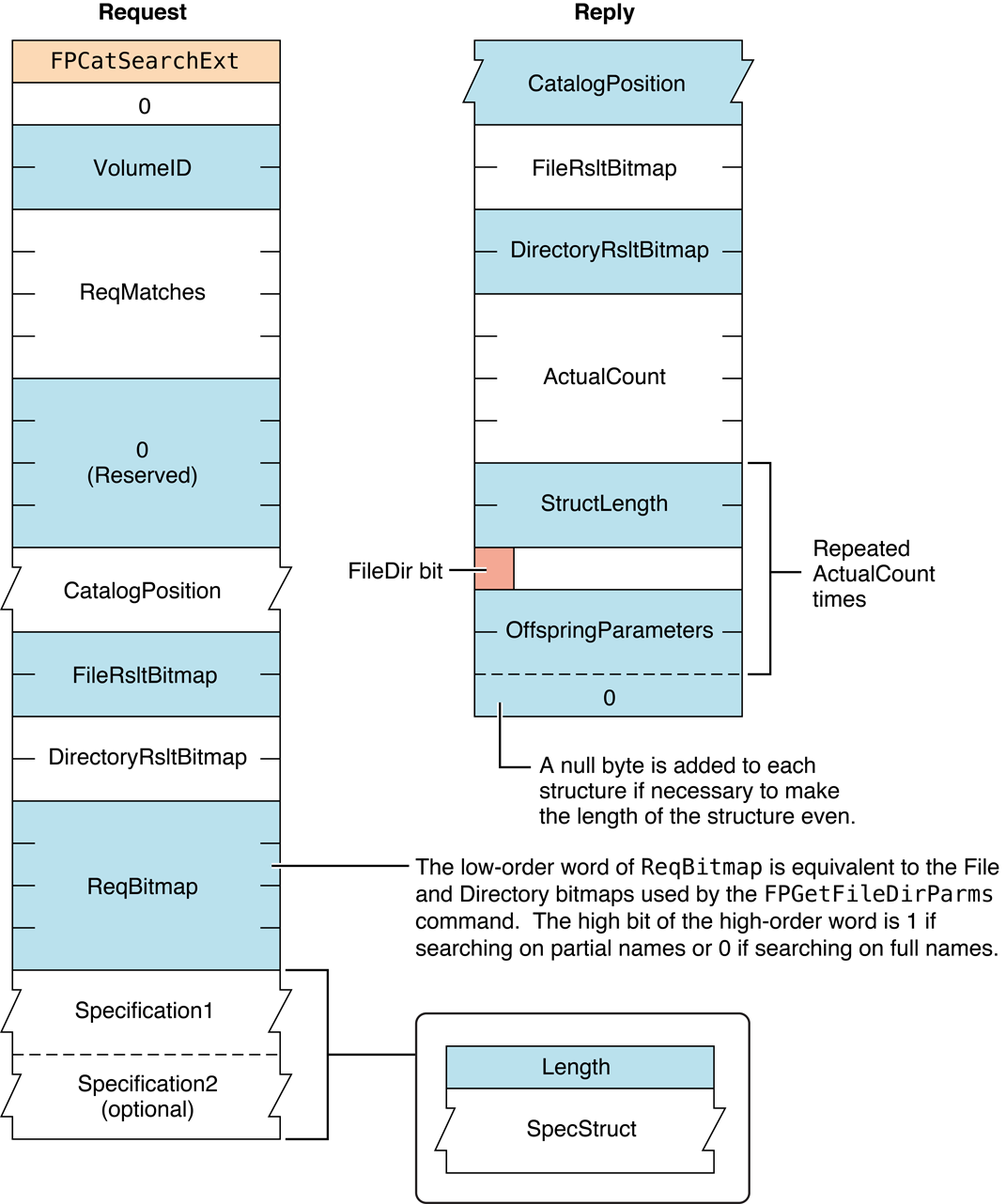
Figure 15 Request and reply blocks for the
FPCatSearchExt commandThe file and directory result bitmaps are described in
“File and Directory Bitmap.”
In the reply block, StructLength is the length of the Parameters
block after it, not including the StructLength field, the FileDir
bitfield byte, or the pad byte (if applicable). Thus, to find the start
of the next set of results, take the current position (before
StructLen) and add StructLen, add 2 (for the structLen field
itself), add 2 (for the FileDir byte and Pad byte).
FPChangePassword#
Allows users to change their passwords.
uint8_t CommandCode
uint8_t Pad
string UAM
string UserName
UserAuthInfoParameters#
CommandCodekFPChangePassword (36).
Pad
Pad byte.
UAM
String specifying the UAM to uses.
UserName
Name of the user whose password is to be changed. Starting with AFP 3.0,
UserName is two bytes with each byte set to zero. The first byte
indicates a zero length string, and the second byte is a pad byte.
UserAuthInfo
UAM-specific information.
ResultkFPNoErr if no error occurred. See
Table
11 for other
possible result codes.
ReplyBlock
Varies depending on the UAM. For any UAM that uses multi-stage
authentication, this command returns kFPAuthContinue and provides a reply
block used in the subsequent authentication stage. See
“Apple Filing Protocol Concepts” in Apple Filing Protocol Programming Guide for details
on each specific UAM.
Discussion#
If the UAM is Cleartxt Passwrd, the AFP client sends the server the
user’s name plus the user’s old and new eight-byte passwords in
cleartext. The server looks up the password for that user. If it matches
the old password sent in the packet, the new password is saved for that
user. For more information on the Cleartext Password UAM, see the
section “Cleartext Password” in the “Introduction” section.
If the UAM is Randnum Exchange, DES is used to encrypt and decrypt
passwords. The AFP client sends the server the user name, the user’s old
eight-byte password encrypted with the user’s new eight-byte password,
and the user’s new eight-byte password encrypted with the user’s old
eight-byte password. The server looks up the password for that user,
uses that password as a key to decrypt the new password, and uses the
result to decrypt the old password. If the final result matches what the
server knows to be the old password, the new password is saved for that
user. For more information on the Random Number Exchange UAM, see the
section “Random Number Exchange” in the “Introduction” section.
When using the Random Number Exchange UAM, be sure to append null bytes to any password that is less than eight bytes so that the resulting password has a length of eight bytes.
If the user logged in using the Two-Way Random Number Exchange UAM, the client uses the Randnum UAM for changing the user’s password.
If the UAM is DHCAST128, the AFP client must call FPChangePassword
twice. The first time, the AFP client calls FPChangePassword to send
the user name and a random number that has been encrypted. The server
replies with an ID, a random number, and a nonce/server signature value
encrypted by a session key. The AFP client calls FPChangePassword
again, this time sending the user name and the ID returned by the
server. The client also sends the nonce incremented by one, the new
password, and the old password, all encrypted by the session key. For
information on using the DHX UAM to change passwords, see the section
“DHX and Changing a Password” in the “Introduction” section.
Servers are not required to support this command. Call
FPGetSrvrInfo to determine
whether a server supports this command.
The user may not have been granted the ability to change his or her password. Granting the ability to change a password is an administrative function and is beyond the scope of this protocol specification.
Table 11 lists the result codes for the FPChangePassword command.
| Result code | Explanation |
|---|---|
kFPNoErr | No error occurred. |
kFPCallNotSupported | Server does not support this command. |
kFPUserNotAuth | UAM failed (the specified old password doesn’t match) or no user is logged in yet for the specified session. |
kFPBadUAM | Specified UAM is not a UAM that FPChangePassword supports. |
kFPAccessDenied | User does not have the access privileges required to use this command. |
kFPParamErr | User name is null, exceeds the UAM’s user name length limit, or does not exist. |
kFPPwdSameErr | User attempted to change his or her password to the same password that he or she previously had. This error occurs only if the password expiration feature is enabled on the server. |
kFPPwdTooShortErr | User password is shorter than the server’s minimum password length, or user attempted to change password to a password that is shorter than the server’s minimum password length. |
kFPPwdPolicyErr | New password does not conform to the server’s password policy. |
kFPMiscErr | Non-AFP error occurred. |
Table 11 Result codes for the FPChangePassword command
Figure 16 shows the request block for the FPChangePassword command.
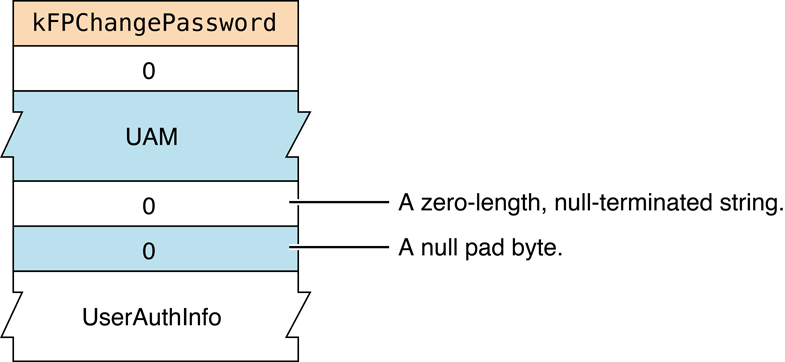
Figure 16 Request block for the
FPChangePassword command
FPCloseDir#
Closes a directory and invalidates its Directory ID.
uint8_t CommandCode
uint8_t Pad
int16_t VolumeID
int32_t DirectoryIDParameters#
CommandCodekFPCloseDir (3).
Pad
Pad byte.
VolumeID
Volume ID.
DirectoryID
Directory ID.
ResultkFPNoErr if no error occurred,
kFPParamErr if the session reference number,
Volume ID, or Directory ID is unknown,
or kFPMiscErr if an error occurred that is
not specific to AFP.
ReplyBlock
None.
Discussion#
This command invalidates the Directory ID specified by DirectoryID.
This command should be used only for variable Directory ID volumes. The
user must have previously called FPOpenVol for this volume and
FPOpenDir for this directory.
Figure 17 shows the request block for the FPCloseDir command.
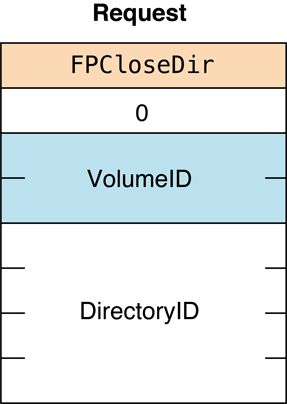
Figure 17 Request block for the FPCloseDir command
Availability#
- Deprecated. This is not used by the OS X client because variable directory ID volumes are no longer supported. Directory IDs are assumed to be unique and are not reused when a directory is deleted.
FPCloseDT#
Closes a volume’s Desktop database.
uint8_t CommandCode
uint8_t Pad
int16_t DTRefNumParameters#
CommandCodekFPCloseDT (49).
Pad
Pad byte.
DTRefNum
Desktop database reference number.
ResultkFPNoErr if no error occurred,
kFPParamErr if the session reference
number or the Desktop database reference number is unknown, or
kFPMiscErr if an error occurred that is
not specific to AFP.
ReplyBlock
None.
Discussion#
This command invalidates the Desktop database reference number specified
by DTRefNum.
The user must first have sent a successful FPOpenDT command.
Figure 18 shows the request block for the FPCloseDT command.
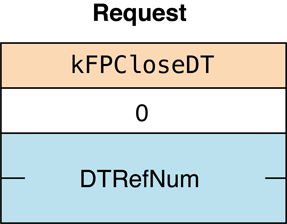
Figure 18 Request block for the FPCloseDT command
Availability#
- Deprecated. The Desktop Database Manager no longer exists in Mac OS v.10.6 and later.
FPCloseFork#
Closes a fork.
uint8_t CommandCode
uint8_t Pad
int16_t OForkRefNumParameters#
CommandCodekFPCloseFork (4).
Pad
Pad byte.
OForkRefNum
Open fork reference number.
ResultkFPNoErr if no error occurred,
kFPParamErr if the session reference
number or the open fork reference number is unknown, or
kFPMiscErr if an error occurred that is
not specific to AFP.
ReplyBlock
None.
Discussion#
This command causes the server to flush and close the specified fork, invalidating the open fork reference number. If the fork was written to, the file’s modification date is set to the server’s clock.
The user must first have sent a successful
FPOpenFork command.
Figure 19 shows the request block for the FPCloseFork command.
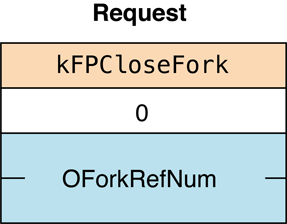
Figure 19 Request block for the
FPCloseFork command
FPCloseVol#
Closes a volume.
uint8_t CommandCode
uint8_t Pad
int16_t VolumeIDParameters#
CommandCodekFPCloseVol (2).
Pad
Pad byte.
VolumeID
Volume ID.
ResultkFPNoErr if no error occurred,
kFPParamErr if the session reference
number or the Volume ID is unknown, or
kFPMiscErr if an error occurred that is
not specific to AFP.
ReplyBlock
None.
Discussion#
This command invalidates the specified Volume ID but does not necessarily close all open files on a volume before closing the volume, so you should close all open files before calling FPCloseVol.
The user must first have sent a successful
FPOpenVol command for this volume.
After sending this command, the user can send no other commands for this volume without opening the volume again.
Figure 20 shows the request block for the FPCloseVol command.
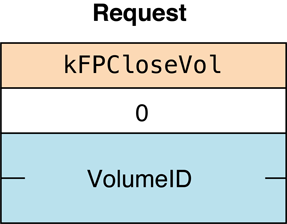
Figure 20 Request block for the FPCloseVol command
FPCopyFile#
Copies a file from one location to another on the same file server.
uint8_t CommandCode
uint8_t Pad
int16_t SourceVolumeID
int32_t SourceDirectoryID
int16_t DestVolumeID
int32_t DestDirectoryID
uint8_t SourcePathType
string SourcePathname
uint8_t DestPathType
string DestPathname
uint8_t NewType
string NewNameParameters#
CommandCodekFPCopyFile (5).
Pad
Pad byte.
SourceVolumeID
Source Volume ID.
SourceDirectoryID
Source ancestor Directory ID.
DestVolumeID
Destination Volume ID.
DestDirectoryID
Destination ancestor Directory ID.
SourcePathType
Type of names in SourcePathname. See “Path Type Constants”
for possible values.
SourcePathname
Pathname of the file to be copied (cannot be null). SourcePathname
is a string if it contains Short or Long Names or an AFPName if it
contains a UTF-8–encoded path.
DestPathType
Type of names in DestPathname. See “Path Type Constants”
for possible values.
DestPathname
Pathname to the destination parent directory (may be null).
DestPathname is a string if it contains Short or Long Names or an
AFPName if it contains a UTF-8–encoded path.
NewType
Type of name in NewName. See “Path Type Constants”
for possible values.
NewName
Name to be given to the copy (may be null).
ResultkFPNoErr if no error occurred. See Table 12 for other
possible result codes.
ReplyBlock
None.
Discussion#
This command copies a file to a new location on the server. The source and destination can be on the same or on different volumes.
The server tries to open the source file for Read, DenyWrite access. If
this fails, the server returns kFPDenyConflict as the result code. If
the server successfully opens the file, it copies the file to the
directory specified by the destination parameters.
The copy is given the name specified by the NewName parameter. If
NewName is null, the server gives the copy the same name as the
original. The file’s other name (Long, Short) is generated as described
in the section “Catalog Node Names” in Chapter 1. A unique file number
is assigned to the file. The server also sets the file’s Parent ID to
the Directory ID of the destination parent directory. All other file
parameters remain the same as the source file’s parameters. The
modification date of the destination parent directory is set to the
server’s lock.
The user must have search access to all ancestors of the source file, except the source parent directory, and read access to the source parent directory. Further, the user must have search or write access to all ancestors of the destination file, except the destination parent directory, and write access to the destination parent directory.
This command is optional and may not be supported by all servers.
See the Character Encoding section of “Apple Filing Protocol Concepts” in Apple Filing Protocol Programming Guide for additional details about the UTF-8 encoding used by AFP.
Table 12 lists the result codes for the FPCopyFile command.
| Result code | Explanation |
|---|---|
kFPAccessDenied | User does not have the access privileges required to read the file or write to the destination. |
kFPCallNotSupported | Server does not support this command. |
kFPDenyConflict | File cannot be opened for Read, DenyWrite. |
kFPDiskFull | No more space exists on the destination volume. |
kFPMiscErr | Non-AFP error occurred. |
kFPObjectExists | File or directory of the name specified by NewName already exists in the destination parent directory. |
kFPObjectNotFound | The source file does not exist; ancestor directory is unknown. |
kFPObjectTypeErr | Source parameters point to a directory. |
kFPParamErr | StartEndFlag bit and Offset parameters specifies a range that starts before byte zero. |
Community Archive Annotation.
The correction of the kFPParamErr result code description
is taken from the AFP 3.0 Reference (January 2001).
The AFP 3.1 Reference and later is considered erroneous
because it talks about open fork/byte-range parameters,
which do not belong to FPCopyFile.
The request block still clearly starts with SourceVolumeID,
and the global kFPParamErr definition covers unknown Volume ID.
Table 12 Result codes for the FPCopyFile command
Figure 21 shows the request block for the FPCopyFile command.
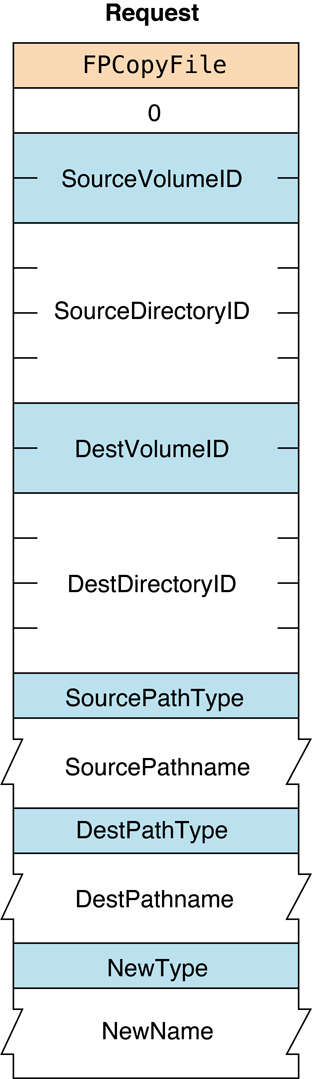
Figure 21 Request block for the
FPCopyFile command
FPCreateDir#
Creates a new directory.
uint8_t CommandCode
uint8_t Pad
int16_t VolumeID
int32_t DirectoryID
uint8_t PathType
string PathnameParameters#
CommandCodekFPCreateDir (6).
Pad
Pad byte.
VolumeID
Volume ID.
DirectoryID
Ancestor Directory ID.
PathType
Type of names in Pathname. See “Path Type Constants”
for possible values.
Pathname
Pathname, including the name of the new directory (cannot be null).
Pathname is a string if it contains Short or Long Names or an AFPName
if it contains a UTF-8–encoded path. See the Character Encoding section
of “Apple Filing Protocol Concepts” in Apple Filing Protocol Programming Guide for
additional details about the UTF-8 encoding used by AFP.
ResultkFPNoErr if no error occurred. See Table 13 for other
possible result codes.
ReplyBlock
If the result code is kFPNoErr, the server returns an
int32_t, called NewDirectoryID, containing the Directory ID of the
new directory in the reply block.
Discussion#
This command creates an empty directory having the name specified by the
Pathname parameter. The file server assigns the directory a unique
Directory ID and returns it in the reply block. The new directory’s
Owner ID is set to the User ID of the user sending the command, and its
Group ID is set to the ID of the user’s Primary Group ID, if a primary
group has been specified for the user.
The new directory’s privileges are initially set to read, write, and search for the owner, with no privileges for a group or Everyone. Finder information is set to zero and all directory attributes are initially cleared. The directory’s creation and modification dates, as well as the modification date of the parent directory, are set to the server’s clock. The directory’s backup date is set to $80000000, signifying that the directory has never been backed up. The directory’s other names are generated as described in the section “Catalog Node Names” in Chapter 1.
The user must have search or write access to all ancestors, except this directory’s parent directory, as well as write access to the parent directory.
Table 13 lists the result codes for the FPCreateDir command.
| Result code | Explanation |
|---|---|
kFPAccessDenied | User does not have the access privileges required to use this command. |
kFPDiskFull | No more space exists on the volume. |
kFPFlatVol | Volume is flat and does not support directories. |
kFPMiscErr | Non-AFP error occurred. |
kFPObjectNotFound | Ancestor directory is unknown. |
kFPObjectExists | File or directory of the specified name already exists. |
kFPParamErr | Session reference number, Volume ID, or pathname is null or invalid. |
kFPVolLocked | Destination volume is read-only. |
Table 13 Result codes for the FPCreateDir command
Figure 22 shows the request
and reply blocks for the FPCreateDir command.
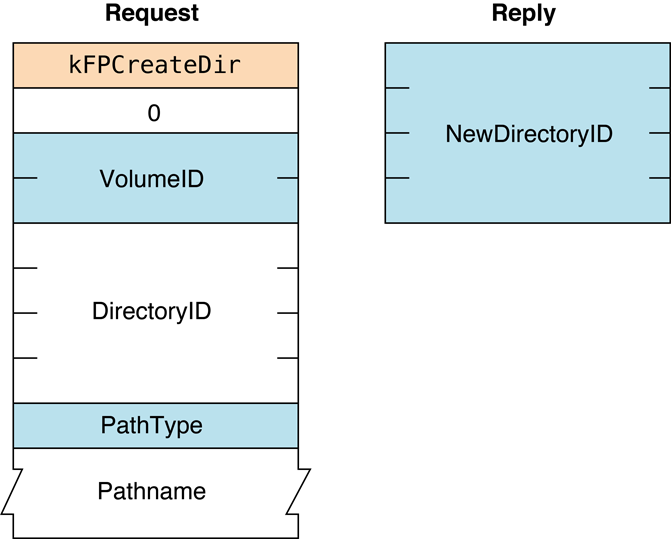
Figure 22 Request and reply blocks for the FPCreateDir command
FPCreateFile#
Creates a new file.
uint8_t CommandCode
uint8_t Flag
int16_t VolumeID
int32_t DirectoryID
uint8_t PathType
string PathnameParameters#
CommandCodekFPCreateFile (7).
Flag
Bit 7 of the Flag parameter is the CreateFlag bit, where 0 indicates a
soft create and 1 indicates a hard create.
VolumeID
Volume ID.
DirectoryID
Ancestor Directory ID.
PathType
Type of names in Pathname. See “Path Type
Constants”
for possible values.
Pathname
Pathname, including the name of the new file (cannot be null).
Pathname is a string if it contains Short or Long Names or an AFPName
if it contains a UTF-8–encoded path. See the Character Encoding section
of “Apple Filing Protocol Concepts” in Apple Filing Protocol Programming Guide for
additional details about the UTF-8 encoding used by AFP.
ResultkFPNoErr if no error occurred. See Table 14 for other
possible result codes.
ReplyBlock
None.
Discussion#
This command creates an empty file having the name specified by
Pathname. For a soft create, if a file by that name already exists,
the server returns a result code of
kFPObjectExists. Otherwise, it creates a
new file and assigns it the name specified by Pathname. A unique file
number is assigned to the file. Finder information is set to zero, and
all file attributes are initially cleared. The file’s creation and
modification dates, and the modification date of the file’s parent of
the file’s parent directory, are set to the server’s clock. The file’s
backup date is set to $80000000, signifying that this file has never
been backed up. The file’s other names are generated as described in the
section “Catalog Node Names” in Chapter 1. The lengths of both of the
file’s forks are set to zero.
For a soft create, the user must have search or write access to all ancestors, except this file’s parent directory, as well as write access to the parent directory. For a hard create, the user must have search access to all ancestors, except the parent directory, as well as read and write access to the parent directory.
For a hard create, if the file already exists and is not open, the file is deleted and then recreated. All file parameters (including the creation date) are reinitialized as described above.
Table 14 lists the result codes for the FPCreateFile command.
| Result code | Explanation |
|---|---|
kFPAccessDenied | User does not have the access privileges required to use this command. |
kFPDiskFull | No more space exists on the volume. |
kFPFileBusy | If attempting a hard create, the file already exists and is open. |
kFPMiscErr | Non-AFP error occurred. |
kFPObjectExists | If attempting a soft create, a file of the specified name already exists. |
kFPObjectNotFound | Ancestor directory is unknown. |
kFPVolLocked | Destination volume is read-only. |
kFPParamErr | Session reference number, Volume ID, or pathname is null or invalid. |
Table 14 Result codes for the FPCreateFile command
Figure 23 shows the request block for the FPCreateFile command.
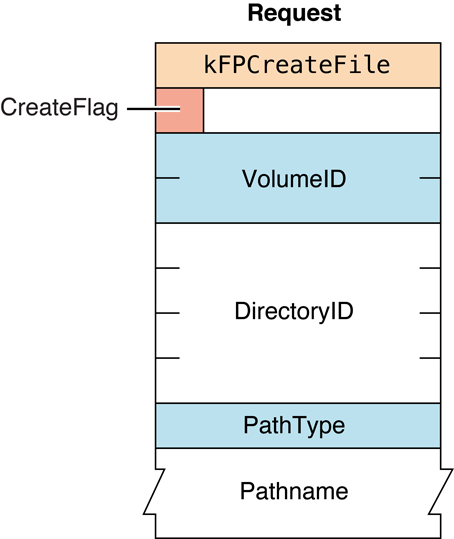
Figure 23 Request block for the
FPCreateFile command
FPCreateID#
Creates a unique File ID for a file.
uint8_t CommandCode
uint8_t Pad
int16_t VolumeID
int32_t DirectoryID
uint8_t PathType
string PathnameParameters#
CommandCodekFPCreateID (39).
Pad
Pad byte.
VolumeID
Volume ID.
DirectoryID
Directory ID of the directory in which the file is to be created.
PathType
Type of names in Pathname. See “Path Type Constants”
for possible values.
Pathname
Name of the file that is the target of the File ID (that is, the
filename of the file for which a File ID is being created). Pathname
is a string if it contains Short or Long Names or an AFPName if it
contains a UTF-8–encoded path. See the Character Encoding section of
“Apple Filing Protocol Concepts” in Apple Filing Protocol Programming Guide for
additional details about the UTF-8 encoding used by AFP.
ResultkFPNoErr if no error occurred. See Table 15 for other
possible result codes.
ReplyBlock
None.
Discussion#
File IDs provide a way to keep track of a file even if its name or location changes. The scope of a File ID is limited to the files on a volume. File IDs cannot be used across volumes.
The AFP server should take steps to ensure that every File ID is unique and that no File ID is reused once it has been deleted.
The user must have the Read Only or the Read & Write privilege to use this command.
Table 15 lists the result codes for the FPCreateID command.
| Result code | Explanation |
|---|---|
kFPMiscErr | Non-AFP error occurred. |
kFPObjectNotFound | Target file does not exist. |
kFPObjectTypeErr | Object defined was a directory, not a file. |
kFPParamErr | Session reference number, Volume ID, or pathname type is unknown; pathname is null or bad. |
kFPVolLocked | Destination volume is read-only. |
Table 15 Result codes for the FPCreateID command
Figure 24 shows the request block for the FPCreateID command.
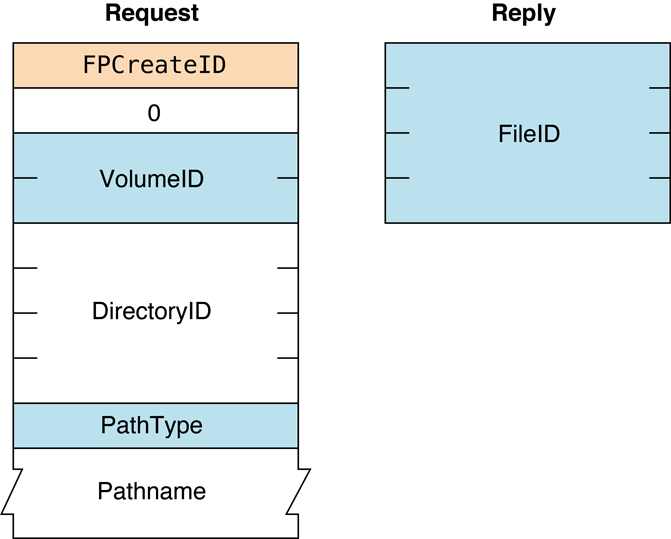
Figure 24 Request block for the FPCreateID command
Availability#
- Deprecated. OS X AFP clients assume that all files and directories have assigned IDs that are unique and are not reused when the item is deleted.
FPDelete#
Deletes a file or directory.
uint8_t CommandCode
uint8_t Pad
int16_t VolumeID
int32_t DirectoryID
uint8_t PathType
string PathnameParameters#
CommandCodekFPDelete (8).
Pad
Pad byte.
VolumeID
Volume ID.
DirectoryID
Ancestor Directory ID.
PathType
Type of names in Pathname. See “Path Type Constants”
for possible values.
Pathname
Pathname of the file or directory to be deleted (may be null if a
directory is to be deleted). Pathnameis a string if it contains Short
or Long Names or an AFPName if it contains a UTF-8–encoded path. See the
Character Encoding section of “Apple Filing Protocol Concepts” in Apple Filing Protocol Programming Guide for
additional details about the UTF-8 encoding used by AFP.
ResultkFPNoErr if no error occurred. See Table
16 for other possible result codes.
ReplyBlock
None.
Discussion#
When deleting a directory, the server checks to see if it contains any
offspring. If a directory contains offspring, the server returns a
result code of kFPDirNotEmpty. If a file that is to be
deleted is open by any user, the server returns a result code of
kFPFileBusy. The modification date of
the parent directory of the deleted file or directory is set to the
servers clock.
The user must have search access to all ancestors except the file or directory’s parent directory, as well as write access to the parent directory. If a directory is being deleted, the user must also have search access to the parent directory; for a file, the user must also have read access to the parent directory.
The AFP server identifies the Network Trash Folder by name, and that name is not localized in international versions of the Mac OS because it is invisible.
Table 16 lists the result codes for the FPDelete command.
| Result code | Explanation |
|---|---|
kFPAccessDenied | User does not have the access privileges required to use this command. |
kFPDirNotEmpty | Directory is not empty. |
kFPMiscErr | Non-AFP error occurred. |
kFPObjectLocked | File or directory is marked DeleteInhibit. |
kFPObjectNotFound | Input parameters do not point to an existing file or directory. |
kFPObjectTypeErr | Object defined was a directory, not a file. |
kFPParamErr | Session reference number, Volume ID, or pathname type is unknown; pathname is invalid. |
kFPVolLocked | Volume is read-only. |
Table 16 Result codes for the FPDelete command
Figure 25 shows the request block for the FPDelete command.
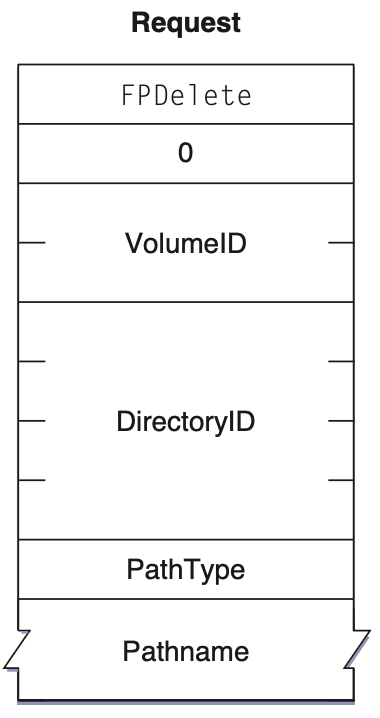
Community Archive Annotation.
Figure 25 is missing from the AFP 3.4 Reference source document. The image shown here is taken from the AFP 3.3 Reference PDF (2009-08-19).
Figure 25 Request block for the FPDelete command
FPDeleteID#
Invalidates all instances of the specified File ID.
uint8_t CommandCode
uint8_t Pad
int16_t VolumeID
int32_t FileIDParameters#
CommandCodekFPDeleteID (40).
Pad
Pad byte.
VolumeID
Volume ID.
FileID
File ID that is to be deleted.
ResultkFPNoErr if no error occurred. See Table 17 for other possible result
codes.
ReplyBlock
None.
Discussion#
This command deletes the specified File ID, which was created by an
earlier call to FPCreateID.
The user must have the Read Only or the Read & Write access privilege to use this command.
Table 17 lists the result codes for the FPDeleteID command.
| Result code | Explanation |
|---|---|
kFPAccessDenied | User does not have the access privileges required to use this command. |
kFPCallNotSupported | Server does not support this command. |
kFPIDNotFound | File ID was not found. (No file thread exists.) |
kFPMiscErr | Non-AFP error occurred. |
kFPObjectNotFound | Target file does not exist. The File ID is deleted anyway. |
kFPObjectTypeErr | Object defined was a directory, not a file. |
kFPParamErr | Session reference number, Volume ID, or pathname type is unknown; pathname is null or bad. |
kFPVolLocked | Volume is read-only. |
Table 17 Result codes for the FPDeleteID command
Figure 26 shows the request block for the FPDeleteID command.
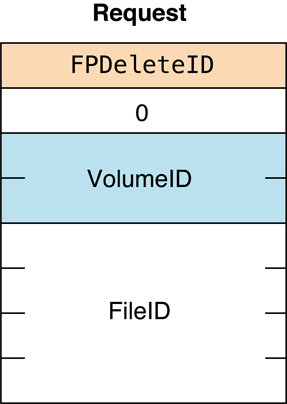
Figure 26 Request block for the FPDeleteID command
Availability#
- Deprecated. Not used by OS X AFP client. OS X AFP clients assume that all files and directories have assigned IDs that are unique and are not reused when the item is deleted.
FPDisconnectOldSession#
Disconnects an old session and transfers its resources to a new session.
uint8_t CommandCode
uint8_t Pad
int16_t Type
int32_t TokenLength
string TokenParameters#
CommandCodekFPDisconnectOldSession (65).
Pad
Pad byte.
Type
Always zero (0) currently.
TokenLength
Length of Token.
Token
Token previous obtained by calling
FPGetSessionToken.
ResultkFPNoErr if no error occurred, kFPCallNotSupported if the server does
not support this command, or kFPMiscErr if an error occurred that is
not specific to AFP.
ReplyBlock
None.
Discussion#
This command disconnects the session identified by the Token parameter,
which was obtained by previously calling FPGetSessionToken and
transfers the resources of the old session to the new session.
The AFP client calls this command when the session it previously established was inadvertently disconnected, it successfully establishes a new session, and it is able to restore the state of the previous session. If the AFP client cannot successfully reestablish the state of the previous session, it should call this command, log out, and report the failure to the local operating system.
If the AFP client successfully reestablishes the state of the previous session, it should call this command again to get a new session token.
Figure 27 shows the request
block for the FPDisconnectOldSession command.
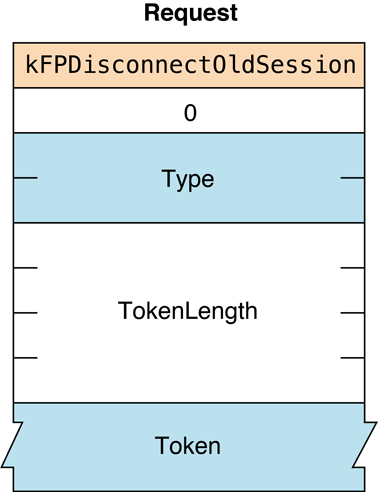
Figure 27 Request block for the FPDisconnectOldSession command
FPEnumerate#
Lists the contents of a directory.
uint8_t CommandCode
uint8_t Pad
int16_t VolumeID
int32_t DirectoryID
int16_t FileBitmap
int16_t DirectoryBitmap
int16_t ReqCount
int16_t StartIndex
int16_t MaxReplySize
uint8_t PathType
string PathnameParameters#
CommandCodekFPEnumerate (9).
Pad
Pad byte.
VolumeID
Volume ID.
DirectoryID
Identifier for the directory to list.
FileBitmap
Bitmap describing the parameters to return if the enumerated offspring
is a file. Set the bit that corresponds to each desired parameter. This
bitmap is the same as the FileBitmap parameter of the
FPGetFileDirParms command and
can be null. For bit definitions for this bitmap, see
“File and Directory Bitmap.”
DirectoryBitmap
Bitmap describing the parameters to return if the enumerated offspring
is a directory. Set the bit that corresponds to each desired parameter.
This bitmap is the same as the DirectoryBitmap parameter of the
FPGetFileDirParms command and
can be null. For bit definitions for this bitmap, see
“File and Directory Bitmap.”
ReqCount
Maximum number of ResultsRecord structures for which information is to
be returned.
StartIndex
Directory offspring index.
MaxReplySize
Maximum size of the reply block.
PathType
Type of names in Pathname. See “Path Type Constants”
for possible values.
Pathname
Pathname to the desired directory. Pathname is a string if it contains
Short or Long Names or an AFPName if it contains a UTF-8–encoded path.
See the Character Encoding section of “Apple Filing Protocol Concepts” in Apple Filing Protocol Programming Guide for
additional details about the UTF-8 encoding used by AFP.
ResultkFPNoErr if no error occurred. See Table 18 for other
possible result codes.
ReplyBlock
If the result code is kFPNoErr, the server returns a reply
block. See Table 19 for the format of the reply block.
Discussion#
This command enumerates a directory as specified by the input
parameters. This command differs from the FPEnumerateExt and
FPEnumerateExt2 commands in
that it is not able to handle values that may be returned when volumes
are larger than 4 GB in size.
If FileBitmap is null, only directory offspring are enumerated, and
StartIndex can range from one to the total number of directory
offspring. Similarly, if DirectoryBitmap is null, only file offspring
are enumerated, and StartIndex can range from one to the total number
of file offspring. If both bitmaps have bits set, StartIndex can range
from one to the total number of offspring. In this case, offspring
structures for both files and directories are returned. These structures
are not returned in any particular order.
This command is completed when the number of structures specified by
ReqCount has been inserted into the reply block, when the reply block
is full, or when no more offspring exist to be enumerated. No partial
offspring structures are returned.
The server retrieves the specified parameters for each enumerated offspring and packs them, in bitmap order, in structures in the reply block. The server inserts one copy of the input bitmaps before all of the structures.
The server needs to keep variable-length parameters, such as Long Name and Short Name, at the end of each structure. In order to do this, the server represents variable-length parameters in the bitmap order as fixed-length offsets (integers). Each offset is measured from the start of the parameters in each structure (not from the start of the bitmap or the start of the header bytes) to the start of the variable-length parameter. Each structure is padded (suffixed) with a null byte if necessary to make its length even.
If this command returns a result code of
kFPNoErr, all structures in the reply
block are valid. If any error result code is returned, no valid
offspring structures are in the reply block.
If the OffSpring Count bit in the directory bitmap is set, the server adjusts the Offspring Count of each directory to reflect the access rights the user has to that directory. For example, if a particular directory contains three file and two directory offspring, the server returns the Offspring Count as 2 if the user has only search access to the directory, 3 if the user has only read access to the directory, or 5 if the user has both search and read access to the directory.
The user must have search access to all ancestors except this directory. In addition, the user needs search access to this directory in order to enumerate directory offspring and read access in order to enumerate file offspring.
Enumerating a large directory may require the sending of several
FPEnumerate commands. During that time, other users may add to or
delete from the directory, so enumeration can miss offspring or return
duplicate offspring. To enumerate a directory accurately, enumerate
until a kFPObjectNotFound result code is
returned and then filter out duplicate entries.
A given offspring is not guaranteed to occupy the same index number in the parent directory from one enumeration to the next.
Table 18 lists the result codes for the FPEnumerate command.
| Result code | Explanation |
|---|---|
kFPAccessDenied | User does not have the access privileges required to use this command. |
kFPBitmapErr | Attempt was made to retrieve a parameter that cannot be retrieved by this command, an attempt was made to retrieve the Directory ID for a directory on a variable Directory ID volume, or both bitmaps are empty. |
kFPDirNotFound | Input parameters do not point to an existing directory. |
kFPMiscErr | Non-AFP error occurred. |
kFPObjectNotFound | No more offspring exist to be enumerated. |
kFPObjectTypeErr | Input parameters point to a file. |
kFPParamErr | Session reference number, Volume ID, or pathname type is unknown, pathname is bad, or MaxReplySize is too small to hold a single offspring structure. |
Table 18 Result codes for the FPEnumerate command
Table 19 describes the reply block for the FPEnumeratecommand.
| Name and size | Data |
|---|---|
FileBitmap (int16_t) | Copy of the input parameter. |
DirectoryBitmap (int16_t) | Copy of the input parameter. |
ActualCount (int16_t) | Actual number of ResultsRecord structures returned. |
Zero or more ResultsRecord structures | Array of ResultsRecord structures consisting of the following fields: StructLength (uint8_t) — Unsigned length of this structure, including this byte and the byte for the FileDir bit. FileDir (bit) — Flag indicating whether the OffspringParameters field describes a file (0) or a directory (1). OffspringParameters — Packed in bitmap order, with a trailing null byte if necessary to make the length of the entire structure an even number. |
Table 19 Reply block for the FPEnumerate command
Figure 28 shows the request and reply
blocks for the FPEnumerate command.
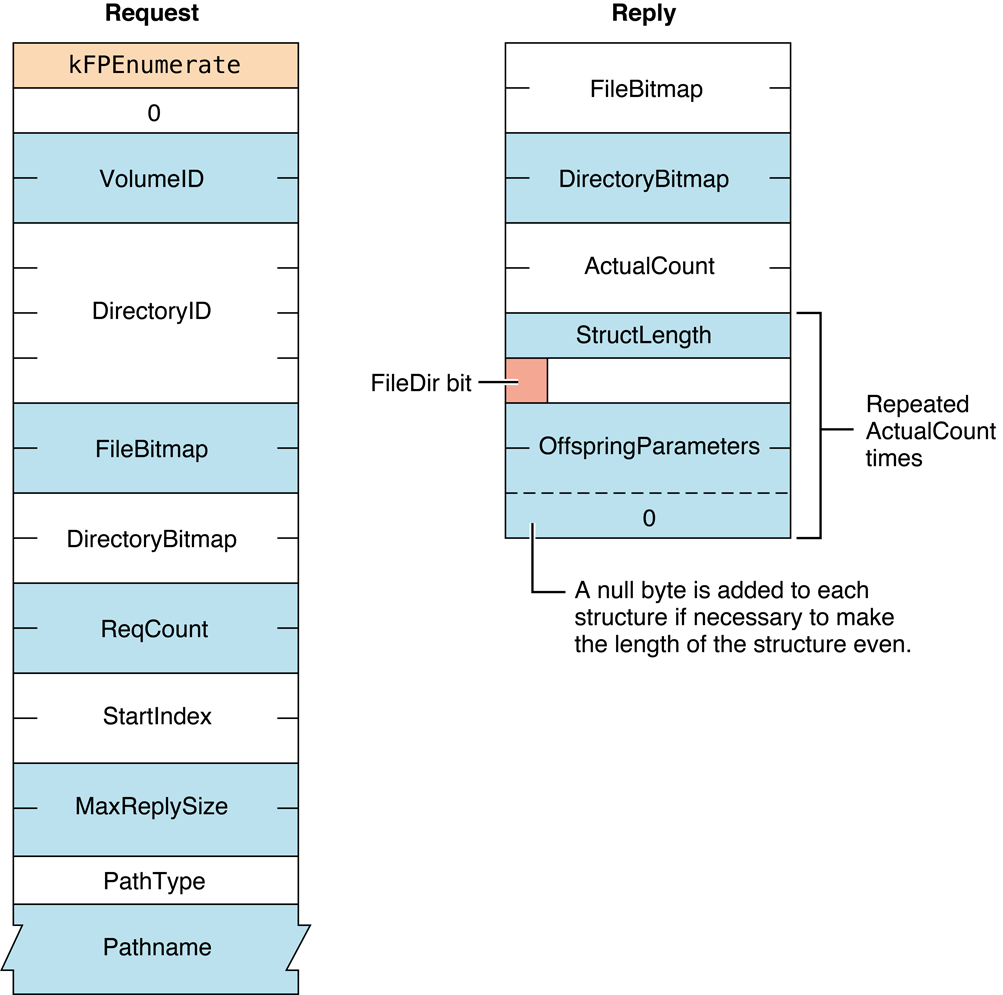
Figure 28 Request and reply blocks for the FPEnumerate command
Availability#
- Deprecated. Use
FPEnumerateExt2instead.
FPEnumerateExt#
Lists the contents of a directory.
uint8_t CommandCode
uint8_t Pad
int16_t VolumeID
int32_t DirectoryID
int16_t FileBitmap
int16_t DirectoryBitmap
int16_t ReqCount
int16_t StartIndex
int16_t MaxReplySize
uint8_t PathType
string PathnameParameters#
CommandCodekFPEnumerateExt (66).
Pad
Pad byte.
VolumeID
Volume ID.
DirectoryID
Identifier for the directory to list.
FileBitmap
Bitmap describing the parameters to return if the enumerated offspring
is a file. Set the bit that corresponds to each desired parameter. This
bitmap is the same as the FileBitmap parameter of the
FPGetFileDirParms command and
can be null. For bit definitions for this bitmap, see
“File and Directory Bitmap.”
DirectoryBitmap
Bitmap describing the parameters to return if the enumerated offspring
is a directory. Set the bit that corresponds to each desired parameter.
This bitmap is the same as the DirectoryBitmap parameter of the
FPGetFileDirParms command and
can be null. For bit definitions for this bitmap, see
“File and Directory Bitmap.”
ReqCount
Maximum number of ResultsRecord structures for which information is to
be returned.
StartIndex
Directory offspring index.
MaxReplySize
Maximum size of the reply block.
PathType
Type of names in Pathname. See “Path Type Constants”
for possible values.
Pathname
Pathname to the desired directory. Pathname is a string if it contains
Short or Long Names or an AFPName if it contains a UTF-8–encoded path.
See the Character Encoding section of “Apple Filing Protocol Concepts” in Apple Filing Protocol Programming Guide for
additional details about the UTF-8 encoding used by AFP.
ResultkFPNoErr if no error occurred. See Table 20 for other
possible result codes.
ReplyBlock
If the result code is kFPNoErr, the server returns a reply
block. See Table 21 for the format of the reply block.
Discussion#
This command enumerates a directory as specified by the input
parameters. This command differs from the
FPEnumerate command in that this
command is prepared to handle values that may be returned when volumes
are larger than 4 GB in size. This command also differs from the
FPEnumerateExt2 command in that
StartIndex and MaxReplySize are int16_t values (instead of int32_t),
which may limit the number of entries in a single directory that can be
listed. The reply block for this command is the same as the reply block
for FPEnumerateExt2.
If FileBitmap is null, only directory offspring are enumerated, and
StartIndex can range from one to the total number of directory
offspring. Similarly, if the DirectoryBitmap is null, only file
offspring are enumerated, and StartIndex can range from one to the
total number of file offspring. If both bitmaps have bits set,
StartIndex can range from one to the total number of offspring. In
this case, offspring structures for both files and directories are
returned. These structures are not returned in any particular order.
This command is completed when the number of structures specified by
ReqCount has been inserted into the reply block, when the reply block
is full, or when no more offspring exist to be enumerated. No partial
offspring structures are returned.
The server retrieves the specified parameters for each enumerated offspring and packs them, in bitmap order, in structures in the reply block. The server inserts one copy of the input bitmaps before all of the structures.
The server needs to keep variable-length parameters, such as Long Name and Short Name, at the end of each structure. In order to do this, the server represents variable-length parameters in the bitmap order as fixed-length offsets (integers). Each offset is measured from the start of the parameters in each structure (not from the start of the bitmap or the start of the header bytes) to the start of the variable-length parameter. Each structure will be padded (suffixed) with a null byte if necessary to make its length even.
If kFPNoErr is returned, all structures in
the reply block are valid. If any error result code is returned, no
valid offspring structures exist in the reply block.
If the OffSpring Count bit in the directory bitmap is set, the server adjusts the Offspring Count of each directory to reflect what access rights the user has to that directory. For example, if a particular directory contains three file and two directory offspring, the server will return its Offspring Count as 2 if the user has only search access to the directory, 3 if the user has only read access to the directory, or 5 if the user has both search and read access to the directory.
The user must have search access to all ancestors except this directory. In addition, the user needs search access to this directory in order to enumerate directory offspring and read access in order to enumerate file offspring.
Enumerating a large directory may require the sending of several
FPEnumerateExt commands. During that time, other users may add to or
delete from the directory, so enumeration can miss offspring or return
duplicate offspring. To enumerate a directory accurately, enumerate
until a kFPObjectNotFound result code is
returned and then filter out duplicate entries.
A given offspring is not guaranteed to occupy the same index number in the parent directory from one enumeration to the next.
Table 20 lists the result codes for the FPEnumerateExt command.
| Result code | Explanation |
|---|---|
kFPAccessDenied | User does not have the access privileges required to use this command. |
kFPBitmapErr | Attempt was made to retrieve a parameter that cannot be retrieved by this command, an attempt was made to retrieve the Directory ID for a directory on a variable Directory ID volume, or both bitmaps are empty. |
kFPDirNotFound | Input parameters do not point to an existing directory. |
kFPMiscErr | Non-AFP error occurred. |
kFPObjectNotFound | No more offspring exist to be enumerated. |
kFPObjectTypeErr | Input parameters point to a file. |
kFPParamErr | Session reference number, Volume ID, or pathname type is unknown, pathname is bad, or MaxReplySize is too small to hold a single offspring structure. |
Table 20 Result codes for the FPEnumerateExt command
Table 21 describes the reply block for the FPEnumerateExt command.
| Name and size | Data |
|---|---|
DirectoryBitmap (int16_t) | Copy of the input parameter. |
ActualCount (int16_t) | Actual number of ResultsRecord structures returned. |
Zero or more ResultsRecord structures | Array of ResultsRecord structures consisting of the following fields: StructLength (uint8_t) — Unsigned length of this structure, including this byte and the byte for the FileDir bit. FileDir (bit) — Flag indicating whether the OffspringParameters field describes a file (0) or a directory (1). Pad (uint8_t) — Always zero. OffspringParameters — Packed in bitmap order, with a trailing null byte if necessary to make the length of the entire structure an even number. |
Figure 29 shows the request and reply blocks for the FPEnumerateExt command.
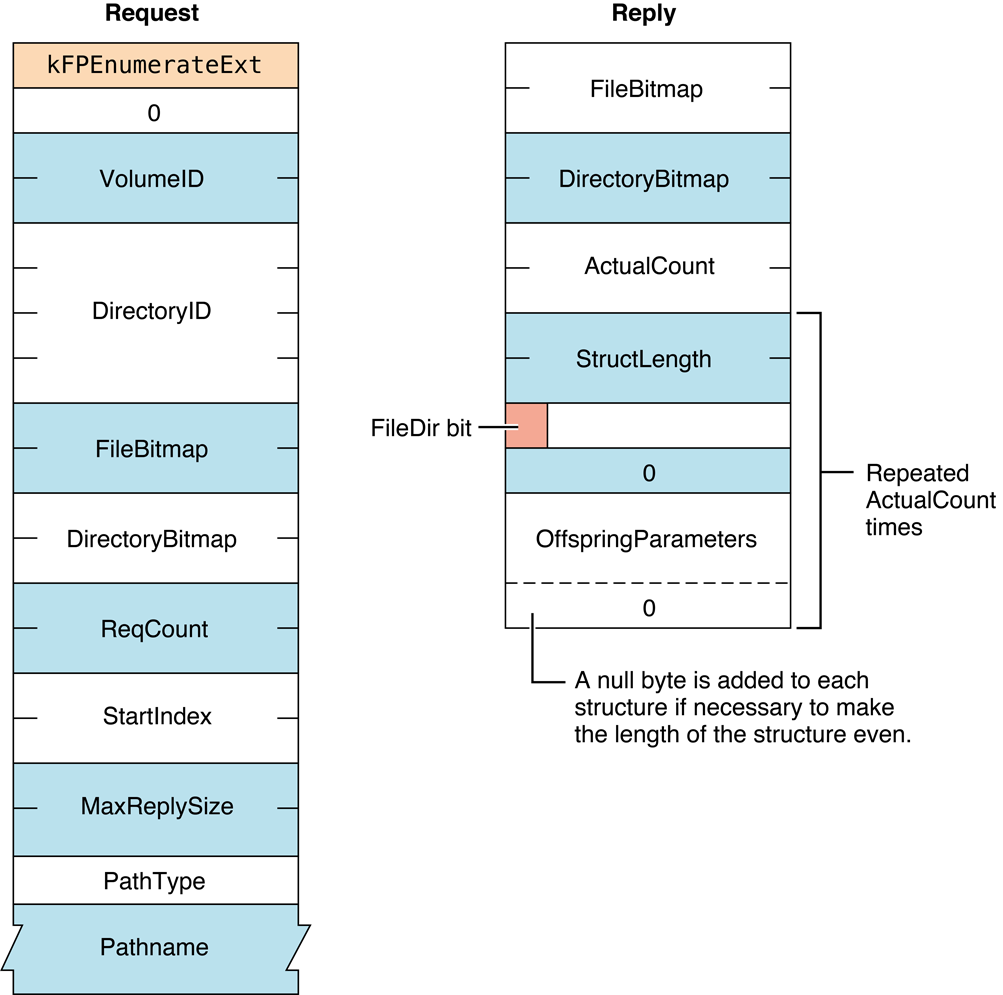
Figure 29 Request and reply blocks for the FPEnumerateExt command
Availability#
- Deprecated. Use
FPEnumerateExt2instead.
FPEnumerateExt2#
Lists the contents of a directory.
uint8_t CommandCode
uint8_t Pad
int16_t VolumeID
int32_t DirectoryID
int16_t FileBitmap
int16_t DirectoryBitmap
int16_t ReqCount
int32_t StartIndex
int32_t MaxReplySize
uint8_t PathType
string PathnameParameters#
CommandCodekFPEnumerateExt2 (68).
Pad
Pad byte.
VolumeID
Volume ID.
DirectoryID
Identifier for the directory to list.
FileBitmap
Bitmap describing the parameters to return if the enumerated offspring
is a file. Set the bit that corresponds to each desired parameter. This
bitmap is the same as the FileBitmap parameter of the
FPGetFileDirParms command and
can be null. For bit definitions for this bitmap, see
“File and Directory Bitmap.”
DirectoryBitmap
Bitmap describing the parameters to return if the enumerated offspring
is a directory. Set the bit that corresponds to each desired parameter.
This bitmap is the same as the DirectoryBitmap parameter of the
FPGetFileDirParms command and
can be null. For bit definitions for this bitmap, see
“File and Directory Bitmap.”
ReqCount
Maximum number of ResultsRecord structures for which information is to
be returned.
StartIndex
Directory offspring index.
StartIndex
Maximum size of the reply block.
PathType
Type of names in Pathname. See “Path Type Constants”
for possible values.
Pathname
Pathname to the desired directory. Pathname is a string if it contains
Short or Long Names or an AFPName if it contains a UTF-8–encoded path.
See the Character Encoding section of “Apple Filing Protocol Concepts” in Apple Filing Protocol Programming Guide for
additional details about the UTF-8 encoding used by AFP.
ResultkFPNoErr if no error occurred. See Table 22 for other
possible result codes.
ReplyBlock
If the result code is kFPNoErr, the server returns a reply
block. See Table 23 for the format of the reply block.
Discussion#
This command enumerates a directory as specified by the input
parameters. This command differs from the
FPEnumerateExt command in that
StartIndex and MaxReplySize are int32_t values instead of int16_t,
thereby allowing this command to list more entries in a single
directory. The reply block for this command is the same as the reply
block for the FPEnumerateExt command.
If FileBitmap is null, only directory offspring are enumerated, and
StartIndex can range from one to the total number of directory
offspring. Similarly, if the DirectoryBitmap is null, only file
offspring are enumerated, and StartIndex can range from one to the
total number of file offspring. If both bitmaps have bits set,
StartIndex can range from one to the total number of offspring. In
this case, offspring structures for both files and directories are
returned. These structures are not returned in any particular order.
This command is completed when the number of structures specified by
ReqCount has been inserted into the reply block, when the reply block
is full, or when no more offspring exist to be enumerated. No partial
offspring structures are returned.
The server retrieves the specified parameters for each enumerated offspring and packs them, in bitmap order, in structures in the reply block. The server inserts one copy of the input bitmaps before all of the structures.
The server needs to keep variable-length parameters, such as Long Name and Short Name, at the end of each structure. In order to do this, the server represents variable-length parameters in the bitmap order as fixed-length offsets (integers). Each offset is measured from the start of the parameters in each structure (not from the start of the bitmap or the start of the header bytes) to the start of the variable-length parameter. Each structure will be padded (suffixed) with a null byte if necessary to make its length even.
If kFPNoErr is returned, all structures in
the reply block are valid. If any error result code is returned, no
valid offspring structures exist in the reply block.
If the OffSpring Count bit in the directory bitmap is set, the server adjusts the Offspring Count of each directory to reflect what access rights the user has to that directory. For example, if a particular directory contains three file and two directory offspring, the server will return its Offspring Count as 2 if the user has only search access to the directory, 3 if the user has only read access to the directory, or 5 if the user has both search and read access to the directory.
The user must have search access to all ancestors except this directory. In addition, the user needs search access to this directory in order to enumerate directory offspring and read access in order to enumerate file offspring.
Enumerating a large directory may require the sending of several
FPEnumerateExt2 commands. During that time, other users may add to or
delete from the directory, so enumeration can miss offspring or return
duplicate offspring. To enumerate a directory accurately, enumerate
until a kFPObjectNotFound result code is
returned and then filter out duplicate entries.
A given offspring is not guaranteed to occupy the same index number in the parent directory from one enumeration to the next.
Table 22 lists the result codes for the FPEnumerateExt2 command.
| Result code | Explanation |
|---|---|
kFPAccessDenied | User does not have the access privileges required to use this command. |
kFPBitmapErr | Attempt was made to retrieve a parameter that cannot be retrieved by this command, an attempt was made to retrieve the Directory ID for a directory on a variable Directory ID volume, or both bitmaps are empty. |
kFPDirNotFound | Input parameters do not point to an existing directory. |
kFPMiscErr | Non-AFP error occurred. |
kFPObjectNotFound | No more offspring exist to be enumerated. |
kFPObjectTypeErr | Input parameters point to a file. |
kFPParamErr | Session reference number, Volume ID, or pathname type is unknown, pathname is bad, or MaxReplySize is too small to hold a single offspring structure. |
Table 22 Result codes for the FPEnumerateExt2 command
Table 23 describes the reply block for
the FPEnumerateExt2 command.
| Name and size | Data |
|---|---|
FileBitmap (int16_t) | Copy of the input parameter. |
DirectoryBitmap (int16_t) | Copy of the input parameter. |
ActualCount (int16_t) | Actual number of ResultsRecord structures returned. |
Zero or more ResultsRecord structures | An array of ResultsRecord structures, each consisting of the following fields: StructLength (uint8_t) — Unsigned length of this structure, including this byte and the byte for the FileDir bit. FileDir (bit) — Flag indicating whether the OffspringParameters field describes a file (0) or a directory (1). Pad (uint8_t) — Always zero. OffspringParameters — Packed in bitmap order, with a trailing null byte if necessary to make the length of the entire structure an even number. |
Table 23 Reply block for the FPEnumerateExt2 command
Figure 30 shows the request and reply
blocks for the FPEnumerateExt2 command.
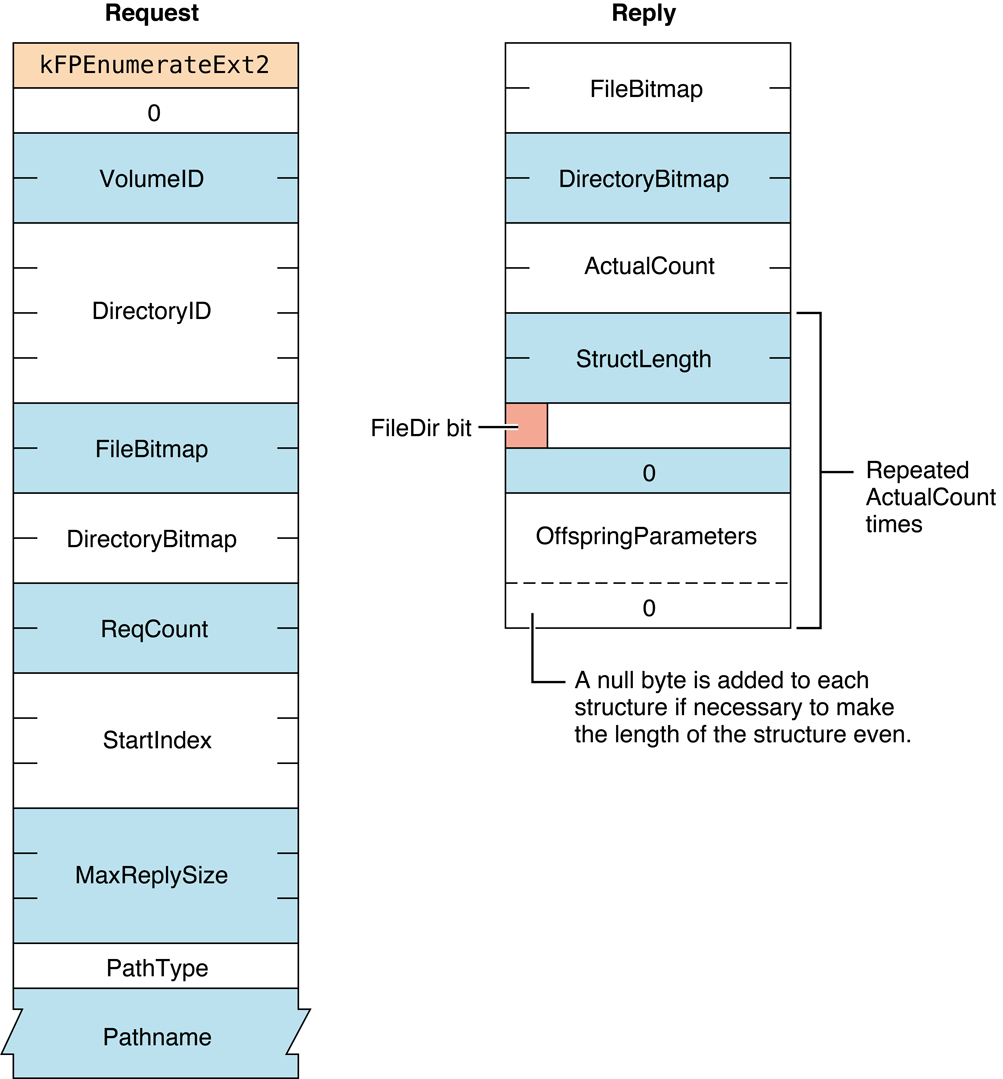
Figure 30 Request and reply blocks for the
FPEnumerateExt2 command
FPExchangeFiles#
Exchanges file metadata between two files.
uint8_t CommandCode
uint8_t Pad
int16_t VolumeID
int32_t SourceDirectoryID
int32_t DestDirectoryID
uint8_t SourcePathType
string SourcePathname
uint8_t DestPathType
string DestPathnameParameters#
CommandCodekFPExchangeFiles (42).
Pad
Pad byte.
VolumeID
Volume ID.
SourceDirectoryID
Identifier of the directory containing the source file.
DestDirectoryID
Identifier of the directory containing the destination file.
SourcePathType
Type of names in SourcePathname. See “Path Type Constants”
for possible values.
SourcePathname
Pathname of the source file. SourcePathname is a string if it contains
Short or Long Names or an AFPName if it contains a UTF-8–encoded path.
DestPathType
Type of names in DestPathname. See “Path Type Constants”
for possible values.
DestPathname
Pathname of the source file. DestPathname is a string if it contains
Short or Long Names or an AFPName if it contains a UTF-8–encoded path.
ResultkFPNoErr if no error occurred. See Table 24 for other
possible result codes.
ReplyBlock
None.
Discussion#
This command atomically exchanges all file system metadata (file name,
file ID, security information, and so on) between two files. The
recommended way to perform a “Save” or “Save as” operation on a file on
an AFP server is to write a new file, then send an FPExchangeFiles
command to exchange the new file with the original.
To use this command, both files must exist on the same volume.
The files being exchanged can be open or closed. If the files are open,
existing references to either file effectively become references to the
other file. Thus reads and writes continue to see the same data as
before, but fstat
and similar operations return different results.
If you open either file after calling FPExchangeFiles, from your
application’s perspective, it appears that the contents of the two files
have been swapped (though this is not precisely what happened).
Figure 31 shows the results of an exchange operation between two files named Blue and Red.
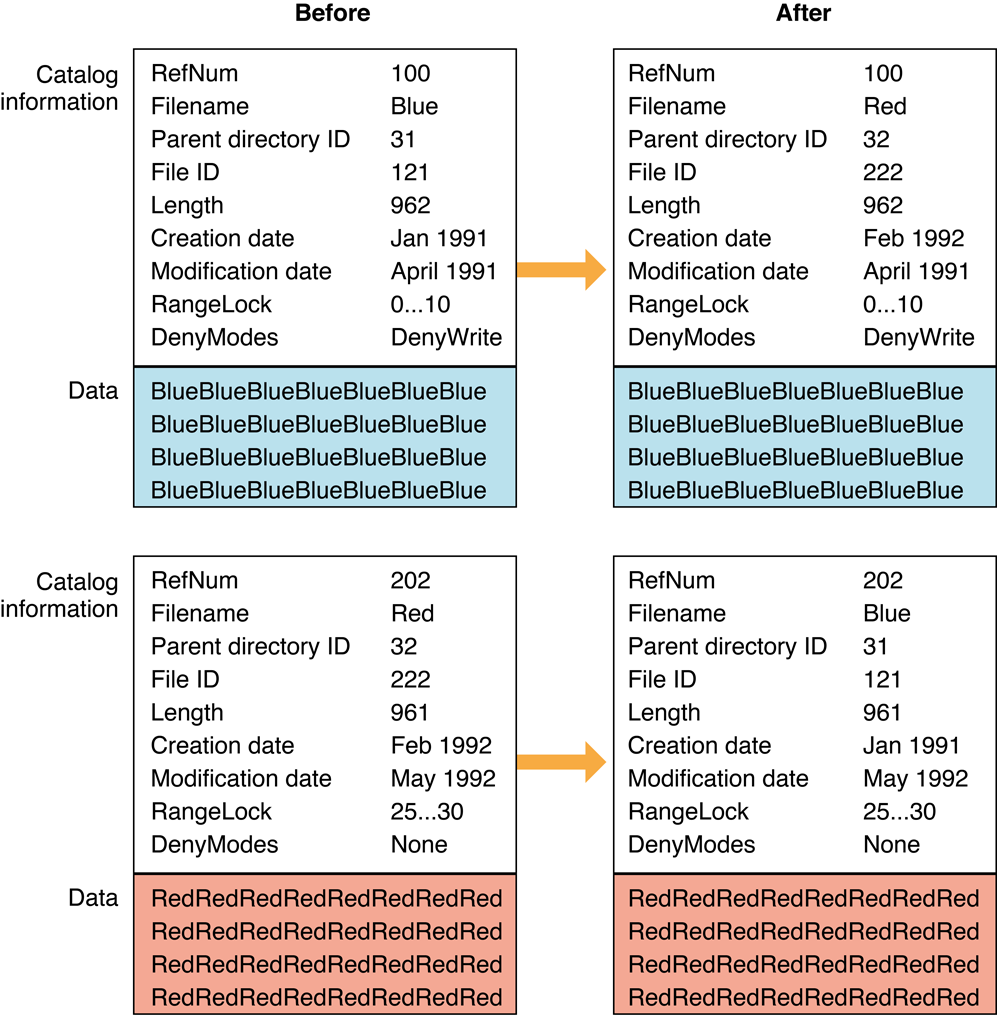
Figure 31 Example of exchanging filesNotice that only the filename, Parent Directory ID, File ID, and creation dates are exchanged. Byte-range locks and deny modes still apply to the same file reference number and data.
The user must have the Read & Write privilege for both files in order to use this command.
Table 24 lists the result codes for the FPExchangeFiles command.
| Result code | Explanation |
|---|---|
kFPAccessDenied | User does not have the access privileges required to use this command. |
kFPBadIDErr | File ID is not valid. |
kFPCallNotSupported | Server does not support this command. |
kFPIDNotFound | File ID was not found. (No file thread exists.) |
kFPMiscErr | Non-AFP error occurred. |
kFPObjectTypeErr | Object defined was a directory, not a file. |
kFPParamErr | Session reference number, Volume ID, or pathname type is unknown; pathname is null or bad. |
Table 24 Result codes for the FPExchangeFiles command
Figure 32 shows the request block for the FPExchangeFiles command.
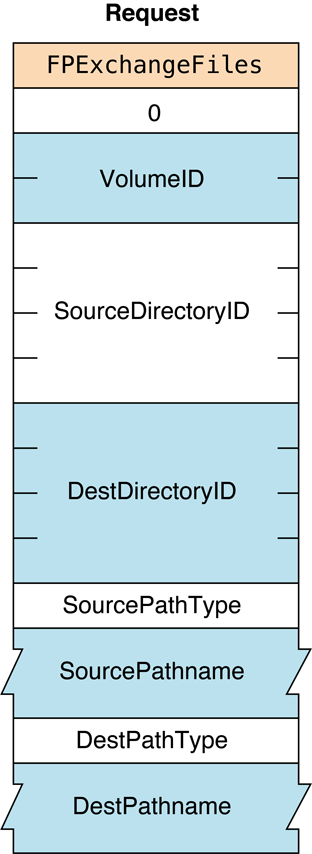
Figure 32 Request block for the
FPExchangeFiles commandSee the Character Encoding section of “Apple Filing Protocol Concepts” in Apple Filing Protocol Programming Guide for
additional details about the UTF-8 encoding used by AFP.
FPFlush#
Writes any volume data that has been modified.
uint8_t CommandCode
uint8_t Pad
int16_t VolumeIDParameters#
CommandCodekFPFlush (10).
Pad
Pad byte.
VolumeID
Volume ID.
ResultkFPNoErr if no error occurred, kFPParamErr if the session reference
number or Volume ID is invalid, or kFPMiscErr if an error occurred that is
not specific to AFP.
ReplyBlock
None.
Discussion#
This command writes to disk as much changed information as possible including
all forks opened by the user
volume catalog information changed by the user
any updated volume data structures
AFP does not specify that the server must perform all of these functions. Therefore, users should not rely on the server to perform any particular function.
The volume’s modification date may change as a result of this command,
but uses should not rely on it; updating of the date is
implementation-dependent. If no volume information was changed since the
last FPFlush command, the date may or may not change.
Notice that only the filename, Parent Directory ID, File ID, and creation dates are exchanged. Byte-range locks and deny modes still apply to the same file reference number and data.
The user must have the Read & Write privilege for both files in order to use this command.
Figure 33 shows the request block for the FPFlush command.
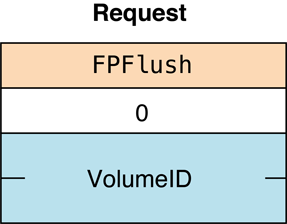
Figure 33 Request block for the FPFlush command
FPFlushFork#
Writes any data buffered from previous write commands.
uint8_t CommandCode
uint8_t Pad
int16_t OForkRefNumParameters#
CommandCodekFPFlushFork (11).
Pad
Pad byte.
OForkRefNum
Open fork reference number.
ResultkFPNoErr if no error occurred, kFPParamErr if the session reference
number or Volume ID is invalid, or kFPMiscErr if an error occurred that is
not specific to AFP.
ReplyBlock
None.
Discussion#
This command writes to disk any data buffered by the server by previous write commands. If the fork has been modified, the server set’s the file’s modification date to the server’s clock.
In order to optimize disk access, the server may buffer write commands made to a particular file fork. Within the constraints of performance, the server flushes each fork as soon as possible. By sending this command, the AFP client can force the server to write any buffered data.
Figure 34 shows the request block for the FPFlushFork command.
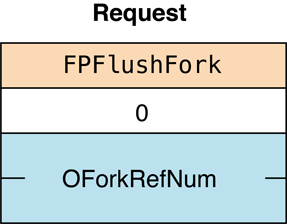
Figure 34 Request block for the FPFlushFork command
FPGetACL#
Gets the access control list for a file or directory.
uint8_t CommandCode
uint8_t Pad
int16_t VolumeID
int32_t DirectoryID
uint16_t Bitmap
int32_t MaxReplySize
uint8_t Pathtype
string PathnameParameters#
CommandCodekFPGetACL (73).
Pad
Pad byte.
VolumeID
Volume identifier.
DirectoryID
Directory identifier.
Bitmap
Bits that specify the values that are to be obtained. Specify
kFileSec_UUID to get the UUID of the specified file or directory. Specify
kFileSec_GRPUUID to get the Group UUID of the specified file or directory.
Specify kFileSec_ACL to get the ACL of the specified file or directory.
For declarations of these constants, see “Access Control List Bitmap.”
MaxReplySize
Reserved. Set this parameter to zero.
PathType
Type of names in Pathname. See “Path Type Constants”
for possible values.
Pathname
Pathname of the file or directory for which the access control list
(ACL) is to be obtained. Pathname is a string if it contains Short or
Long Names or an AFPName if it contains a UTF-8–encoded path. See the
Character Encoding section of “Apple Filing Protocol Concepts” in Apple Filing Protocol Programming Guide for
additional details about the UTF-8 encoding used by AFP.
ResultkFPNoErr if no error occurred. See Table 25 for other possible result
codes.
ReplyBlock
If the result code is kFPNoErr, the server returns a reply
block. See Table 27 for the format of the reply block.
Discussion#
Depending on the bits set in the Bitmap parameter, this command gets
the UUID, Group UUID, or ACL for the specified file or directory. If the
kFileSec_UUID bit is set, the file or
directory’s UUID appears first in the reply packet. If the
kFileSec_GRPUUID bit is set, the file or
directory’s Group UUID appears next in the reply packet. If the
kFileSec_ACL bit is set, the file or
directory’s ACL appears next in the packet.
Support for this command, as well as FPAccess and
FPSetACL is required in order to
support access control lists (ACLs). Support for UTF-8 and UUIDs is also
required in order to support ACLs. See the Character Encoding section of
“Apple Filing Protocol Concepts” in Apple Filing Protocol Programming Guide for
additional details about the UTF-8 encoding used by AFP.
Table 25 lists the result codes for the FPGetACL command.
| Result code | Explanation |
|---|---|
kFPAccessDenied | User does not have the access rights required to get the ACL for the specified file or directory. |
kFPMiscErr | Non-AFP error occurred. |
kFPObjectNotFound | Input parameters do not point to an existing file or directory. |
kFPParamErr | A parameter is invalid. |
Table 25 Result codes for the FPGetACL command
Table 26 describes the reply block for
the FPGetACL command.
| Name and size | Data |
|---|---|
Bitmap (int16_t) | Copy of the bitmap sent to the server. |
UUID (16 bytes) | File or directory’s UUID, if the kFileSec_UUID bit was set. |
GRPUUID (16 bytes) | File or directory’s Group UUID, if the kFileSec_GRPUUID bit was set. |
ACL | File or directory’s ACL in a kauth_acl structure, if the kFileSec_ACL bit was set. For details, see Access Control List Structure. |
Table 26 Reply block for the FPGetACL command
Figure 35 shows the request and reply blocks for the FPGetACL command.
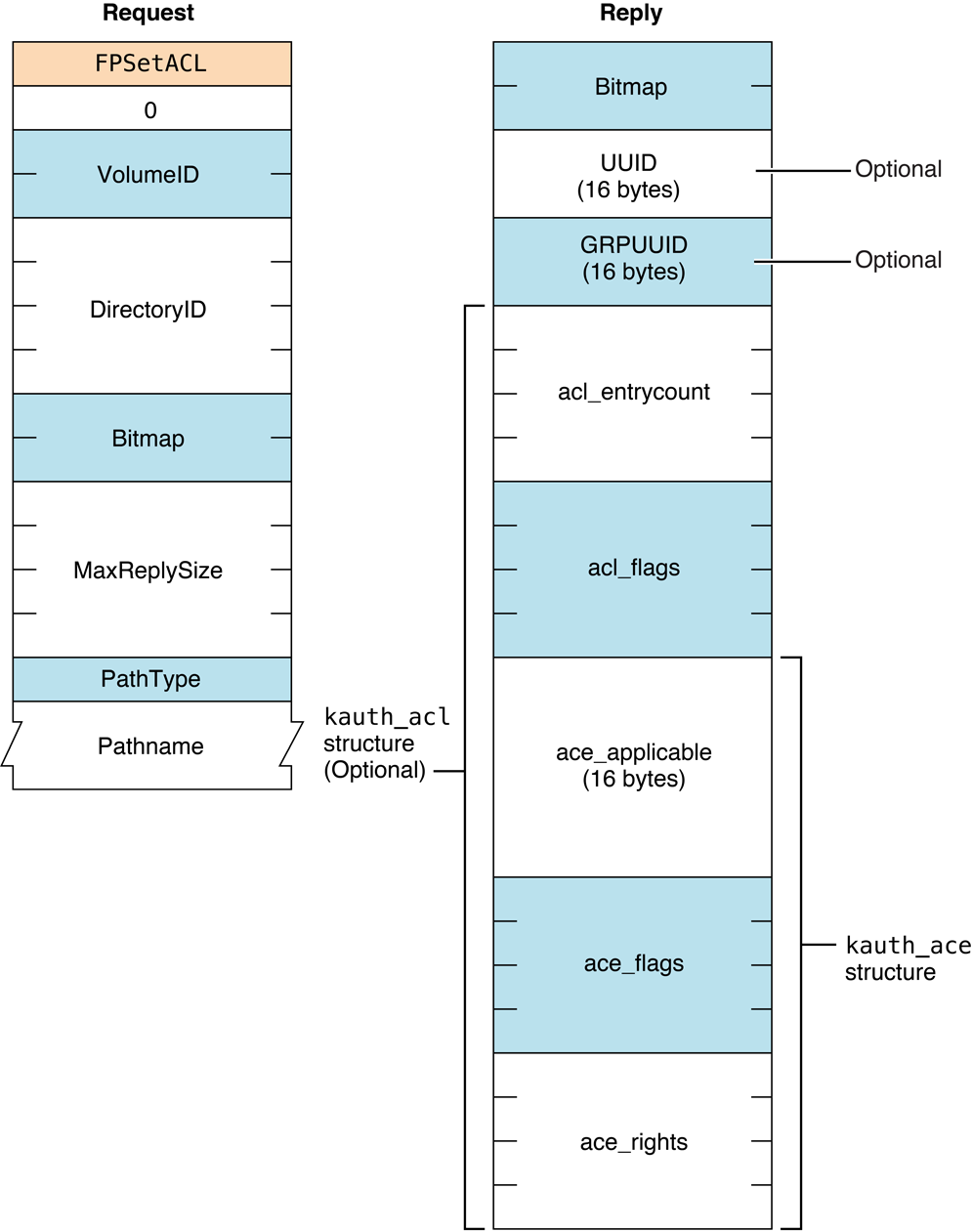
Figure 35 Request and reply blocks for the FPGetACL command
Version Notes#
Introduced in AFP 3.2.
FPGetAPPL#
Retrieves an APPL mapping from a volume’s Desktop database.
uint8_t CommandCode
uint8_t Pad
int16_t DTRefNum
int32_t FileCreator
int16_t APPLIndexParameters#
CommandCodekFPGetAPPL (55).
Pad
Pad byte.
DTRefNum
Desktop database reference number.
FileCreator
File creator of the application corresponding to the APPL mapping to be
retrieved.
APPLIndex
Index of the APPL mapping to be retrieved.
ResultkFPNoErr if no error occurred, kFPParamErr if the session reference
number or Desktop database reference is unknown,
kFPItemNotFound if no entries in the
Desktop database match the input parameters,
kFPBitmapErr if an attempt was made to
retrieve a parameter that cannot be obtained with this command, or
kFPMiscErr if an error occurred that is
not specific to AFP.
ReplyBlock
If the result code is kFPNoErr, the server returns a reply
block. See Table 27 for the format of the reply block.
Discussion#
For each file creator, the Desktop database contains a list of APPL mappings. Each APPL mapping contains the Parent Directory ID and CNode name of an application associated with the file creator, as well as an APPL Tag that can be used to distinguish among the APPL mappings (the APPL Tag is uninterpreted by the Desktop database).
Information about the application file associated with each APPL mapping
can be obtained by sending successive FPGetAPPL commands with
Index varying from one to the total number of APPL mappings stored in
the Desktop database for that file creator. If Index is more than the
number of APPL mappings in the Desktop database for FileCreator, a
kFPItemNotFound result code is returned.
An Index of zero returns the first APPL mapping, if one exists in the
Desktop database.
The server retrieves the specified parameters for the application file and packs the, in bitmap order, in the reply block.
The user must have search access to all ancestors except the parent directory and read access to the parent directory of the application for which information will be returned.
The user must have previously called FPOpenDT for the corresponding volume.
Table 27 describes the reply block for the FPGetAPPL command.
| Name and size | Data |
|---|---|
Bitmap (int16_t) | Bitmap describing the parameters of the application file to return. Set the bit that corresponds to each desired parameter. This bitmap is the same as the FileBitmap parameter of the FPGetFileDirParms command. For bit definitions for the File bitmap, see Table 1-7 in “File and Directory Bitmap.“ |
APPLTag (int32_t) | Tag information associated with the APPL mapping. |
FileParameters | Requested file parameters. |
Table 27 Reply block for the FPGetAPPL command
Figure 36 shows the request and reply blocks for the FPGetAPPL command.
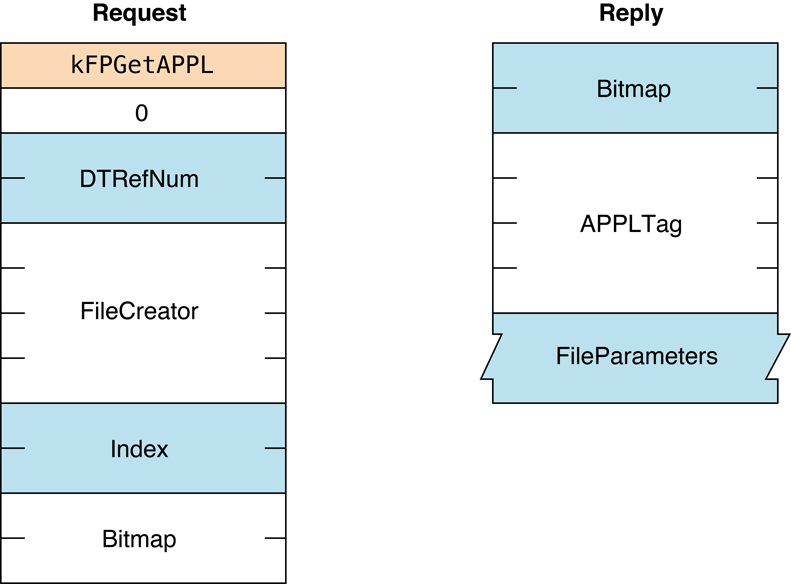
Figure 36 Request and reply blocks for the FPGetAPPL command
Availability#
- Deprecated in OS X v.10.6.
FPGetAuthMethods#
Gets the UAMs that an Open Directory domain supports.
uint8_t CommandCode
uint8_t Pad
uint8_t Flags
uint8_t PathType
string PathnameParameters#
CommandCodekFPGetAuthMethods (62).
Pad
Pad byte.
Flags
Flags providing additional information. (No flags are currently
defined.)
PathType
Type of names in Pathname. See “Path Type Constants”
for possible values.
Pathname
Pathname of the Open Directory domain for which UAMs are to be obtained.
Pathname is a string if it contains Short or Long Names or an AFPName
if it contains a UTF-8–encoded path. See the Character Encoding section
of “Apple Filing Protocol Concepts” in Apple Filing Protocol Programming Guide for
additional details about the UTF-8 encoding used by AFP.
ResultkFPNoErr if no error occurred, kFPObjectNotFound if the specified Open
Directory domain could not be found, or
kFPMiscErr if an error occurred that is
not specific to AFP.
ReplyBlock
If the result code is kFPNoErr, the server returns a reply
block. See Table 28 for the format of the reply block.
Discussion#
This command gets the UAMs for the specified Open Directory domain.
Table 28 describes the reply block for
the FPGetAuthMethods command.
Flags (uint8_t) | Copy of the Flags input parameter. |
Count (uint8_t) | Number of UAMs that follow. |
UAMStrings (packed Pascal strings) | Packed Pascal strings containing the names of the available UAMs |
Table 28 Reply block for the FPGetAuthMethods command
Figure 37 shows the request and reply blocks for the FPGetAuthMethods command.
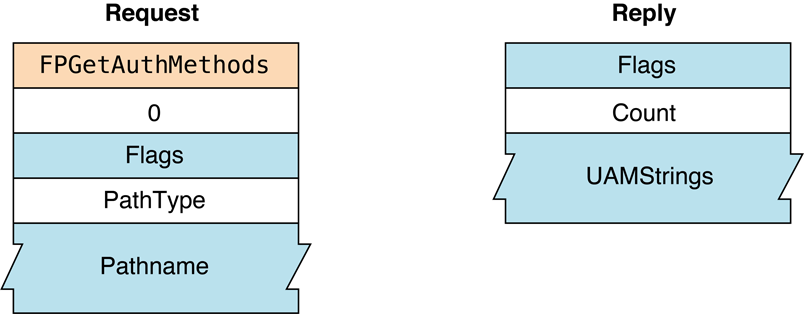
Figure 37 Request and reply blocks for the FPGetAuthMethods command
Availability#
- Deprecated.
FPGetComment#
Gets the comment associated with a file or directory from the volume’s Desktop database.
uint8_t CommandCode
uint8_t Pad
int16_t DTRefNum
int32_t DirectoryID
uint8_t PathType
string PathnameParameters#
CommandCodekFPGetComment (58).
Pad
Pad byte.
DTRefNum
Desktop database reference number.
DirectoryID
Directory ID.
PathType
Type of names in Pathname. See “Path Type Constants”
for possible values.
Pathname
Pathname to desired file or directory. Pathname is a string if it
contains Short or Long Names or an AFPName if it contains a
UTF-8–encoded path. See the Character Encoding section of
“Apple Filing Protocol Concepts” in Apple Filing Protocol Programming Guide for
additional details about the UTF-8 encoding used by AFP.
ResultkFPNoErr if no error occurred. See Table 29 for other possible result
codes.
ReplyBlock
If the result code is kFPNoErr, the server returns a reply
block. The reply block consists of a string, called Comment,
containing the comment text.
Discussion#
The comment for the specified file or directory, if it is found in the volume’s Desktop database, is returned in the reply block.
If the comment is associated with a directory, the user must have search access to all ancestors, including the parent directory. If the comment is associated with a file, the user must have search access to all ancestors except the parent directory and read access to the parent directory.
The user must have previously called FPOpenDT for the corresponding volume.
In addition, the file or directory must exist before this command is sent.
Table 29 lists the result codes for the FPGetComment command.
| Result code | Explanation |
|---|---|
kFPAccessDenied | User does not have the access privileges required to use this command. |
kFPItemNotFound | No comment was found in the Desktop database. |
kFPParamErr | Session reference number or Desktop database reference number is unknown. |
kFPObjectNotFound | Input parameters do point to an existing file or directory. |
kFPMiscErr | Non-AFP error occurred. |
Table 29 Result codes for the FPGetComment command
Figure 38 shows the request and reply blocks for the FPGetComment command.
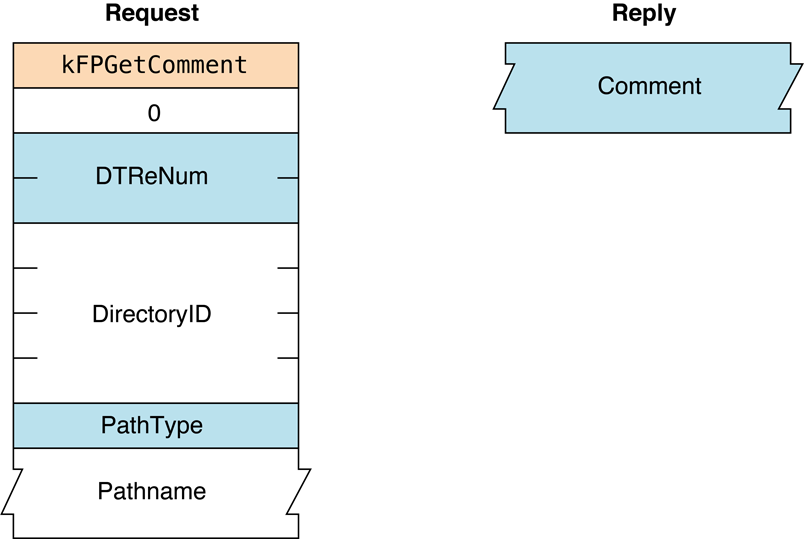
Figure 38 Request and reply blocks for the FPGetComment command
Availability#
- Deprecated in OS X v.10.6.
FPGetExtAttr#
Gets the value of an extended attribute.
uint8_t CommandCode
uint8_t Pad
int16_t VolumeID
int32_t DirectoryID
uint16_t Bitmap
int64_t Offset
int64_t ReqCount
int32_t MaxReplySize
uint8_t PathType
string Pathname
uint8_t Pad
uint16_t NameLength
string NameParameters#
CommandCodekFPGetExtAttr (69).
Pad
Pad byte.
VolumeID
Volume identifier.
DirectoryID
Directory identifier.
Bitmap
Bitmap specifying the desired behavior when getting the value of an
extended attribute. For this command, only kAttrDontFollow is valid.
For details, see “Extended Attributes Bitmap”
for details.
Offset
Always zero; reserved for future use.
ReqCount
Always –1; reserved for future use.
MaxReplySize
Size in bytes of the reply that your application can handle; set to zero
to get the size of the reply without actually getting the attributes.
PathType
Type of names in Pathname. See “Path Type Constants”
for possible values.
Pathname
Pathname to desired file or directory. Pathname is a string if it
contains Short or Long Names or an AFPName if it contains a
UTF-8–encoded path.
Pad
Optional pad byte if needed to pad to an even boundary.
NameLength
Length in bytes of the extended attribute name that follows.
Name
UTF-8–encoded name of the extended attribute whose value is to be
obtained.
ResultkFPNoErr if no error occurred. See Table 30 for other
possible result codes.
ReplyBlock
If the result code is kFPNoErr, the server returns a reply
block. The reply block consists of a bitmap and the value of the
extended attribute that was requested. See Table 31 for the format of
the reply block.
Discussion#
If the result code is kFPNoErr, this command returns in the
reply block the value of the extended attribute that was requested.
If the extended attribute is too large to fit in the client’s buffer (as
specified by the MaxReplySize parameter), the server should fill in
the Bitmap field, set the DataLength field to the actual size of the
extended attribute, and return kFPParamErr.
Note: The maximum attribute length that the FPGetExtAttr and
FPSetExtAttr commands can handle is the lesser of the server’s quantum
size (see DSIOpenSession and
“AFP Over TCP”) and the maximum extended
attribute length that the backing filesystem can handle.
For example, if the AFP Server is sharing part of an HFS+ volume, the maximum length of the extended attribute is either the AFP server quantum size or the HFS+ maximum extended attribute length, whichever is smaller.
The server should return kFPMiscErr if the extended attribute
requested does not exist on this file.
Support for this command, as well as FPListExtAttrs,
FPRemoveExtAttr and FPSetExtAttr is required in order
to support extended attributes. UTF-8 support is also required in order
to support extended attributes.
See the Character Encoding section of “Apple Filing Protocol Concepts” in Apple Filing Protocol Programming Guide for additional details about the UTF-8 encoding used by AFP.
Table 30 lists the possible result codes for the FPGetExtAttr command.
| Result code | Explanation |
|---|---|
kFPAccessDenied | User does not have the access privileges required to get the file of an extended attribute for the specified file or directory. |
kFPBitmapErr | Bitmap is null or specifies a value that is invalid for this command. |
kFPMiscErr | Non-AFP error occurred. For example, the server should return kFPMiscErr if the extended attribute requested does not exist on this file. |
kFPObjectNotFound | Input parameters do not point to an existing file or directory. |
kFPParamErr | A parameter is invalid. |
Table 30 Result codes for the FPGetExtAttr command
Table 31 describes the reply block for the FPGetExtAttr command.
| Name and size | Data |
|---|---|
Bitmap (int16_t) | Copy of the input parameter. |
DataLength (int32_t) | Length in bytes of the extended attribute data that follows. |
ExtendedAttribute Data (string) | Extended attribute data |
Table 31 Reply block for the FPGetExtAttr command
Figure 38 shows the request and reply blocks for the FPGetExtAttr command.
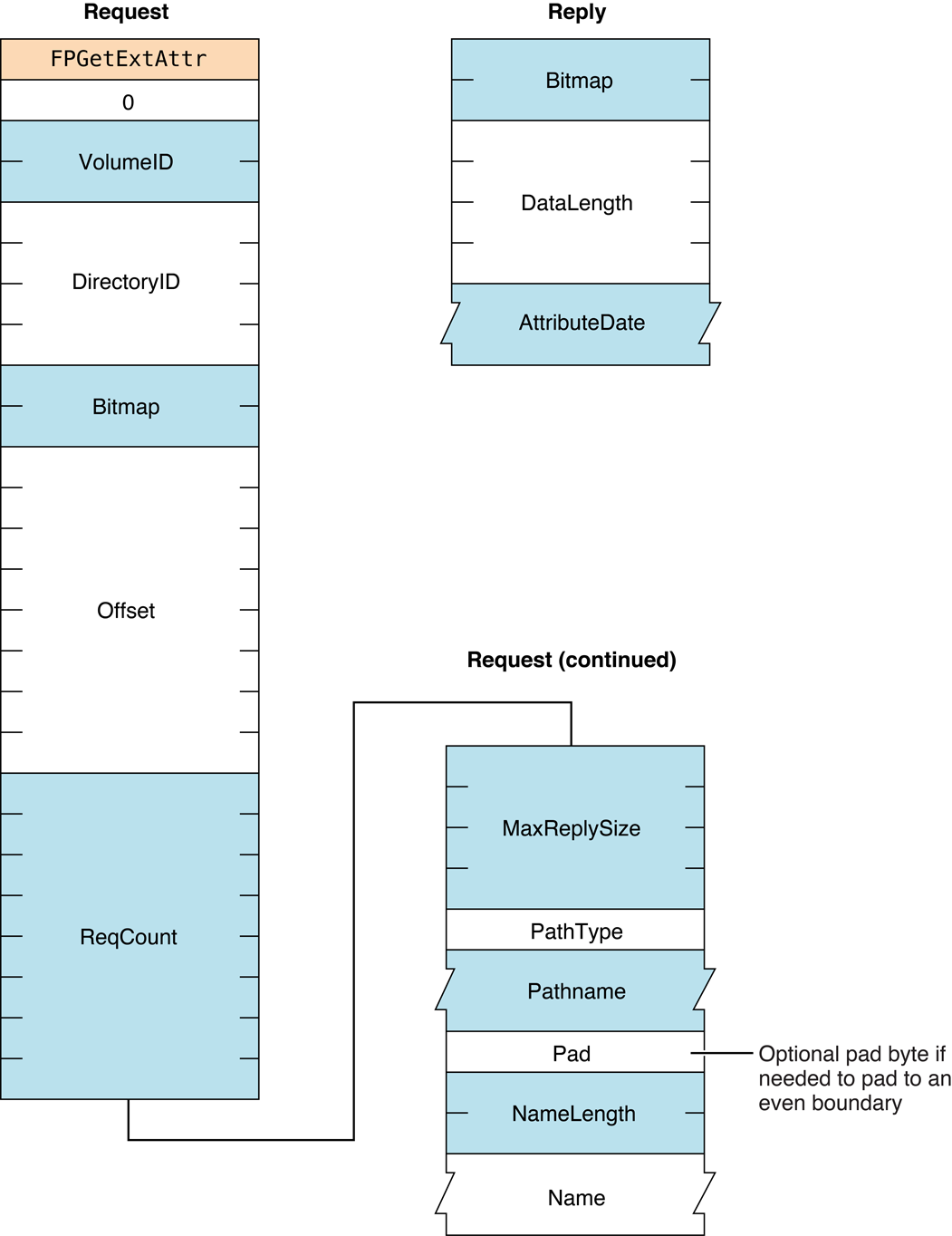
Figure 39 Request and reply blocks for the FPGetExtAttr command
Version Notes#
Introduced in AFP 3.2.
FPGetFileDirParms#
Gets the parameters for a file or a directory.
uint8_t CommandCode
uint8_t Pad
int16_t VolumeID
int32_t DirectoryID
int16_t FileBitmap
int16_t DirectoryBitmap
uint8_t PathType
string PathnameParameters#
CommandCodekFPGetFileDirParms (34).
Pad
Pad byte.
VolumeID
Volume ID.
DirectoryID
Directory ID.
FileBitmap
Bitmap describing the parameters to return for a file. Set the bit that
corresponds to each desired parameter. For the bit definitions of this
bitmap, see “File and Directory Bitmap.”
DirectoryBitmap
Bitmap describing the parameters to return for a directory. Set the bit
that corresponds to each desired parameter. For the bit definitions of
this bitmap, see “File and Directory Bitmap.”
PathType
Type of names in Pathname. See “Path Type Constants”
for possible values.
Pathname
Pathname to desired file or directory. Pathname is a string if it
contains Short or Long Names or an AFPName if it contains a
UTF-8–encoded path. See the Character Encoding section of
“Apple Filing Protocol Concepts” in Apple Filing Protocol Programming Guide for
additional details about the UTF-8 encoding used by AFP.
ResultkFPNoErr if no error occurred. See Table 32 for other
possible result codes.
ReplyBlock
If the result code is kFPNoErr, the server returns a reply
block. See Table 33 for the format of the reply block.
Discussion#
The server packs the requested parameters in the reply block in the
order specified by the appropriate bitmap. The FileDir bit indicates
whether the parameters are for a file or a directory. A copy of the
input bitmaps is inserted before the parameters.
Variable- length parameters, such as Long Name and Short Name, are kept at the end of the block. To do this, the server represents variable-length parameters in the bitmap order as fixed-length offsets (integers). Each offset is measured from the start of the parameters (not from the start of the bitmap) to the start of the variable-length parameter. The actual variable-length parameters are then packed after all fixed-length parameters.
If the CNode exists and both bitmaps are null, no error is returned;
FileBitmap, DirectoryBitmap, and the byte containing the FileDir
bit are returned with no other parameters.
If a directory’s access rights are requested, the server returns the Access Rights parameter (a four-byte quantity) containing the read, write, and search access privileges corresponding to owner, group, and everyone as well as the User Access Rights Summary byte, which indicates the privileges the current user of the AFP client has to this directory. For bit definitions of the Access Rights parameter, see “Access Rights Bitmap.”
If the Offspring Count bit of the DirectoryBitmap parameter is set,
the server will adjust the Offspring Count to reflect the access rights
the user has to that directory. For example, if a particular directory
contains three file and two directory offspring, the server will return
its Offspring Count as two if the user has only search access to the
directory, three if the user has only read access to the directory, or
five if the user has both search and read access to the directory.
Figure 40 shows the file and directory bitmaps, the File and Directory Attributes parameters, and the Access Rights for directories.
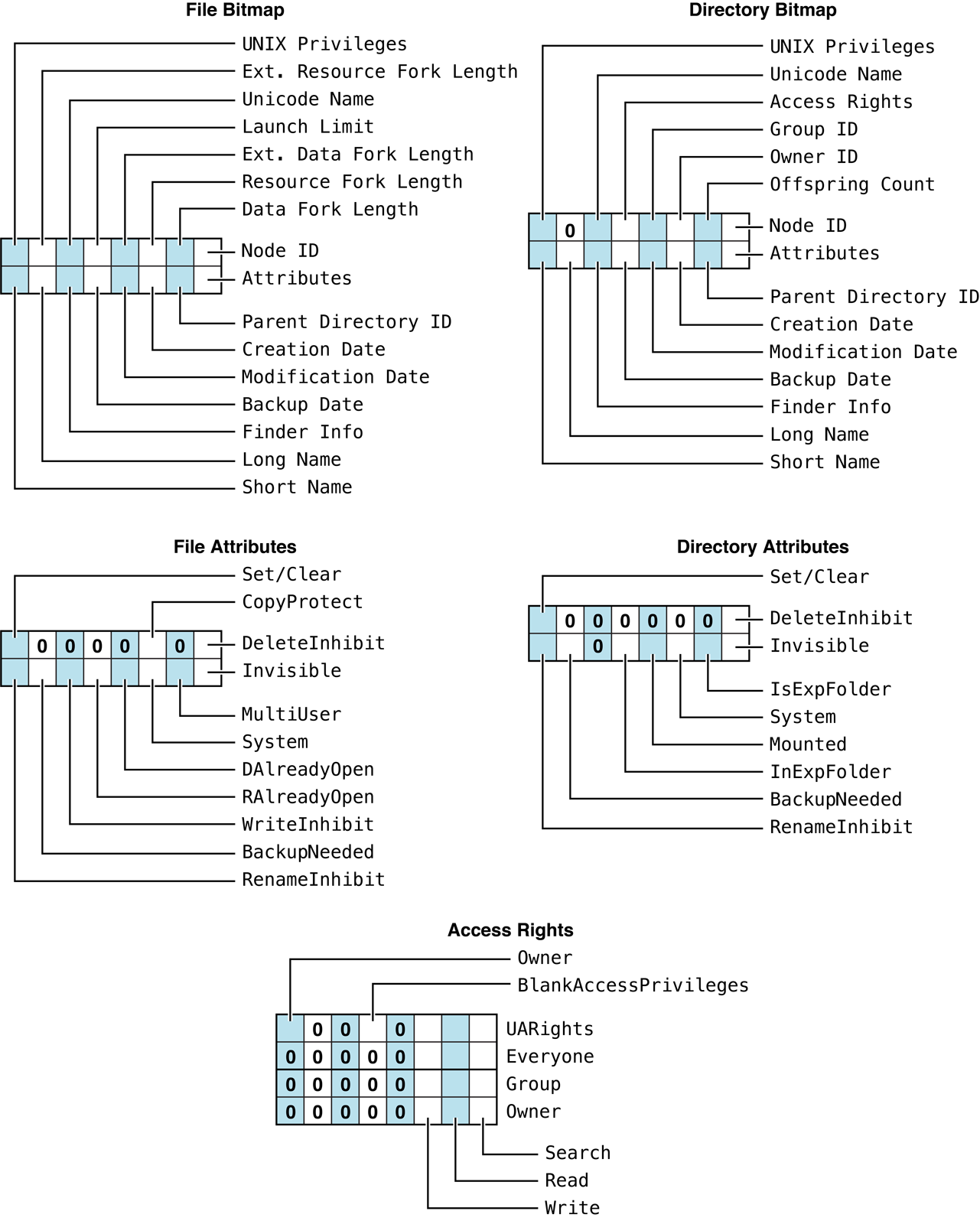
Figure 40 Bitmaps, Attributes, and Access
Rights returned by FPGetFileDirParms
The user must have search access to all ancestors except this CNode’s parent directory. For directories, the user also needs search access to the parent directory. For files, the user needs read access to the parent directory.
Most of the attributes requested by this command are stored in corresponding flags within the CNode’s Finder Info record.
Table 32 lists the result codes for the FPGetFileDirParms command.
| Result code | Explanation |
|---|---|
kFPAccessDenied | User does not have the access privileges required to use this command. |
kFPBitmapErr | Attempt was made to retrieve a parameter that cannot be obtained with this command. |
kFPMiscErr | Non-AFP error occurred. |
kFPObjectNotFound | Input parameters do not point to an existing file or directory. |
kFPParamErr | Session reference number, Volume ID, or pathname type is unknown; pathname is invalid. |
Table 32 Result codes for the FPGetFileDirParms command
Table 33 describes the reply block for the FPGetFileDirParms command.
| Name and size | Data |
|---|---|
FileBitmap (int16_t) | Copy of the input parameter. |
DirectoryBitmap (int16_t) | Copy of the input parameter. |
FileDir (bit) | Bit indicating whether the CNode is a file or a directory:0 = file 1 = directory |
ReqParameters | Requested parameters. |
Table 33 Reply block for the FPGetFileDirParms command
Figure 41 shows the request and reply blocks for the FPGetFileDirParms command.
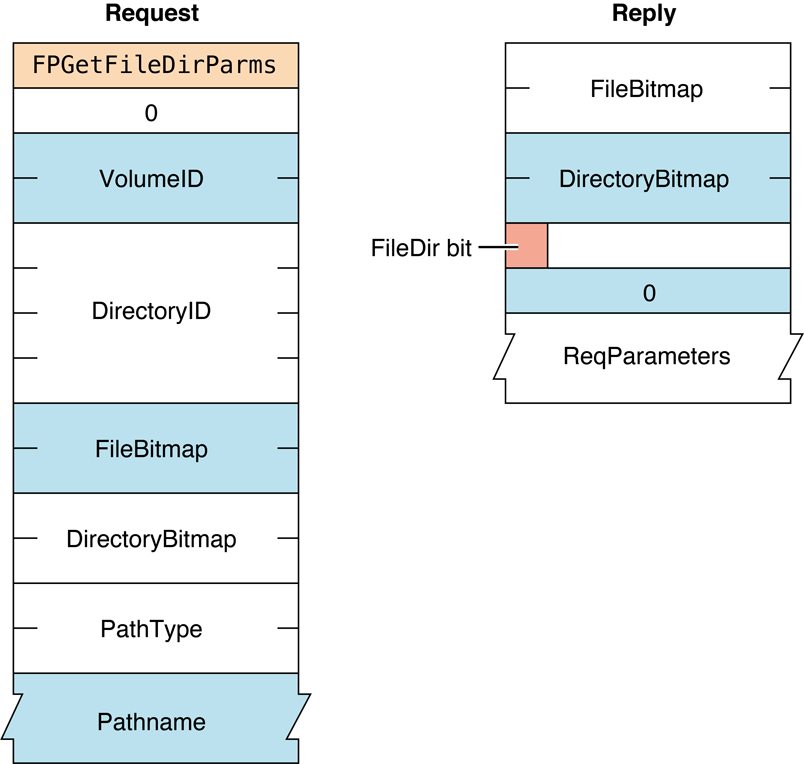
Figure 41 Request and reply blocks for the FPGetFileDirParms command
FPGetForkParms#
Gets the parameters for a fork.
uint8_t CommandCode
uint8_t Pad
int16_t OForkRefNum
int16_t BitmapParameters#
CommandCodekFPGetForkParms (14).
Pad
Pad byte.
OForkRefNum
Open fork reference number.
Bitmap
Bitmap describing the parameters to be returned. Set the bits that
correspond to each desired parameter. This bitmap is the same as the
FileBitmap parameter of the FPGetFileDirParms command.
For bit definitions for this bitmap, see “File and Directory Bitmap.”
ResultkFPNoErr if no error occurred, kFPParamErr if the session reference
number or open fork reference number is invalid,
kFPBitmapErr if an attempt was made to
retrieve a parameter that cannot be obtained with this command; bitmap
is null, or kFPMiscErr if an error occurred that is
not specific to AFP.
ReplyBlock
If the result code is kFPNoErr, the server returns a reply
block. See Table 34 for the format of the reply block.
Discussion#
The server packs the parameters in bitmap order in the reply block.
Variable- length parameters, such as Long Name and Short Name, are kept at the end of the block. To do this, the server represents variable-length parameters in the bitmap order as fixed-length offsets (integers). Each offset is measured from the start of the parameters (not from the start of the bitmap) to the start of the variable-length parameter. The actual variable-length fields are then packed after all fixed-length parameters.
This command retrieves the length the fork indicated by OForkRefNum; a
kFPBitmapErr result code is returned if
an attempt is made to retrieve the length of the file’s other fork.
The user must have previously called FPOpenFork for this volume.
Table 34 describes the reply block for the FPGetForkParms command.
| Name and size | Data |
|---|---|
Bitmap (int16_t) | Copy of the input parameter. |
FileParameters | Requested fork parameters. |
Table 34 Reply block for the FPGetForkParms command
Figure 42 shows the request and reply blocks for the FPGetForkParms command.
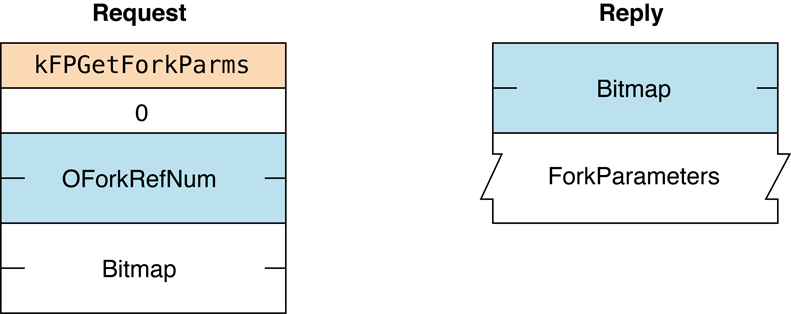
Figure 42 Request and reply blocks for the FPGetForkParms command
FPGetIcon#
Gets an icon from the Desktop database.
uint8_t CommandCode
uint8_t Pad
int16_t DTRefNum
int32_t FileCreator
int32_t FileType
uint8_t IconType
uint8_t Pad
int16_t LengthParameters#
CommandCodekFPGetIcon (51).
Pad
Pad byte.
DTRefNum
Desktop database reference number.
FileCreator
File creator of the file with which the icon is associated.
FileType
File type of the file with which the icon is associated.
IconType
Preferred icon type.
Pad
Pad byte.
Length
Number of bytes the caller expects the icon bitmap to require in the
reply block.
ResultkFPNoErr if no error occurred, kFPParamErr if the session reference
number or Desktop database reference number is unknown,
kFPItemNotFound if no icon corresponding
to the input parameters was found in the Desktop database, or
kFPMiscErr if an error occurred that is
not specific to AFP.
ReplyBlock
If the result code is kFPNoErr, the server returns a reply
block. The reply block consists of a int16_t containing the requested
icon bitmap.
Discussion#
The server retrieves an icon bitmap from the Desktop database as
specified by the FileCreator, FileType, and IconType parameters.
An input Length value of zero is acceptable to test for the presence
or absence of a particular icon. If Length is less than the actual
size of the icon bitmap, only Length bytes are returned.
The user must have previously called FPOpenDT for the corresponding volume.
Figure 43 shows the request and reply blocks for the FPGetIcon command.
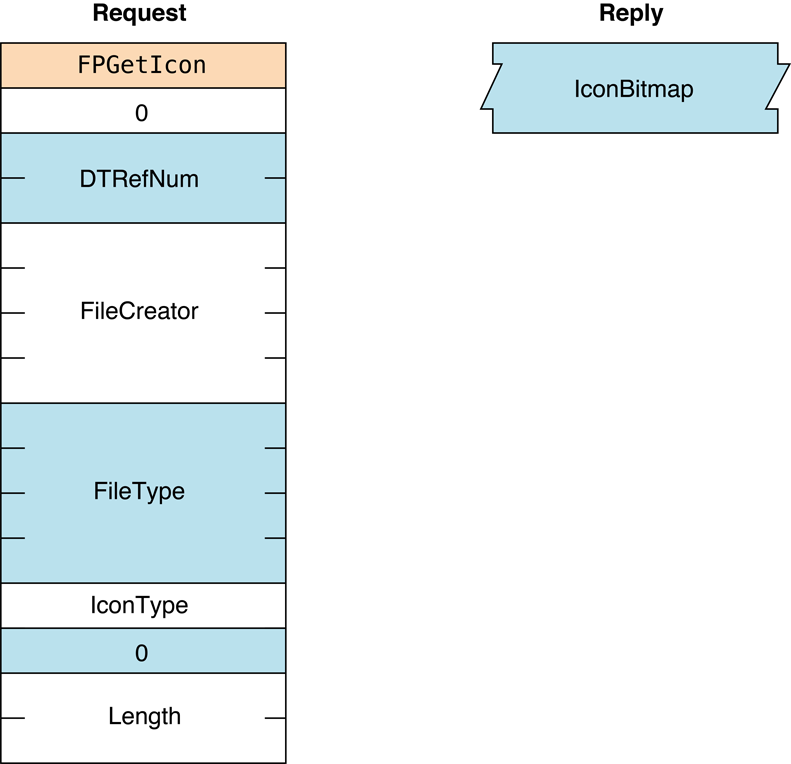
Figure 43 Request and reply blocks for the FPGetIcon command
Availability#
- Deprecated in OS X v.10.6.
FPGetIconInfo#
Gets icon information from the Desktop database.
uint8_t CommandCode
uint8_t Pad
int16_t DTRefNum
int32_t FileCreator
int16_t IconIndexParameters#
CommandCodekFPGetIconInfo (51).
Community Archive Annotation.
The CommandCode for this command is assumed to be 52. The value of 51 is used by the FPGetIcon command, which is described in the previous section.
Pad
Pad byte.
DTRefNum
Desktop database reference number.
FileCreator
File creator of the file with which the icon is associated.
IconIndex
Index of the requested icon.
ResultkFPNoErr if no error occurred, kFPParamErr if the session reference
number or Desktop database reference number is unknown,
kFPItemNotFound if no icon corresponding
to the input parameters was found in the Desktop database, or
kFPMiscErr if an error occurred that is not specific to AFP.
ReplyBlock
If the result code is kFPNoErr, the server returns a reply
block. See Table 35 for the format of the reply block.
Discussion#
The server retrieves a information about an icon in the volume’s Desktop database as specified by the icon’s file creator and icon index.
For each file creator, the Desktop database contains a list of icons.
Information about each icon can be obtained by sending successive
FPGetIconInfo commands with IconIndex varying from one to the total
number of icons stored in the Desktop database for that file creator. If
IconIndex is more than the number of icons in the Desktop database for
the specified file creator, a result code of
kFPItemNotFound is returned.
The user must have previously called FPOpenDTFPOpenDT
for the corresponding volume.
Table 35 describes the reply block for the FPGetIconInfo command.
| Name and size | Data |
|---|---|
IconTag (int32_t) | Tag information associated with the requested icon. |
FileType (int32_t) | File type of the requested icon. |
IconType (uint8_t) | Type of the requested icon. |
Pad (uint8_t) | Pad byte. |
Size (int16_t) | Size of the icon bitmap. |
Table 35 Reply block for the FPGetIconInfo command
Figure 44 shows the request and reply blocks for the FPGetIconInfo command.
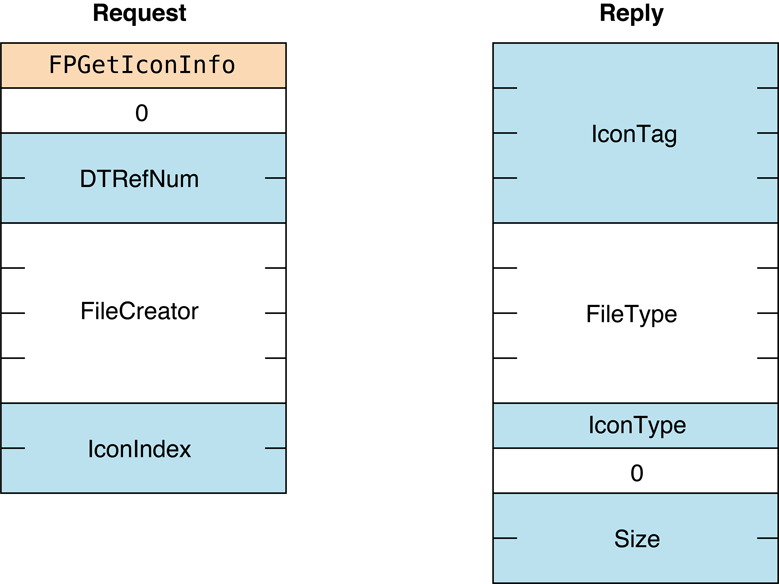
Figure 44 Request and reply blocks for the FPGetIconInfo command
Availability#
- Deprecated in OS X v.10.6.
FPGetSessionToken#
Gets a session token.
uint8_t CommandCode
uint8_t Pad
int16_t Type
int32_t IDLength
int32_t timeStamp (optional)
IDParameters#
CommandCodekFPGetSessionToken (64).
Pad
Pad byte.
Type
The value of this parameter is kLoginWithoutID (0) if the client
supports an earlier version of AFP that does not send an IDLength and
an ID parameter.
It is kLoginWithTimeAndID (3) if the client is
sending an IDLength, an ID, and a Timestamp parameter and the
client wants its old session to be discarded.
It is kReconnWithTimeAndID (4) if the client
has just finished a successful reconnect, is sending an IDLength, an
ID, and a Timestamp parameter, and wants the session to be updated
with the ID parameter.
It is kRecon1Login (5) if the client is using
the Recon1 UAM to login.
It is kRecon1ReconnectLogin (6) if the client
just finished a successful reconnect and it is using the Recon1 UAM.
It is kRecon1RefreshToken (7) if the client is
using the Recon1 UAM and needs to refresh the token.
It is kGetKerberosSessionKey (8) if the client
is logging in using Kerberos v5.
See “FPGetSessionToken Types” for the enumeration that defines the constants for this parameter.
IDLength
Length of the ID parameter.
timeStamp
Optional time stamp specified only if the value of ID is
kLoginWithTimeAndID or kReconnWithTimeAndID.
ID
A client-defined value that uniquely identifies this session.
ResultkFPNoErr if no error occurred, kFPParamErr if the session reference
number is unknown, kFPCallNotSupported if the server does
not support this command, or kFPMiscErr if an error occurred that is
not specific to AFP.
ReplyBlock
If the result code is kFPNoErr, the server returns a reply
block. See Table 36 for the format of the reply block.
Discussion#
This command helps an AFP client manage a disconnect that occurs and there are open files or locked resources on the remote server. The remote server will save the current state of the session (including open files) and wait until its reconnect timeout expires before closing the files and discarding the saved session. In the case of an AFP client that fails to wake up properly from sleep with a mounted AFP server, the session will be saved on the remote server until the sleep timeout expires.
Under these circumstances, prior to AFP 3.1, when an AFP client logged back into the server from the same system, attempts to access the files that were open at the time of the crash would fail with a “file already open” or “resources already locked” result. The AFP client would have to wait for the reconnect or sleep timeout to expire, or a server administrator would have to manually disconnect the old session.
With AFP 3.1 and later, the AFP client can set the Type parameter to
kLoginWithID, set the ID parameter to a unique client-defined value,
and send this command. The server will associate the value of ID with
the session. Later, if the local system crashes and the AFP client logs
in again, the AFP client can set the Type parameter to kLoginWithID,
set the ID parameter to the ID that it previously sent to the remote
server, and send this command again. The remote server will look for a
session that matches the value of ID. If a match is found, it will close
any files associated with the session that are open, free any locked
resources, and disconnect the matching session. Note that in the current
version, the unique ID is associated with a particular computer, so
after the system crashes, the AFP client must log in from the same
computer using the same information that was used to log in originally.
With AFP 3.1 and later, the AFP client can also set the Type parameter
to kLoginWithTimeAndID. In this case, the client must include a
four-byte time stamp after the IDLength field, and the server saves
the time stamp as well as the value of ID for each session. When the
server receives a FPGetSessionToken command having a TYPE parameter
whose value is kLoginWithTimeAndID, the server searches all of its
session queues. If the server finds a session that matches the value of
ID, it also checks the time stamp. If the time stamp matches, the
client has not restarted so the session is not discarded. The session
is only discarded if the saved time stamp does not match.
This command returns a session token that, with AFP 3.0 and later, is
used to reconnect. If the local system is disconnected and the AFP
client logs in again using the same log in information as before, the
AFP client can call FPDisconnectOldSession,
passing the session token obtained by calling FPGetSessionToken, to
tell the server to transfer the old session to the new session.
Note that sending the FPGetSrvrMsg command does not initiate a
reconnect.
For security purposes, the server always fails reconnections for users who log in as Guest.
Table 36 describes the reply block for
the FPGetSessionToken command.
| Name and size | Data |
|---|---|
TokenLength (int32_t) | Length of the token that follows. |
Token (variable length) | Token that can be passed to FPDisconnectOldSession if the session is inadvertently disconnected and then re-established. If the client supports the Reconnect UAM, the token needs to be refreshed periodically, and is also sent to the server by the FPLoginExt command to reconnect if the session is disconnected. |
Table 36 Reply block for the FPGetSessionToken command
Figure 45 shows the request and reply
blocks for the FPGetSessionToken command.
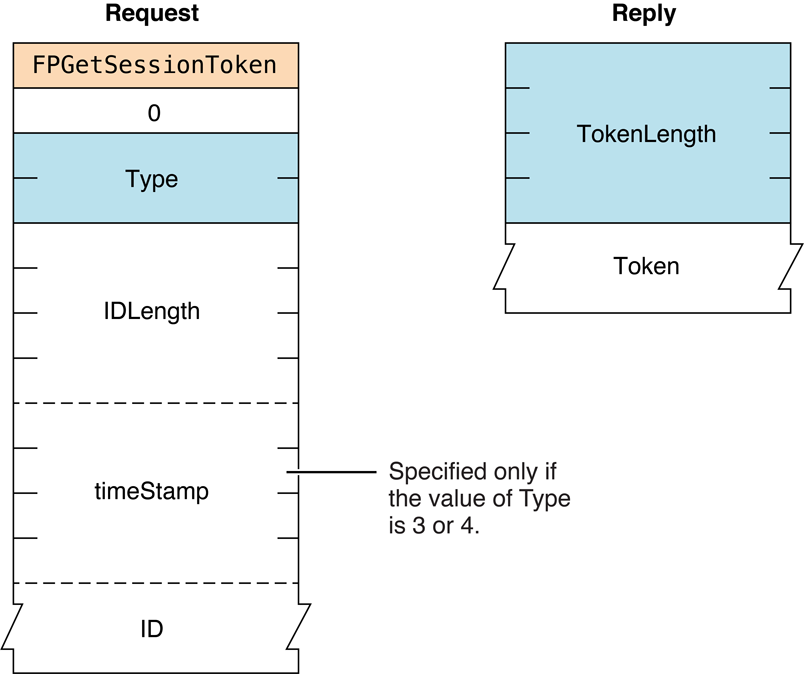
Figure 45 Request and reply blocks for the FPGetSessionToken command
FPGetSrvrInfo#
Gets information about a server.
uint8_t CommandCode
uint8_t PadParameters#
CommandCodekFPGetSrvrInfo (15).
Pad
Pad byte.
ResultkFPNoErr if no error occurred, kFPNoServer if the server is not
responding, or kFPMiscErr if an error occurred that is
not specific to AFP.
ReplyBlock
If the result code is kFPNoErr, the server returns a reply
block. See Table 38 for the format of the reply block.
Discussion#
The reply block begins with the offset to the MachineType parameter,
followed by the offset to the AFPVersions parameter, the offset to the
UAMs parameter, and the offset to the VolumeIconAndMask parameter.
The offsets are followed by the Flags parameter, the ServerName
parameter padded to an even boundary, the offset to the
ServerSignature parameter, and the offset to the NetworkAddresses
parameter.
The server packs the information in the reply block in any order, so no
assumption should be made about the order of the information. Instead
AFP clients should access the information only through the offsets. The
exception is the ServerName parameter, which is always after the
Flags parameter.
Providing offsets to the VolumeIconAndMask, ServerSignature,
NetworkAddresses, and DirectoryNames parameters is required, but
providing the parameters themselves is optional. If not provided, the
value of each parameter is zero.
The Flags parameter indicates the server’s support for certain
features. If bit 9 in the Flags parameter is set, the reply block
contains a UTF8ServerNames offset to the server’s name in UTF-8
format. (See the Character Encoding section of
“Apple Filing Protocol Concepts” in Apple Filing Protocol Programming Guide for
additional details about the UTF-8 encoding used by AFP.)
Figure 46 shows how bits are used in the Flags parameter.
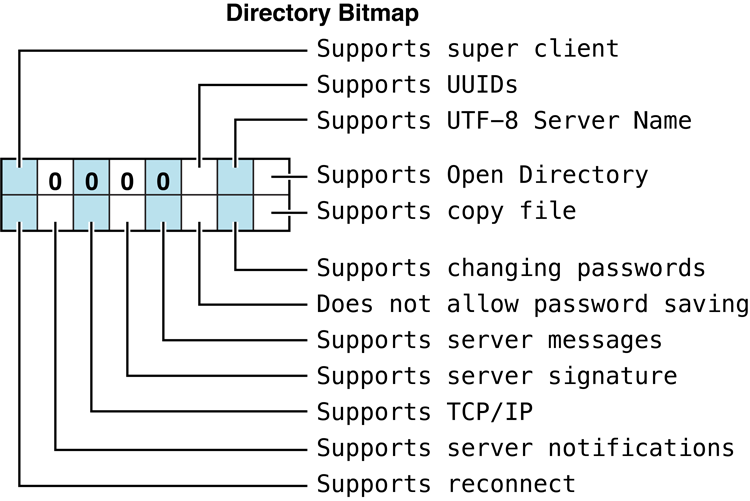
Figure 46 Bit usage in the ServerFlags
parameterThe AFPVersionsCount and UAMCount parameters are each one byte
containing the number of AFP and UAM version strings that follow, with
the strings packed back-to-back without padding. For the AFP versions
supported by this version of AFP, see “AFP Version Strings”.
For the UAMs supported by this version of AFP, see
“AFP UAM Strings”.
The optional ServerSignature parameter contains a unique identifier
for the server. An AFP client should use the server signature to ensure
that it does not log on to the same server multiple times. Preventing
multiple log ins is important when the server is configured for
multihoming.
The NetworkAddresses parameter contains the addresses that the client
can use to connect to the server. Each address is stored as an AFP
Network Address. The format of an AFP Network Address is shown in
Figure 47.

Figure 47 AFP Network Address
formatEach AFP Network Address consists of a length byte containing the total
length in bytes of the Network Address, followed by a tag byte
identifying the type of address the Address field contains, followed by
up to 254 bytes of data. Table 37
lists the possible values of the Length and Tag fields and describes
the type of address stored in the Address field.
| Length | Tag | Address |
|---|---|---|
| 0x00 | Reserved | |
| 0x6 | 0x01 | Four-byte IP address |
| 0x8 | 0x02 | Four-byte IP address followed by a two-byte port number |
| 0x6 | 0x03 | DDP address (two bytes for the network number, one byte for the node number, and one byte for the socket number) |
| Variable | 0x04 | DNS name (maximum of 254 bytes) |
| 0x8 | 0x05 | IP address (four bytes) with port number (2 bytes). If this tag is present and the client is so configured, the client attempts to build a Secure Shell (SSH) tunnel between itself and the server and tries to connect through it. This functionality is deprecated. |
| 0x12 | 0x06 | IPv6 address (16 bytes) |
| 0x14 | 0x07 | IPv6 address (16 bytes) followed by a two-byte port number |
Table 37 AFP Network Address fields
The network address format provides the available network addresses to the AFP client. AFP clients should ignore any tags that it does not recognize.
FPGetSrvrInfo can be called without first establishing a session with
the server.
Table 38 describes the reply block for the FPGetSrvrInfo command.
| Name and size | Data |
|---|---|
MachineType offset | Offset to the location in the reply block containing the server’s machine type. |
AFPVersionCount offset | Offset to the location in the reply block containing the number of AFP versions the server supports. (AFPVersionCount is a two-byte integer.) |
UAMCount offset | Offset to the location in the reply block containing the number of UAMs the server supports. (UAMCount is a two-byte integer.) |
VolumeIconAndMask offset | Offset to the location in the reply block containing volume icon and mask data. This functionality is deprecated in OS X. It consists of a 32-by-32 bit (128 bytes) icon bitmap followed by a 32-by-32 bit (128 bytes) icon mask. The mask usually consists of the icon’s outline filled with black (bits that are set). For more information about icons, refer to Inside OS X. |
Flags (int16_t) | Flags describing the server’s capabilities. For bit definitions, see the section “Server Flags Bitmap.” |
ServerName (string) | String containing the server’s name. This Pascal string is limited to 32 characters in length. |
ServerSignature offset | Offset to the location in the reply block containing the server’s signature. |
NetworkAddressesCount offset | Offset to the location in the reply block containing the number of AFP Network Addresses. |
DirectoryNamesCount offset | Offset to the location in the reply block containing the number of Directory Names. |
UTF8ServerName offset | Offset to the location in the reply block containing the server’s name in UTF-8 characters. See the Character Encoding section of “Apple Filing Protocol Concepts” in Apple Filing Protocol Programming Guide for additional details about the UTF-8 encoding used by AFP. |
MachineType (string) | A string containing a description of the server’s hardware, operating system, or both. This Pascal string (up to 16 characters long) has no significance to AFP. |
AFPVersionsCount (uint8_t) | Number of AFP version strings that follow. |
AFPVersions (packed string) | Each AFP version that the server supports in packed format. For each supported version, there is one byte stating the number of bytes in the version string that follows. |
UAMsCount (uint8_t) | Number of UAM strings that follow. |
UAMs (packed string) | Each UAM that the server supports in packed format. For each supported UAM, there is one byte stating the number of bytes in the UAM name string that follows. Each string can be up to 16 characters long. For more information, see “Apple Filing Protocol Concepts”. |
ServerSignature (16 bytes) | Sixteen-byte number that uniquely identifies the server, or zero if not supported. For AFP servers, supporting server signatures is optional, but AFP servers must provide a ServerSignature offset. An AFP server indicates that it supports server signatures by setting the kSupportsSrvrSig bit in the Flags parameter. |
NetworkAddresses (AFP Network Address) | Server’s network addresses, or zero if not supported. (The AFP Network Address format is described later in this section.) For AFP servers, providing a NetworkAddresses parameter is optional, but AFP servers must provide a NetworkAddresses offset. An AFP server indicates that it supports Network Addresses by setting the kSupportsTCP bit in the Flags parameter. |
DirectoryNames (string) | String containing the names of directories that Open Directory has made available for sharing, or zero if not supported. For AFP servers, supporting Open Directory is optional, but AFP servers must provide a DirectoryNames offset. An AFP server indicates that it supports Open Directory by setting the kSupportsDirServices bit in the Flags parameter. If the server supports the Kerberos UAM, it places its principal name in this string. |
UTF8ServerName (AFPName) | AFPName containing the UTF-8–encoded name of the server. See the Character Encoding section of “Apple Filing Protocol Concepts” in Apple Filing Protocol Programming Guide for additional details about the UTF-8 encoding used by AFP. |
VolumeIconAndMask (256 bytes) | 128 bytes of icon data and 128 bytes of mask data. This functionality is deprecated in OS X. |
Figure 48 shows the request and reply blocks for the FPGetSrvrInfo command.
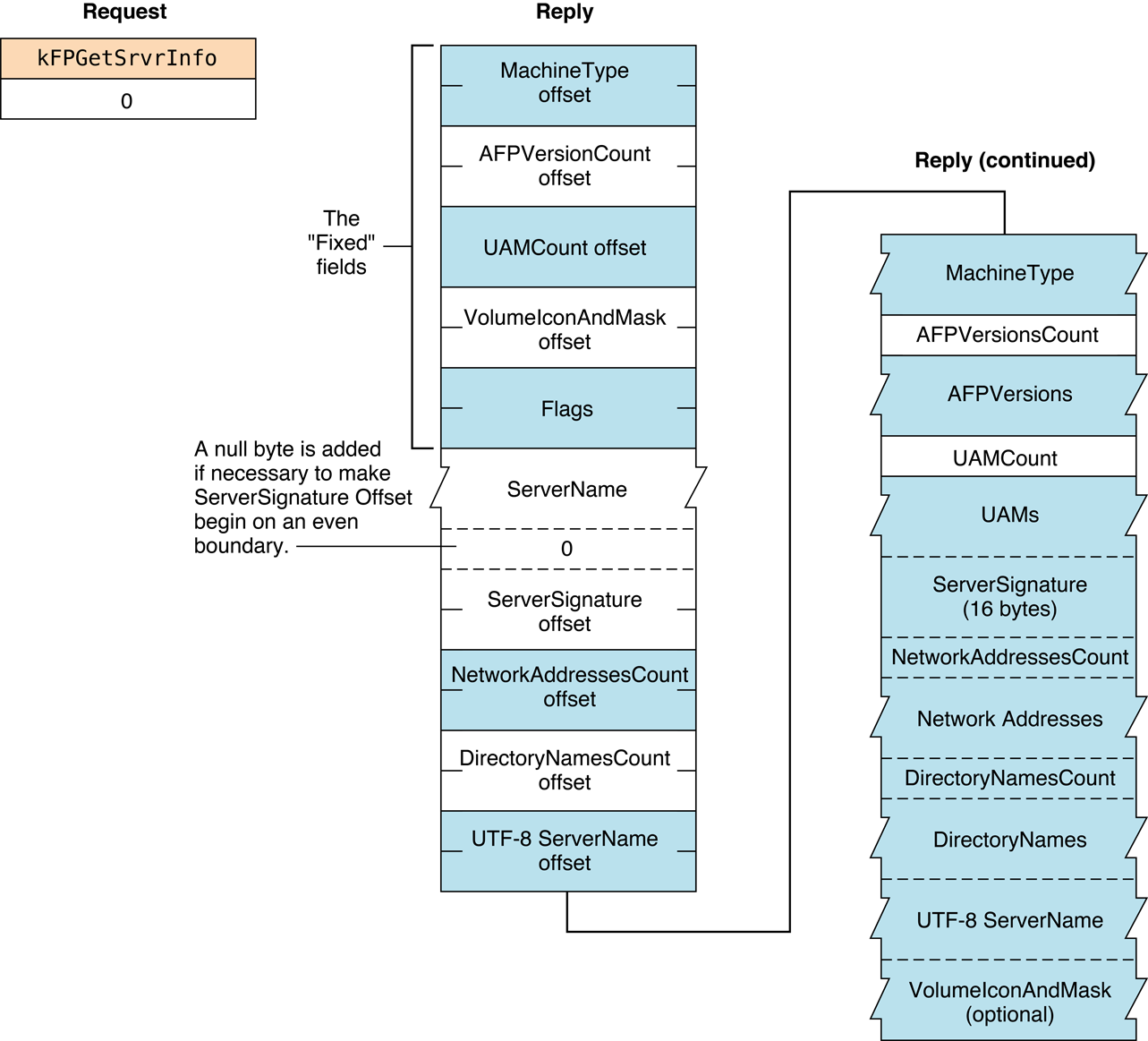
Figure 48 Request and reply blocks for the FPGetSrvrInfo command
FPGetSrvrMsg#
Gets a message from a server.
uint8_t CommandCode
uint8_t Pad
int16_t MessageType
int16_t MessageBitmapParameters#
CommandCodekFPGetSrvrMsg (38).
Pad
Pad byte.
MessageType
Type of message, were 0 indicates log in and 1 indicates server. (Set
MessageType to 1 when the Server Message bit in the attention code is
set.)
MessageBitmap
Bitmap providing additional information. The client sets bit 0 of this
bitmap to indicate it is requesting a message. Starting with AFP 3.0,
the client can set bit 1 of this bitmap to indicate that it supports
UTF-8 messages. See the Character Encoding section of
“Apple Filing Protocol Concepts” in Apple Filing Protocol Programming Guide for
additional details about the UTF-8 encoding used by AFP.
ResultkFPNoErr if no error occurred, kFPCallNotSupported if the server does
not support this command, kFPBitmapErr if unrecognized bits are
set in MessageBitmap, or kFPMiscErr if an error occurred that is
not specific to AFP.
ReplyBlock
If the result code is kFPNoErr, the server returns a reply
block. See Table 39 for the format of the reply block.
Discussion#
An AFP client uses the FPGetSrvrMsg command to get messages from the
server. Usually, the server sends an attention code to the client when
server messages are available, and the client responds by calling
FPGetSrvrMsg. However, the client can call FPGetSrvrMsg at any time.
If no message is available when the client calls FPGetSrvrMsg, the
server returns a zero-length string.
There are two message types: log in and server. The log in message type
allows the server to send a message to a client at log in time. The
client can query the server for a log in message at log in time, or
whenever it is convenient to do so. If there is no login message,
FPGetSrvrMsg returns a zero-length string.
The server message type allows the server to send messages to the client
once the client has logged on. The server notifies the client that a
server message is available by sending a DSI Attention packet in which
the Server Message bit in the AFPUserBytes field is set. (See
“AFPUserBytes Definitions.”)
There are two server message types:
Shutdown. The server can send a shutdown message to explain why the server is shutting down, how long it will be down, and so on. In addition to setting the Server Message bit in the
AFPUserBytesfield of the DSI Attention packet, the server sets the Shutdown bit to indicate that a shutdown message is available.User. The server can send a message to a specific user. The client is made aware that a user message is available when the server sends an DSI Attention packet in which the Server Message bit in the
AFPUserBytesfield is set and the Shutdown bit is not set.
The maximum message size is 255 bytes.
The user must be logged on to the server to receive server message notifications. Otherwise, no special access privileges are necessary to use this command.
Note that in the case of a disconnected session, sending this command does not initiate a reconnect.
Table 39 describes the reply block for the FPGetSrvrMsg command.
| Name and size | Data |
|---|---|
MessageType (int16_t) | Copy of the input parameter. |
MessageBitmap (int16_t) | Bitmap describing the message. See “FPGetSrvrMsg Bitmap” for a list of possible values. |
ServerMessage (string) | Message from the server. If the message is in UTF-8 format, this field begins with a uint16_t length field. If the message is not in UTF-8 format, this field begins with a uint8_t length field. |
Figure 49 shows the request and reply blocks for the FPGetSrvrMsg command.
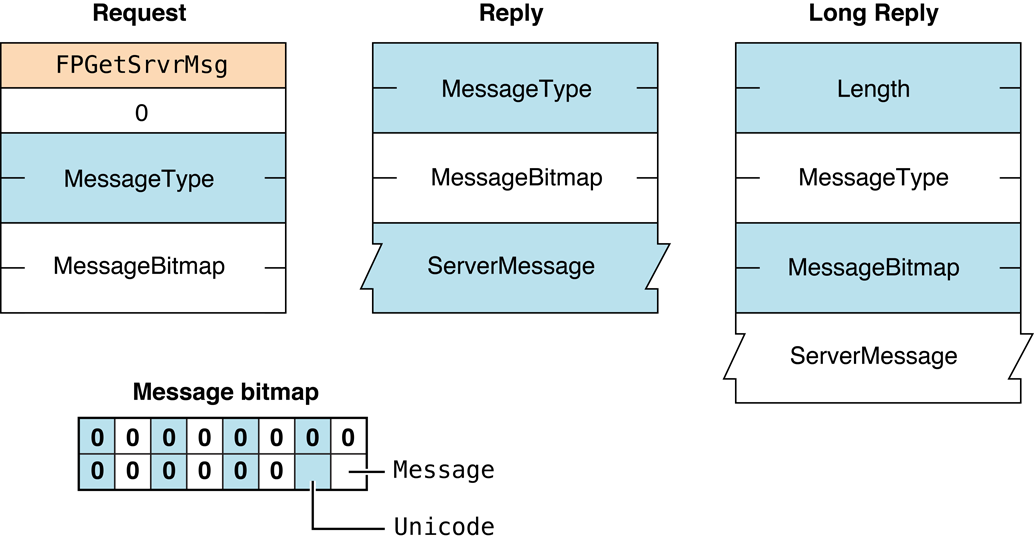
Figure 49 Request and reply blocks for the FPGetSrvrMsg command
FPGetSrvrParms#
Gets server parameters.
uint8_t CommandCode
uint8_t PadParameters#
CommandCodekFPGetSrvrParms (16).
Pad
Pad byte.
ResultkFPNoErr if no error occurred, kFPParamErr if the session reference
number is unknown, or kFPMiscErr if an error occurred that is
not specific to AFP.
ReplyBlock
If the result code is kFPNoErr, the server returns a reply
block. See Table 40 for the format of the reply block.
Discussion#
The VolName string, the HasPassword bit, and the HasConfigInfo bit
are packed without padding in the reply block.
For AFP 2.x, this command returns volume names in ANSI format with a maximum length of 27 bytes.
For AFP 3.x, this command returns volume names in UTF-8 format with a one-byte length byte specifying any length up to 255. Early versions of the Finder limited setting volume names to no more than 27 characters, but this limit is no longer enforced. See “AFP Character Encoding” in Apple Filing Protocol Programming Guide for additional details about the UTF-8 encoding used by AFP.
Table 40 describes the reply block for the FPGetSrvrParms command.
| Name and size | Data |
|---|---|
ServerTime (int32_t) | Current date and time on the server’s clock. |
NumVolStructures (int16_t) | Number of VolStructure structures that follow. |
VolStructures | An array of VolStructure structures consisting of the following fields: Flags (uint8_t) where bit 0 (HasConfigInfo) is set if the volume has configuration information, and bit 7 (HasPassword) is set if a password is set for the volume; VolName (string) name of the volume |
Figure 50 shows the request and reply blocks for the FPGetSrvrParms command.
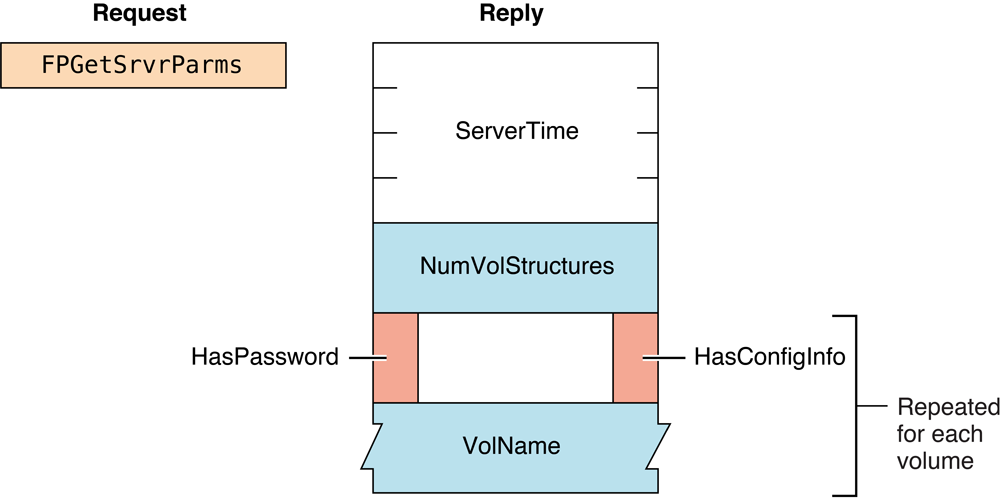
Figure 50 Request and reply blocks for the FPGetSrvrParms command
FPGetUserInfo#
Gets information about a user.
uint8_t CommandCode
uint8_t Flags
int32_t UserID
int16_t BitmapParameters#
CommandCodekFPGetUserInfo (37).
Flags
If the lowest bit (0x1) is set (the ThisUser flag), information is
obtained about the current user and the UserID field is ignored.
UserID
ID of user for whom information is to be retrieved. (Not valid if the
ThisUser bit is set in the flags field.)
This field is deprecated for security reasons. The ThisUser bit should
always be set in the flags field.
Bitmap
Bitmap describing which IDs to retrieve, where bit zero (0x1) is set
to get the user’s User ID, bit 1 (0x2) is set to get the user’s
Primary Group ID, and bit 2 (0x4) is set to get the user’s UUID.
ResultkFPNoErr if no error occurred. See Table 41 for the other possible result
codes.
ReplyBlock
If the result code is kFPNoErr, the server returns a reply
block. See Table 42 for the format of the reply block.
Discussion#
The server retrieves the specified information for the specified user and packs them, in bitmap order, in the reply block.
This command can be used only to retrieve the User ID and the Primary
Group ID of the user who is the client of this session, thus requiring
that the ThisUser bit be set. The UserID parameter is intended for
future use.
Table 41 lists the result codes for the FPGetUserInfo command.
| Result code | Explanation |
|---|---|
kFPAccessDenied | User does not have the access privileges required to get information about the specified user. |
kFPBitmapErr | Attempt was made to retrieve a parameter that cannot be obtained with this command. |
kFPCallNotSupported | Server does not support this command. |
kFPItemNotFound | Specified User ID is unknown. |
kFPMiscErr | Non-AFP error occurred. |
kFPParamErr | ThisUser bit is not set. |
kFPPwdExpiredErr | User’s password has expired. User is required to change his or her password. The user is logged on but can only change his or her password or log out. |
kFPPwdNeedsChangeErr | User’s password needs to be changed. User is required to change his or her password. The user is logged on but can only change his or her password or log out. |
Table 41 Result codes for the FPGetUserInfo command
If this command returns a result code of kFPPwdExpiredErr or
kFPPwdNeedsChangeErr, the AFP client
should display an explanatory dialog box and allow the user to change
his or her password.
Table 42 describes the reply block for the FPGetUserInfo command.
| Name and size | Data |
|---|---|
Bitmap (int16_t) | Copy of the input parameter. |
UserInfo | Requested information, packed in bitmap order, beginning with the lowest bit set. For example, if the UID and UUID bits are set in the reply bitmap, then the UID is first in the reply, followed by the UUID. |
Table 42 Reply block for the FPGetUserInfo command
Figure 51 shows the request and reply blocks for the FPGetUserInfo command.
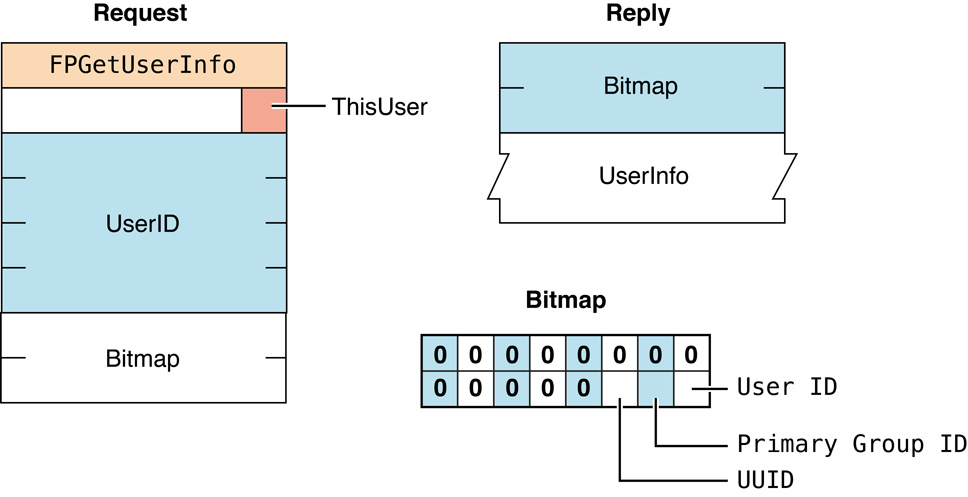
Figure 51 Request and reply blocks for the FPGetUserInfo command
FPGetVolParms#
Gets volume parameters.
uint8_t CommandCode
uint8_t Pad
int16_t VolumeID
int16_t BitmapParameters#
CommandCodekFPGetVolParms (17).
Pad
Pad byte.
VolumeID
Volume ID for the volume whose parameters are to be retrieved.
Bitmap
Bitmap describing the parameters that are to be returned. Set the bit of
the desired parameter. This bitmap is the same as the bitmap used by the
FPOpenVol command. For bit definitions for this bitmap, see “Volume
Bitmap.”
ResultkFPNoErr if no error occurred, kFPParamErr if the session reference
number or Volume ID is unknown, kFPBitmapErr if the specified bitmap has
unrecognized bits set, or kFPMiscErr if an error occurred that is
not specific to AFP.
ReplyBlock
If the result code is kFPNoErr, the server returns a reply
block. See Table 43 for the format of the reply block.
Discussion#
This command retrieves parameters that describe a volume as specified by the volume’s Volume ID.
The server responds to this command by returning a reply block
containing a bitmap for the volume parameters and the parameters
themselves. All variable-length parameters, such as Volume Name, are at
the end of the block. The server represents variable-length parameters
in bitmap order as fixed-length offsets (int16_t values). These
offsets are measured from the start of the parameters (not from the
start of the bitmap) to the start of the variable-length parameters. The
variable-length parameters are then packed after all fixed-length
parameters.
Table 43 describes the reply block for the FPGetVolParms command.
| Name and size | Data |
|---|---|
Bitmap (int16_t) | Copy of the input parameter. |
VolumeParameters | Volume parameters packed in bitmap order. |
Table 43 Reply block for the FPGetVolParms command
Figure 52 shows the request and reply blocks for the FPGetVolParms command.
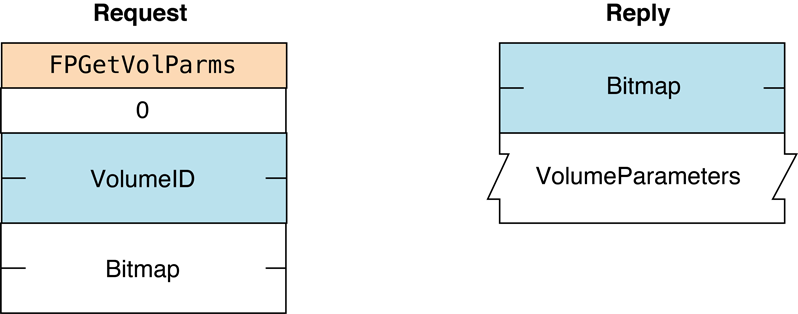
Figure 52 Request and reply blocks for the
FPGetVolParms commandFor the layout of the bitmap and the volume parameters, see the sections “Volume Attributes Bitmap” and “Volume Bitmap.”
FPListExtAttrs#
Gets the names of extended attributes for a file or directory.
uint8_t CommandCode
uint8_t Pad
int16_t VolumeID
int32_t DirectoryID
uint16_t Bitmap
int16_t ReqCount
int32_t StartIndex
int32_t MaxReplySize
uint8_t PathType
string PathnameParameters#
CommandCodekFPListExtAttrs (72).
Pad
Pad byte.
VolumeID
Volume identifier.
DirectoryID
Directory identifier.
Bitmap
Bitmap describing the desired behavior when getting the names of
extended attributes. For this command kAttrDontFollow is the only
valid bit. For details, see “Extended Attributes Bitmap”.
ReqCount
Reserved for future use. For AFP 3.2, set ReqCount to zero. Servers
should ignore this parameter.
StartIndex
Reserved for future use. For AFP 3.2, set StartIndex to zero. Servers
should ignore this parameter.
MaxReplySize
Maximum size of the reply block, including the size of the Bitmap and
DataLength parameters. If MaxReplySize is zero, the server should
return the Bitmap and set DataLength to the size of the reply block
(the list of extended attribute names) that would be returned without
actually sending the names of the extended attributes.
PathType
Type of names in Pathname. See “Path Type Constants”
for possible values.
Pathname
Pathname to desired file or directory. Pathname is a string if it
contains Short or Long Names or an AFPName if it contains a
UTF-8–encoded path. See the Character Encoding section of
“Apple Filing Protocol Concepts” in Apple Filing Protocol Programming Guide for
additional details about the UTF-8 encoding used by AFP.
ResultkFPNoErr if no error occurred. See Table 44 for other possible result
codes.
ReplyBlock
If the result code is kFPNoErr, the server returns a reply
block. See “Reply block for the FPListExtAttrs command ” for the
format of the reply block.
Discussion#
If the result code is kFPNoErr, this command returns in the
reply block the names of extended attributes for the specified file or
directory.
Support for this command, as well as FPGetExtAttr, FPRemoveExtAttr and
FPSetExtAttr is required in order
to support extended attributes. UTF-8 support is also required in order
to support extended attributes. See the Character Encoding section of
“Apple Filing Protocol Concepts” in Apple Filing Protocol Programming Guide for
additional details about the UTF-8 encoding used by AFP.
Table 44 lists the possible result codes for the FPListExtAttrs command.
| Result code | Explanation |
|---|---|
kFPAccessDenied | User does not have the access privileges required to list the extended attribute names for the specified file or directory. |
kFPBitmapErr | Bitmap is null or specifies a value that is invalid for this command. |
kFPMiscErr | Non-AFP error occurred. |
kFPObjectNotFound | Input parameters do not point to an existing file or directory. |
kFPParamErr | A parameter is invalid. |
Table 44 Result codes for the FPListExtAttrs command
Table 45 describes the reply block for the FPListExtAttrs command.
| Name and size | Data |
|---|---|
Bitmap (int16_t) | Reserved. |
DataLength (uint32_t) | Length of the data that follows. If MaxReplySize was set to zero, DataLength is set to the size of the list of extended attribute names that would otherwise have been returned. |
AttributeNames (string) | Series of null-terminated, UTF-8 encoded extended attribute names if MaxReplySize was not set to zero. See the Character Encoding section of “Apple Filing Protocol Concepts” in Apple Filing Protocol Programming Guide for additional details about the UTF-8 encoding used by AFP. |
Table 45 Reply block for the FPListExtAttrs command
Figure 38 shows the request and reply blocks for the FPListExtAttrs command.
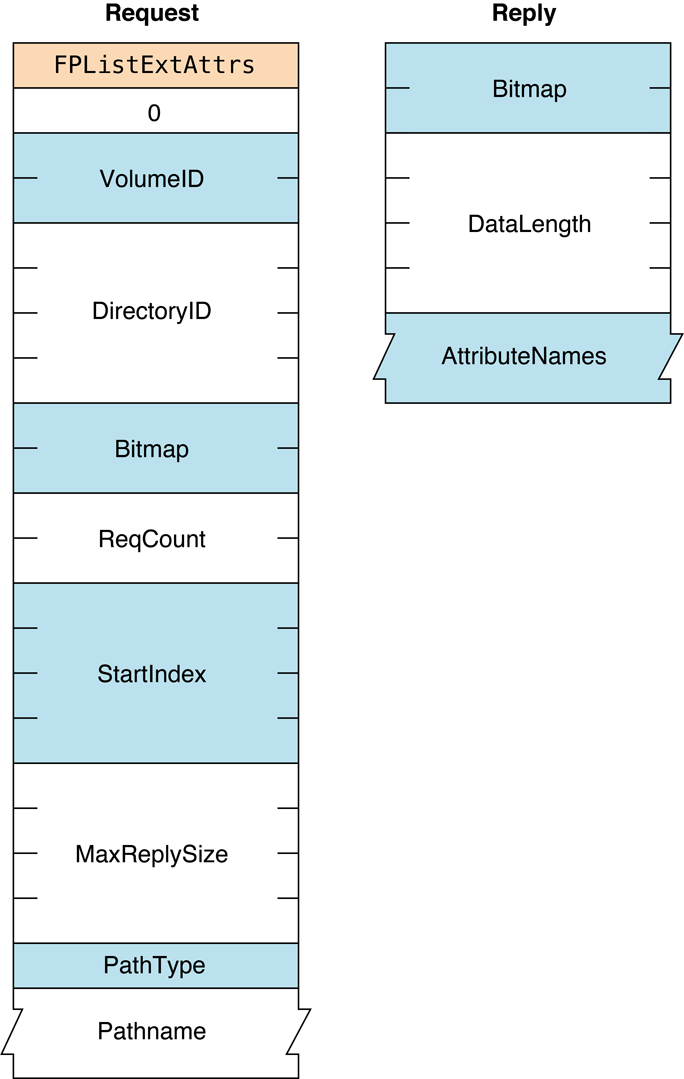
Figure 53 Request and reply blocks for the FPListExtAttrs command
Version Notes#
Introduced in AFP 3.2.
FPLogin#
Establishes a session with a server.
uint8_t CommandCode
string AFPVersion
string UAM
UserAuthInfoParameters#
CommandCodekFPLogin (18).
AFPVersion
String indicating which AFP version to use. For possible values, see
“AFP Version Strings”.
UAM
String indicating which UAM to use. For possible values, see
“AFP UAM Strings”.
UserAuthInfo
UAM-dependent information required to authenticate the user (can be
null). The data type of UserAuthInfo depends on the UAM specified by
UAM.
ResultkFPNoErr if no error occurred. See Table 46 for the possible
result codes.
ReplyBlock
If the result code is kFPNoErr, the server returns a reply
block. See Table 47 for the format of the reply block.
Discussion#
This command establishes an AFP session with an AFP server. Before
calling FPLogin, the AFP client should call
FPGetSrvrInfo to obtain the AFP versions
and UAMs that the server supports. From the list of AFP versions and
UAMs returned by FPGetSrvrInfo, the AFP client chooses
the highest AFP version and the most secure UAM that the client supports
and provides them as the AFPVersion and UAM parameters to the
FPLogin command.
If the server returns any result code other than kFPAuthContinue or
kFPNoErr, a session has not been established.
For more detailed information about UAMs, see “File Server Security” in the “Introduction” section.
The AFP server keeps a count of log in attempts that is reset to zero
after every successful login. For every failed login attempt without a
preceding successful login, the count is incremented. When the maximum
number of failed login attempts is reached, the user’s account is
disabled. Any attempts to log in after the account is disabled yield a
result code of kFPParamErr, indicating that the user is
unknown or that his or her account is disabled. The administrator must
enable the user’s account again. AFP does not notify the administrator
that a user’s account has been disabled; the user must notify the
administrator by some other means.
Table 46 lists the result codes for the FPLogin command.
| Result code | Explanation |
|---|---|
kFPAuthContinue | Authentication is not yet complete. |
kFPBadUAM | Specified UAM is unknown. |
kFPBadVersNum | Server does not support the specified AFP version. |
kFPCallNotSupported | Server does not support this command. |
kFPMiscErr | User is already authenticated. |
kFPNoServer | Server is not responding. |
kFPServerGoingDown | Server is shutting down. |
kFPUserNotAuth | Authentication failed. |
kFPNoMoreSessions | The server cannot handle any additional connections. |
Table 46 Result codes for the FPLogin command
After login, the AFP client should immediately call
FPGetUserInfo to see if the user’s password has expired.
Table 47 describes the reply block for the FPLogincommand.
| Name and size | Data |
|---|---|
ID (int16_t) | ID returned by certain UAMs to be passed to the FPLoginCont command. (Valid only when kFPAuthContinue is returned as the result code.) |
UserAuthInfo | Value returned by certain UAMs. (Valid only when kFPAuthContinue is returned as the result code.) |
Table 47 Reply block for the FPLogin command
Figure 54 shows the request and reply blocks for the FPLogin command.
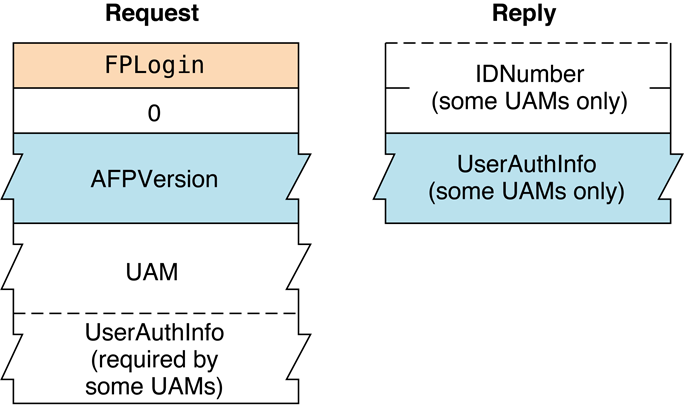
Figure 54 Request and reply blocks for the FPLogin command
Availability#
- Deprecated in AFP 3.x. Use
FPLoginExtinstead.
FPLoginCont#
Continues the login and user authentication process started by a login command.
uint8_t CommandCode
uint8_t Pad
int16_t ID
UserAuthInfoParameters#
CommandCodekFPLoginCont (19).
Pad
Pad byte.
ID
Number returned by a previous call to FPLogin, FPLoginExt, or
FPLoginCont.
UserAuthInfo
UAM-dependent information required to authenticate the user (can be
null). The data type of UserAuthInfo depends on the UAM that was
specified when FPLogin or
FPLoginExt was called.
ResultkFPNoErr if no error occurred. See Table 48 for the possible
result codes.
ReplyBlock
If the result code is kFPNoErr or kFPAuthContinue, the server may return a
reply block, depending on the UAM. See Table 49 for the format of
the reply block.
Discussion#
This command sends the ID and UserAuthInfo parameters to the server,
which uses them to execute the next step in the UAM. If an additional
exchange of packets is required, the server returns a result code of
kFPAuthContinue. Otherwise, it returns
no kFPNoErr (meaning the user has been
authenticated) or kFPUserNotAuth (meaning the
authentication has failed). If the server returns
kFPNoErr, the session is valid. If the
server returns kFPUserNotAuth, the server also closes
the session.
Table 48 lists the result codes for the FPLoginCont command.
| Result code | Explanation |
|---|---|
kFPAuthContinue | Authentication is not yet complete. |
kFPMiscErr | Non-AFP error occurred. |
kFPNoServer | Server is not responding. |
kFPParamErr | Authentication failed for an undisclosed reason. |
kFPUserNotAuth | User was not authenticated because the password is incorrect. |
kFPNoMoreSessions | The server cannot handle any additional connections. |
Table 48 Result codes for the FPLoginCont command
Table 49 describes the reply block for the FPLoginCont command.
| Name and size | Data |
|---|---|
ID (int16_t) | ID returned by certain UAMs to be passed to the FPLoginCont command. (Valid only if kFPAuthContinue is returned as the result code.) |
UserAuthInfo | Value returned by certain UAMs. (Valid only if kFPAuthContinue or kFPNoErr is returned as the result code.) |
Table 49 Reply block for the FPLoginCont command
Figure 55 shows the request and reply blocks for the FPLoginCont command.
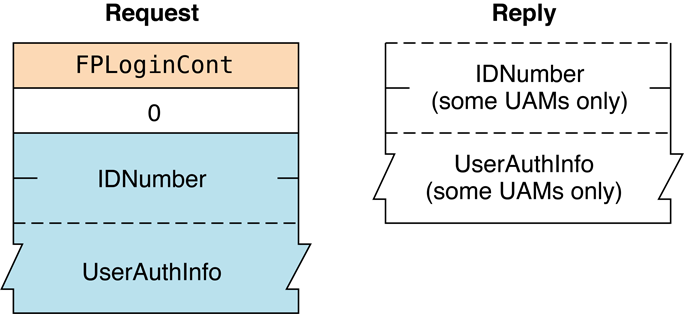
Figure 55 Request and reply blocks for the FPLoginCont command
FPLoginExt#
Establishes a session with a server using an Open Directory domain.
uint8_t CommandCode
uint8_t Pad
int16_t Flags
string AFPVersion
string UAM
uint8_t UserNameType
AFPName UserName
uint8_t PathType
string Pathname
uint8_t Pad
UserAuthInfoParameters#
CommandCodekFPLoginExt (63).
Pad
Pad byte.
Flags
Flags providing additional information. (No flags are currently
defined.)
AFPVersion
String indicating which AFP version to use. For possible values, see
“AFP Version Strings”.
UAM
String indicating which UAM to use. For possible values, see
“AFP UAM Strings”.
UserNameType
Type of name in UserName; always 3.
UserName
UTF-8–encoded name of the user.
PathType
Type of names in PathName. See “Path Type Constants”
for possible values.
Pathname
Pathname for the Open Directory domain in which the user specified by
UserName can be found. Pathname is a string if it contains Short or
Long Names or an AFPName if it contains a UTF-8–encoded path.
Pad
Pad byte that may be required for Pathname to end on an even boundary.
UserAuthInfo
UAM-dependent information required to authenticate the user (can be
null). The data type of UserAuthInfo is dependent on the UAM specified
by UAM.
ResultkFPNoErr if no error occurred. See Table 50 for other
possible result codes.
ReplyBlock
If the result code is kFPNoErr or kFPAuthContinue, the server returns a
reply block. See Table 51 for the format of the reply block.
Discussion#
This command establishes an AFP session using the specified Open
Directory domain in which information about the user can be found.
Before sending this command, the AFP client should call
FPGetAuthMethods to obtain the
UAMs that the Open Directory domain supports. From the list of UAMs
returned by FPGetAuthMethods, the AFP client chooses the most secure
UAM that it supports and provides it in the UAM parameter of the
FPLoginExt command.
If the server returns any result code other than kFPAuthContinue or
kFPNoErr, a session has not been established.
For more detailed information about UAMs, see “File Server Security” in the “Introduction” section.
See the Character Encoding section of “Apple Filing Protocol Concepts” in Apple Filing Protocol Programming Guide for additional details about the UTF-8 encoding used by AFP.
The AFP server keeps a count of log in attempts that is reset to zero
after every successful login. For every failed log in attempt without a
preceding successful log in, the count is incremented. When the maximum
number of failed log in attempts is reached, the user’s account is
disabled. Any attempts to log in after the account is disabled result in
an kFPParamErr indicating that the user is
unknown or that his or her account is disabled. The administrator must
enable the user’s account again. AFP does not notify the administrator
that a user’s account has been disabled; the user must notify the
administrator by some other means.
Table 50 lists the result codes for the FPLoginExt command.
| Result code | Explanation |
|---|---|
kFPAuthContinue | Authentication is not yet complete. |
kFPBadUAM | Specified UAM is unknown. |
kFPBadVersNum | Server does not support the specified AFP version. |
kFPMiscErr | User is already authenticated. |
kFPParamErr | Specified user is unknown or the account has been disabled due to too many login attempts. |
kFPNoServer | Server is not responding. |
kFPServerGoingDown | Server is shutting down. |
kFPUserNotAuth | Authentication failed. |
kFPNoMoreSessions | The server cannot handle any additional connections. |
Table 50 Result codes for the FPLoginExt command
Table 51 describes the reply block for the FPLoginExt command.
| Name and size | Data |
|---|---|
ID (int16_t) | ID returned by certain UAMs to be passed to the FPLoginCont command. (Valid only when kFPAuthContinue is returned as the result code.) |
UserAuthInfo | Value returned by certain UAMs when kFPAuthContinue is returned as the result code. |
Table 51 Reply block for the FPLoginExt command
Figure 56 shows the request and reply blocks for the FPLoginExt command.
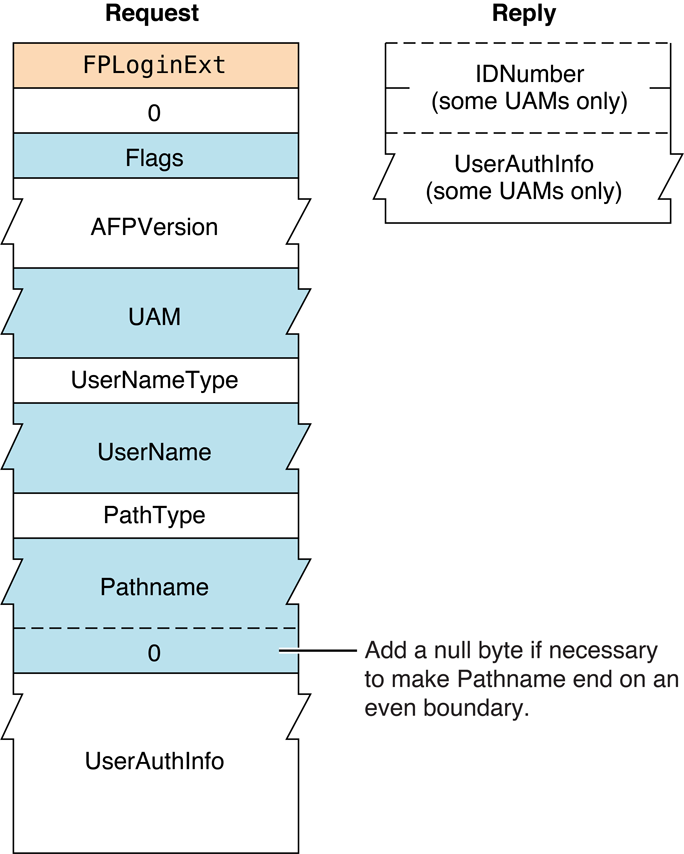
Figure 56 Request and reply blocks for the FPLoginExt command
FPLogout#
Terminates a session with a server.
uint8_t CommandCode
uint8_t PadParameters#
CommandCodekFPLogout (20).
Pad
Pad byte.
ResultkFPNoErr if no error occurred, kFPParamErr if the session reference
number is unknown, or kFPMiscErr if an error occurred that is
not specific to AFP.
ReplyBlock
None.
Discussion#
This command terminates sessions established by FPLogin and
FPLoginExt. The server flushes and
closes any forks opened by the session, frees all session-related
resources, and invalidates the session reference number.
Figure 57 shows the request block for the FPLogout command.
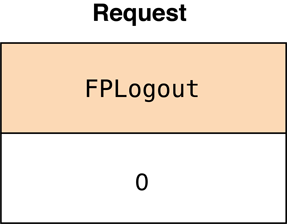
Figure 57 Request block for the FPLogout command
FPMapID#
Maps a User ID, Group ID, UUID, or GUID to a name.
uint8_t CommandCode
uint8_t Subfunction
int32_t or int64_t IDParameters#
CommandCodekFPMapID (21).
Subfunction
Subfunction code. Possible subfunction codes are listed in
“FPMapID Constants.”
See the Character Encoding section of “Apple Filing Protocol Concepts” in Apple Filing Protocol Programming Guide for additional details about the UTF-8 encoding used by AFP.
ID
Group ID, User ID, UUID, or GUID to be mapped.
The ID field is an int32_t for user and group IDs, or an int64_t for
UUIDs or GUIDs.
ResultkFPNoErr if no error occurred,
kFPParamErr if the session reference
number or subfunction code is unknown,
kFPItemNotFound if the ID was not found,
or kFPMiscErr if an error occurred that is
not specific to AFP.
ReplyBlock
If the result code is kFPNoErr, the server returns a reply
block. The reply block differs depending on the subcommand.
For all subcommands except
kUserUUIDToUTF8Name and kGroupUUIDToUTF8Name, the reply block
consists of a string, called Name, containing the name that
corresponds to ID. The name can be a string of up to 255 Macintosh
Roman characters or an AFPName of up to 255 characters.
For kUserUUIDToUTF8Name and kGroupUUIDToUTF8Name, the reply block is
as follows:
uint32_t   objType;   /* 1 if UID, 2 if GID */
uint32_t   id;        /* user or group ID */
uint8_t    name[kAFPMaxFileNameBytes + 1];
Note: The kUserUUIDToUTF8Name and
kGroupUUIDToUTF8Name commands can both
return user or group IDs because the UUIDs share the same namespace.
Clients must check to make sure that the returned objType field
contains the expected value (1 for a user ID, 2 for a group ID).
Discussion#
The server retrieves the user or group name in that corresponds to the specified User ID, Group ID, UUID, or GUID.
The Subfunction parameter tells the server which database (user or
group) to search first. User and group IDs come from the same pool of
numbers, so if the ID has been assigned, FPMapID always returns a user
or group name. The subfunction codes are described in “FPMapID Constants.”
Figure 58 shows the request and reply blocks for the FPMapID command.
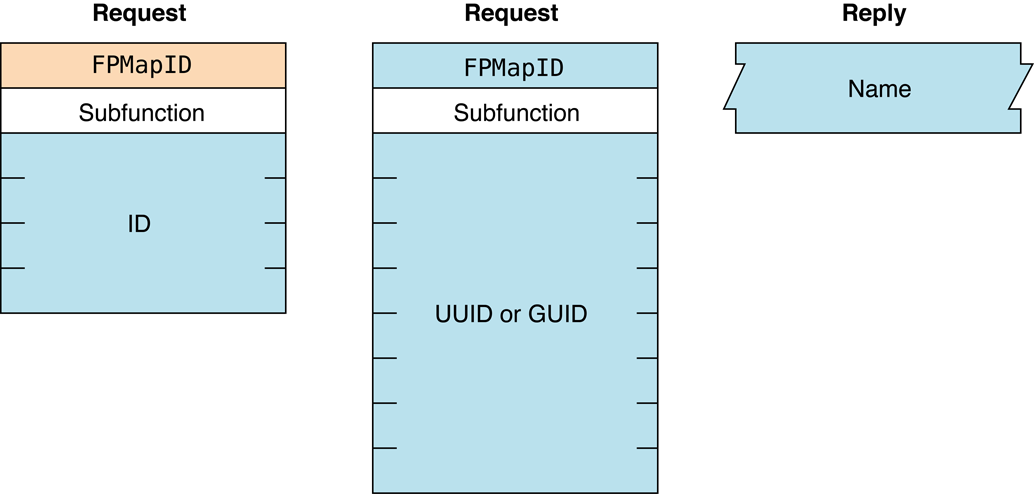
Figure 58 Request and reply blocks for the FPMapID command
FPMapName#
Maps a user name or group name to a User ID, Group ID, UUID, or GUID.
uint8_t CommandCode
uint8_t Subfunction
string NameParameters#
CommandCodekFPMapName (22).
Subfunction
Subfunction codes. The subfunction codes are described in
“FPMapName Constants.”
See the Character Encoding section of “Apple Filing Protocol Concepts” in Apple Filing Protocol Programming Guide for additional details about the UTF-8 encoding used by AFP.
Name
Name that is to be mapped to an ID. The name can be a string of up to
255 Macintosh Roman characters or an AFPName of up to 255 characters.
ResultkFPNoErr if no error occurred, kFPParamErr if the session reference
number or subfunction code is unknown,
kFPItemNotFound if the ID was not found,
or kFPMiscErr if an error occurred that is
not specific to AFP.
ReplyBlock
If the result code is kFPNoErr, the server returns a reply
block. The reply block consists of an int32_t, called ID, containing
the ID corresponding to the input name.
Discussion#
The server retrieves the ID number that corresponds to the specified
user or group name or returns a
kFPItemNotFound result code if it does
not find the name in its list of valid names.
The Subfunction parameter tells the server which database (user or
group) to search first. If you have a user and a group that are both
named “Fred” and you call FPMapName, the subfunction code will
determine in which database (user or group) the match is found.
Figure 59 shows the request and reply blocks for the FPMapName command.
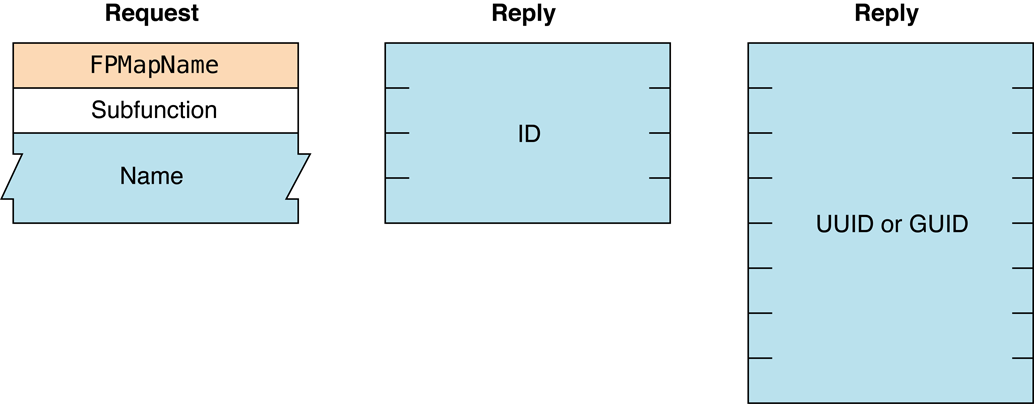
Figure 59 Request and reply blocks for the FPMapName command
FPMoveAndRename#
Moves a CNode to another location on a volume or renames a CNode.
uint8_t CommandCode
uint8_t Pad
int16_t VolumeID
int32_t SourceDirectoryID
int32_t DestDirectoryID
uint8_t SourcePathType
string SourcePathname
uint8_t DestPathType
string DestPathname
uint8_t NewType
string NewNameParameters#
CommandCodekFPMoveAndRename (23).
Pad
Pad byte.
VolumeID
Volume ID.
SourceDirectoryID
Source ancestor Directory ID.
DestDirectoryID
Destination ancestor Directory ID.
SourcePathType
Type of names in SourcePathname. See “Path Type Constants”
for possible values.
SourcePathname
Pathname of the file or directory to be moved (may be null if a
directory is being moved). SourcePathname is a string if it contains
Short or Long Names or an AFPName if it contains a UTF-8–encoded path.
DestPathType
Type of names in DestPathname. See “Path Type Constants”
for possible values.
DestPathname
Pathname of the file or directory to be moved (may be null if a
directory is being moved). DestPathname is a string if it contains
Short or Long Names or an AFPName if it contains a UTF-8–encoded path.
NewType
Type of name in NewName. See “Path Type Constants”
for possible values.
NewName
New name of file or directory (may be null). NewName is a string if it
contains Short or Long Names or an AFPName if it contains a
UTF-8–encoded path.
ResultkFPNoErr if no error occurred. See Table 52 for other
possible result codes.
ReplyBlock
If the result code is kFPNoErr, the server returns a reply
block. The reply block consists of one of the following (depending on
the request):
An
int32_tcalled ID containing the Group or User ID corresponding to the input name.An
int64_tcalled ID containing the UUID or GUID corresponding to the input name.
Discussion#
This command copies and optionally renames the CNode and removes the
CNode from the original parent directory. If the NewName parameter is
null, the moved CNode retains it original name. Otherwise, the server
moves the CNode, creating the Long or Short Names as described in the
section “Catalog Node Names” in Chapter 1. The CNode’s modification date
and the modification date of the source and destination parent
directories are set to the server’s clock. The CNode’s Parent ID is set
to the destination Parent ID. All other parameters remain unchanged, and
if the CNode is a directory, the parameters of all descendent
directories and files remain unchanged.
The FPMoveAndRename command indicates the destination of the move by
specifying the ancestor Directory ID and the pathname to the CNode’s
destination parent directory.
If the CNode being moved is a directory, all its descendants are moved as well.
To move a directory, the user must have search access to all ancestors, down to and including the source and destination parent directories, as well as write access to those directories. To move a file, the user must have search access to all ancestors, except the source and destination parents, as well as read and write access to the source parent directory and write access to the destination parent directory.
A CNode cannot be moved from one volume to another with this command, even if both volumes are managed by the same server.
See the Character Encoding section of “Apple Filing Protocol Concepts” in Apple Filing Protocol Programming Guide for additional details about the UTF-8 encoding used by AFP.
Table 52 lists the result codes for the FPMoveAndRename command.
| Result code | Explanation |
|---|---|
kFPAccessDenied | User does not have the access privileges required to move or rename the specified file or directory. |
kFPCantMove | Attempt was made to move a directory into one of its descendent directories. |
kFPInsideSharedErr | Directory being moved contains a sharepoint and is being moved into a directory that is shared or is the descendent of a directory that is shared. |
kFPInsideTrashErr | Shared directory is being moved into the Trash; a directory is being moved to the trash and it contains a shared folder. |
kFPMiscErr | Non-AFP error occurred. |
kFPObjectExists | File or directory having the name specified by NewName already exists. |
kFPObjectLocked | Directory being moved, renamed, or moved and renamed is marked RenameInhibit; file being moved and renamed is marked RenameInhibit. |
kFPObjectNotFound | Input parameters do not point to an existing file or directory. |
kFPParamErr | Session reference number, Volume ID, or pathname type is unknown; a pathname or NewName is invalid. |
kFPVolLocked | Volume is ReadOnly. |
Table 52 Result codes for the FPMoveAndRename command
Figure 60 shows the request block for the FPMoveAndRename command.
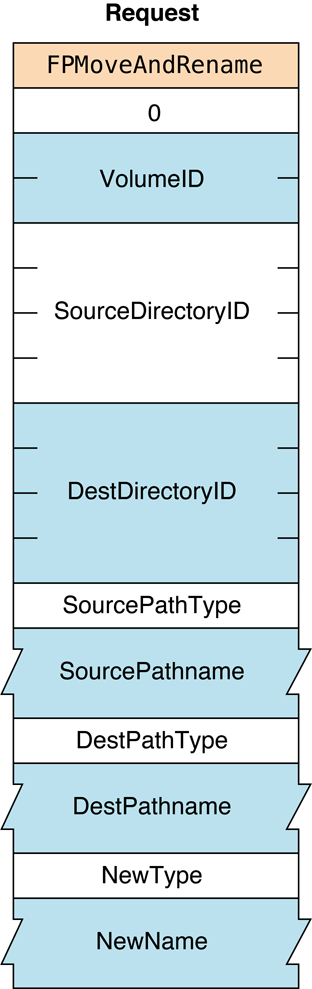
Figure 60 Request block for the FPMoveAndRename command
FPOpenDir#
Opens a directory on a variable Directory ID volume and returns its Directory ID.
uint8_t CommandCode
uint8_t Pad
int16_t VolumeID
int32_t DirectoryID
uint8_t PathType
string PathnameParameters#
CommandCodekFPOpenDir (25).
Pad
Pad byte.
VolumeID
Volume ID.
DirectoryID
Ancestor Directory ID.
PathType
Type of names in Pathname. See “Path Type Constants”
for possible values.
Pathname
Pathname of the file or directory to be moved (may be null if a
directory is being moved). Pathname is a string if it contains Short
or Long Names or an AFPName if it contains a UTF-8–encoded path. See the
Character Encoding section of “Apple Filing Protocol Concepts” in Apple Filing Protocol Programming Guide for
additional details about the UTF-8 encoding used by AFP.
ResultkFPNoErr if no error occurred. See Table 53 for other
possible result codes.
ReplyBlock
If the result code is kFPNoErr, the server returns a reply
block. The reply block consists of an int32_t called DirectoryID
containing the Directory ID of the opened directory.
Discussion#
If VolumeID specifies a variable Directory ID volume, the server
generates a Directory ID for the specified directory. If VolumeID
specifies a fixed Directory ID type, the server returns the fixed
Directory ID belonging to the directory specified by Pathname.
Although this command can obtain a Directory ID for a directory on a
fixed Directory ID volume, the recommended way to obtain a Directory ID
for a directory on a fixed Directory ID volume is to call
FPGetFileDirParms.
The user must have search access to all ancestors down to and including the specified directory’s parent directory.
Table 53 lists the result codes for the FPOpenDir command.
| Result code | Explanation |
|---|---|
kFPAccessDenied | User does not have the access privileges required to open the directory. |
kFPMiscErr | Non-AFP error occurred. |
kFPObjectNotFound | Input parameters do not point to an existing directory. |
kFPObjectTypeErr | Input parameters point to a file. |
kFPParamErr | Session reference number, Volume ID, or pathname type is unknown; a pathname is invalid. |
Table 53 Result codes for the FPOpenDir command
Figure 61 shows the request and reply blocks for the FPOpenDir command.
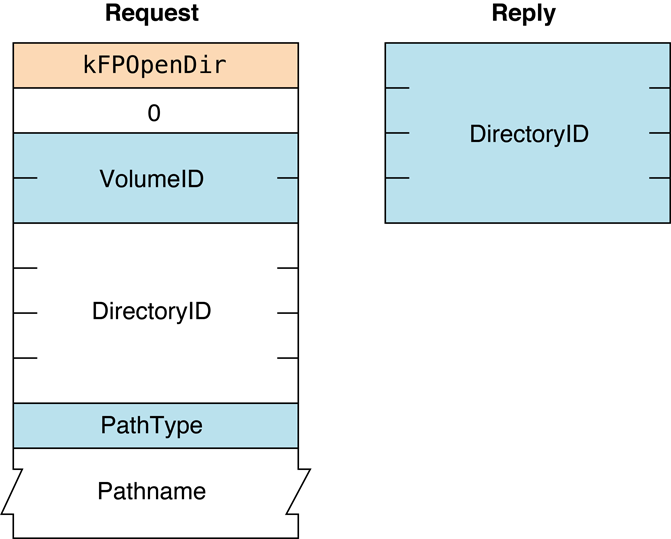
Figure 61 Request and reply blocks for the FPOpenDir command
Availability#
- Deprecated in OS X.
FPOpenDT#
Opens the Desktop database on a particular volume.
uint8_t CommandCode
uint8_t Pad
int16_t VolumeIDParameters#
CommandCodekFPOpenDT (48).
Pad
Pad byte.
VolumeID
Volume ID.
ResultkFPNoErr if no error occurred, kFPParamErr if the session reference
number or VolumeID is unknown, or kFPMiscErr if an error occurred that is
not specific to AFP.
ReplyBlock
If the result code is kFPNoErr, the server returns a reply
block. The reply block consists of a int16_t, called DTRefNum,
containing a Desktop database reference number.
Discussion#
The server opens the Desktop database on the selected volume and returns a Desktop database reference number that is unique among such reference numbers. The Desktop database reference number is to be used in all subsequent Desktop database commands relating to this volume.
The user must have previously called FPOpenVol for this volume.
Figure 62 shows the request and reply blocks for the FPOpenDT command.
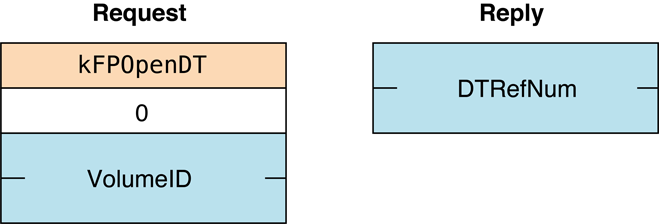
Figure 62 Request and reply blocks for the FPOpenDT command
Availability#
- Deprecated in OS X v.10.6.
FPOpenFork#
Opens a fork of an existing file for reading or writing.
uint8_t CommandCode
uint8_t Flag
int16_t VolumeID
int32_t DirectoryID
int16_t Bitmap
int16_t AccessMode
uint8_t PathType
string PathnameParameters#
CommandCodekFPOpenFork (26).
Flag
Bit 7 of the Flag parameter is the ResourceDataFlag bit, and it
indicates which fork to open, where 0 specifies the data fork and 1
specifies the resource fork.
VolumeID
Volume ID.
DirectoryID
Ancestor Directory ID.
Bitmap
Bitmap describing the fork parameters to be returned. Set the bit that
corresponds to each desired parameter. This bitmap is the same as the
FileBitmap parameter of the FPGetFileDirParms command and
can be null. For bit definitions for the File bitmap, see
“File and Directory Bitmap.”
AccessMode
Desired access and deny modes, specified by any combination of the
following bits:
0 = Read — allows the fork to be read.
1 = Write — allows the fork to be written.
4 = DenyRead — prevents others from reading the fork while it is open.
5 = DenyWrite — prevents others from writing the fork while it is open.
For more information on access and deny modes, see “File Sharing Modes” in Apple Filing Protocol Programming Guide.
PathType
Type of names in Pathname. See “Path Type Constants”
for possible values.
Pathname
Pathname to the desired file (cannot be null). Pathname is a string if
it contains Short or Long Names or an AFPName if it contains a
UTF-8–encoded path. See “AFP Character Encoding” in Apple Filing Protocol Programming Guide for
additional details about the UTF-8 encoding used by AFP.
ResultkFPNoErr if no error occurred. See Table 54 for the possible
result codes.
ReplyBlock
If the result code is kFPNoErr, the server returns a reply
block. See Table 55 for the format of the reply block.
Discussion#
The server opens the specified fork if the user has the access rights for the requested access mode and if the access mode does not conflict with already-open access paths to the fork.
If the fork is opened, the server returns in the reply block a copy of the input bitmap, an open fork reference number for use with all subsequent commands involving the opened fork, and followed by file parameters packed in bitmap order.
File parameters are returned only if the command completes without error
or if the command returns with a
kFPDenyConflict result code. In the
latter case, the server returns a fork reference of zero.
A kFPBitmapErr result code is returned if
an attempt is made to retrieve the length of the file’s other fork.
The server needs to keep variable-length parameters, such as Long Name or Short Name, at the end of the reply block. In order to do this, the server represents variable-length parameters in bitmap order as fixed-length offsets (integer) to the start of the variable-length parameters. The actual variable-length fields are then packed after all fixed-length parameters.
If the fork is opened and the user has requested the file’s attributes
in the file bitmap, the appropriate DAlreadyOpen or RAlreadyOpen bit
is set.
To open a fork for read or no access (when neither read or write access is requested), the user must have search access to all ancestors, except the parent directory, as well as read access to the parent directory. For information about access modes, see “File Sharing Modes” in the “Introduction” section.
To open a fork for write access, the volume must not be designated for read-only access. If both forks are currently empty, the user must have search or write access to all ancestors, except the parent directory, as well as write access to the parent directory. If either fork is not empty and one of the forks is being opened for writing, the user must have search access to all ancestors, except the parent directory, as well as read and write access to the parent directory.
The user must have previously called
FPOpenVol for this volume. Each fork
must be opened separately; a unique fork reference is returned for each
fork.
Table 54 lists the result codes for the FPOpenFork command.
| Result code | Explanation |
|---|---|
kFPAccessDenied | User does not have the access privileges required to open the specified fork. |
kFPBitmapErr | Attempt was made to retrieve a parameter that cannot be obtained with this command (the fork is not opened). |
kFPDenyConflict | File or fork cannot be opened because of a deny modes conflict. |
kFPMiscErr | Non-AFP error occurred. |
kFPObjectNotFound | Input parameters do not point to an existing file. |
kFPObjectLocked | Attempt was made to open a file for writing that is marked WriteInhibit. |
kFPObjectTypeErr | Input parameters point to a directory. |
kFPParamErr | Session reference number, Volume ID, or pathname type is unknown; a pathname is invalid. |
kFPTooManyFilesOpen | Server cannot open another fork. |
kFPVolLocked | Attempt was made to open for writing a file on a volume that is marked ReadOnly. |
Table 54 Result codes for the FPOpenFork command
Table 55 describes the reply block for the FPOpenForkcommand.
| Name and size | Data |
|---|---|
Bitmap (int16_t) | Copy of the input parameter. |
OForkRefNum (int16_t) | Open fork reference number for use when referring to this fork in when sending subsequent commands. |
FileParameters | Requested parameters. |
Table 55 Reply block for the FPOpenFork command
Figure 63 shows the request and reply blocks for the FPOpenFork command.
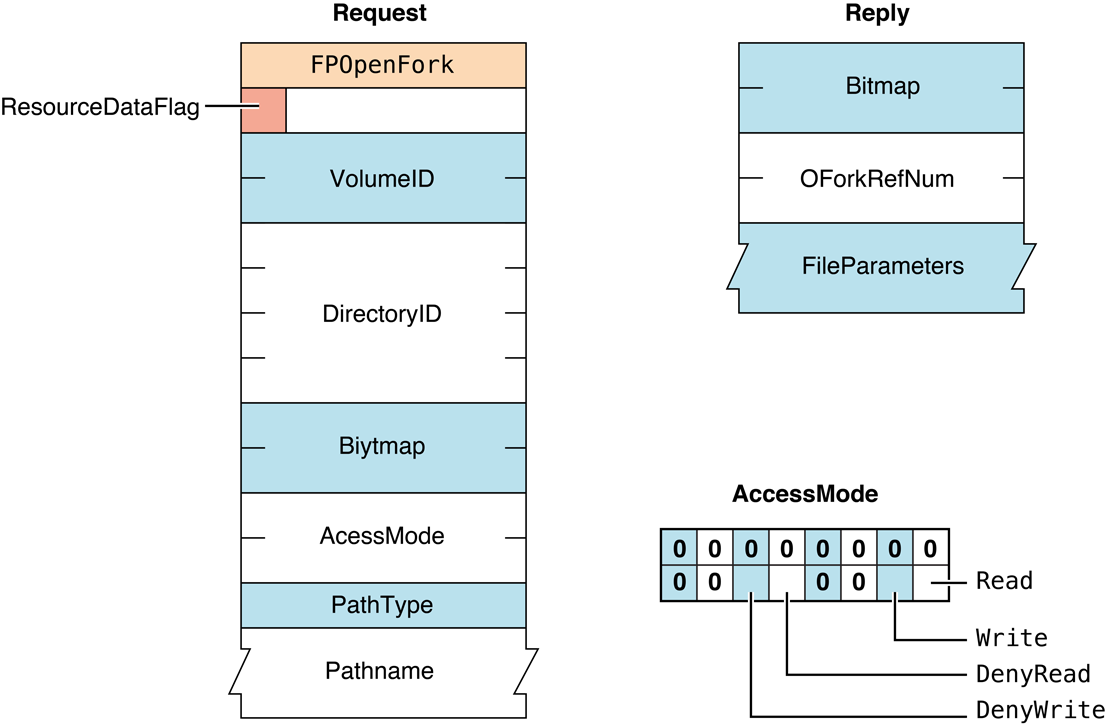
Figure 63 Request and reply blocks for the FPOpenFork command
FPOpenVol#
Opens a volume.
uint8_t CommandCode
uint8_t Pad
int16_t Bitmap
string VolumeName
8 bytes PasswordParameters#
CommandCodekFPOpenVol (24).
Pad
Pad byte.
Bitmap
Bitmap describing the parameters that are to be returned. Set the bit
that corresponds to each desired parameter. The bitmap is the same as
the Volume bitmap used by the FPGetVolParms command and cannot
be null. For bit definitions, see “Volume Bitmap.”
VolumeName
Name of the volume as returned by FPGetSrvrParms.
Password
Optional volume password.
Return Value#
Returns kFPNoErr if no error occurred. See Table 56 for the possible
result codes.
If the result code is kFPNoErr, the server returns a reply
block. See Table 57 for the format of the reply block.
Discussion#
This command must be made before any other command can be made to obtain access to CNodes on the specified volume.
If a password is required to gain access to the volume, it is sent as
the Password parameter in cleartext. Append null bytes to the password
as necessary to obtain a length of eight bytes. Password comparison is
case-sensitive. If the supplied password does not match the password
kept with the volume, or if a password is not supplied when a password
is required, the server returns a result code of
kFPAccessDenied.
If the passwords match, or if the volume is not password-protected, the server packs the requested parameters in the reply block The user can now send commands related to CNodes on the volume.
The Bitmap parameter must request that the Volume ID be returned.
There is no other way to retrieve the Volume ID, which is required by
most subsequent commands related to this volume.
Table 56 lists the result codes for the FPOpenVol command.
| Result code | Explanation |
|---|---|
kFPAccessDenied | Password is not supplied or does not match. |
kFPBitmapErr | Attempt was made to retrieve a parameter that cannot be obtained with this command. (The bitmap is null.) |
kFPMiscErr | Non-AFP error occurred. |
kFPObjectNotFound | Input parameters do not point to an existing volume. |
kFPParamErr | Session reference number or volume name is unknown. |
Table 56 Result codes for the FPOpenVol command
Table 57 describes the reply block for the FPOpenVol command.
| Name and size | Data |
|---|---|
Bitmap (int16_t) | Copy of the input parameter. |
VolumeParameters | Requested parameters, including the Volume ID, for the opened volume. |
Table 57 Reply block for the FPOpenVol command
Figure 64 shows the request and reply blocks for the FPOpenVol command.
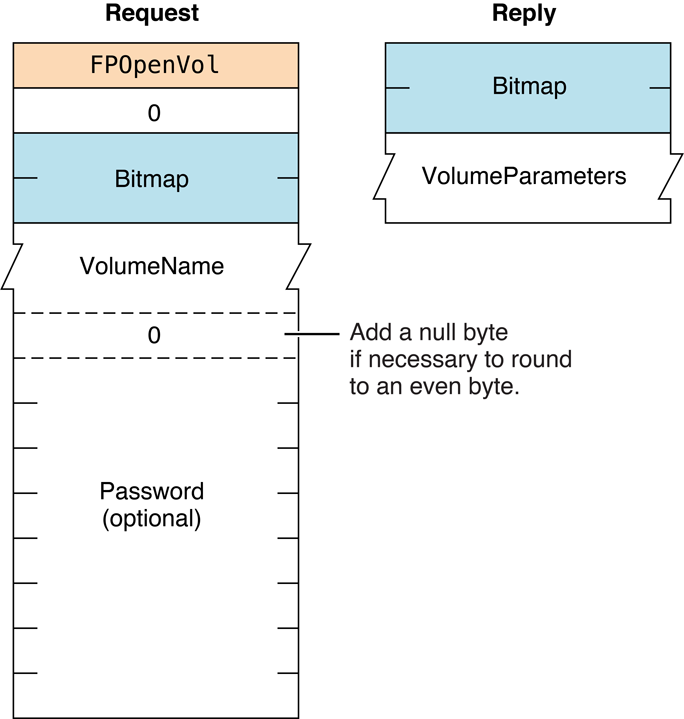
Figure 64 Request and reply blocks for the FPOpenVol command
FPRead#
Reads a block of data.
uint8_t CommandCode
uint8_t Pad
int16_t OForkRefNum
int32_t Offset
int32_t ReqCount
uint8_t NewLineMask
uint8_t NewLineCharParameters#
CommandCodekFPRead (27).
Pad
Pad byte.
OForkRefNum
Open fork reference number.
Offset
Number of the first byte to read.
ReqCount
Number of bytes to read.
NewLineMask
Mask for determining where the read should terminate.
NewLineChar
Character for determining where the read should terminate.
ResultkFPNoErr if no error occurred. See Table 58 for the possible
result codes.
ReplyBlock
If the result code is kFPNoErr, the server returns a reply
block containing the data that was read.
Discussion#
This command retrieves the specified range of bytes from an open fork.
Call FPOpenFork to open the fork.
The server begins reading at the byte number specified by the Offset
parameter. Reading stops when one of the following occur:
The server encounters the character specified by the combination of the
NewLineMaskandNewLineCharparametersThe server reaches the end of the fork
The server encounters the start of a range locked by another user
The server reads the number of bytes specified by the
ReqCountparameter
If the server reaches the end of fork or the start of a locked range, it
returns all data read to that point and a result code of
kFPEOFErr or kFPLockErr, respectively.
The NewLineMask parameter is a byte mask that is to be logically ANDed
with a copy of each byte read. If the result matches the NewLineChar
parameter, the read terminates. Using a NewLineMask value of zero
essentially disables the Newline check feature.
If a user reads a byte that was never written to the fork, the result is undefined.
Lock the range to be read before sending this command. The underlying transport mechanism may force the request to be broken into multiple smaller requests. If the range is not locked when this command begins execution, it is possible for another user to lock some or all of the range before this command completes, causing the read to succeed partially.
Table 58 lists the result codes for the FPRead command.
| Result code | Explanation |
|---|---|
kFPAccessDenied | Fork was not opened for read access. |
kFPEOFErr | End of fork was reached. |
kFPLockErr | Some or all of the requested range is locked by another user. |
kFPMiscErr | Non-AFP error occurred. |
kFPParamErr | Session reference number or open fork reference number is unknown; ReqCount or Offset is negative; NewLineMask is invalid. |
Table 58 Result codes for the FPRead command
Figure 65 shows the request and reply blocks for the FPRead command.
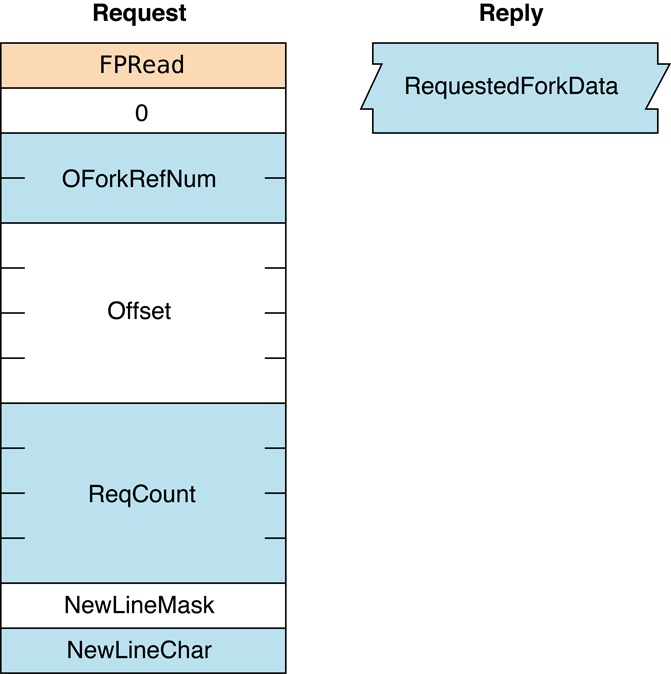
Figure 65 Request and reply blocks for the FPRead command
Availability#
- Deprecated. Use
FPReadExtinstead.
FPReadExt#
Reads a block of data.
uint8_t CommandCode
uint8_t Pad
int16_t OForkRefNum
int64_t Offset
int64_t ReqCountParameters#
CommandCodekFPReadExt (60).
Pad
Pad byte.
OForkRefNum
Open fork reference number.
Offset
Number of the first byte to read.
ReqCount
Number of bytes to read.
ResultkFPNoErr if no error occurred. See Table 59 for the possible
result codes.
ReplyBlock
If the result code is kFPNoErr, the server returns a reply
block containing the data that was read.
Discussion#
This command retrieves the specified range of bytes from an open fork.
Call FPOpenFork to open the fork.
This command differs from the FPRead
command in that this command is prepared to handle large values that may
be returned for files the reside in volumes larger than 4 GB in size.
Also, this command does not support the NewlineMask and NewlineChar
parameters that FPRead supports.
The server begins reading at the byte number specified by the Offset
parameter. Reading stops when one of the following occur:
The server reaches the end of the fork
The server encounters the start of a range locked by another user
The server reads the number of bytes specified by the
ReqCountparameter
If the server reaches the end of fork or the start of a locked range, it
returns all data read to that point and a result code of
kFPEOFErr or kFPLockErr, respectively.
If a user reads a byte that was never written to the fork, the result is undefined.
Lock the range to be read before sending this command. The underlying transport mechanism may force the request to be broken into multiple smaller requests. If the range is not locked when this command begins execution, it is possible for another user to lock some or all of the range before this command completes, causing the read to succeed partially.
Table 59 lists the result codes for the FPReadExt command.
| Result code | Explanation |
|---|---|
kFPAccessDenied | Fork was not opened for read access. |
kFPEOFErr | End of fork was reached. |
kFPLockErr | Some or all of the requested range is locked by another user. |
kFPMiscErr | Non-AFP error occurred. |
kFPParamErr | Session reference number or open fork reference number is unknown; ReqCount or Offset is negative. |
Table 59 Result codes for the FPReadExt command
Figure 66 shows the request and reply blocks for the FPReadExt command.
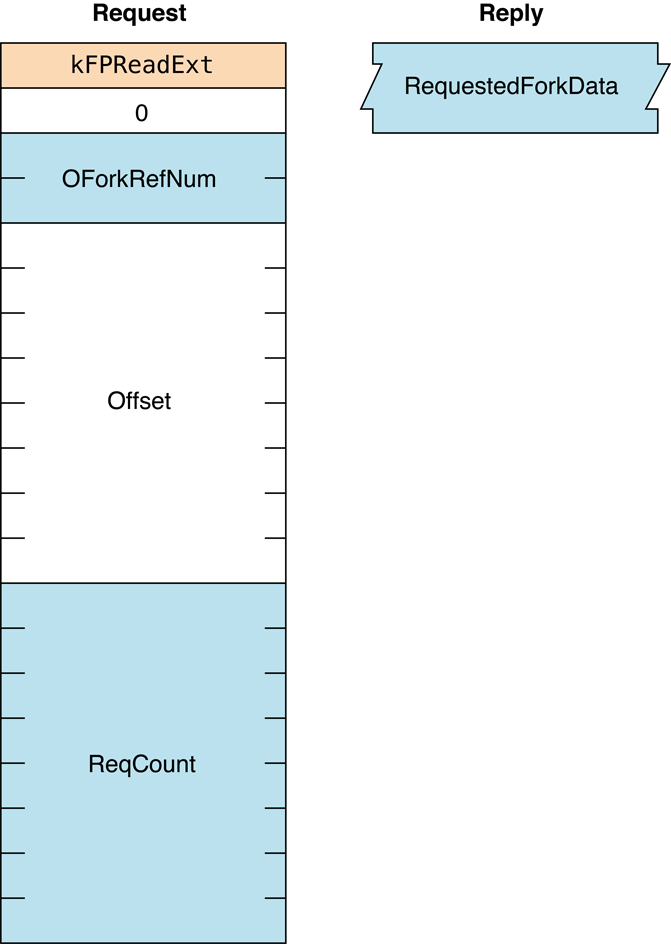
Figure 66 Request and reply blocks for the FPReadExt command
FPRemoveAPPL#
Removes an APPL mapping from a volume’s Desktop database.
uint8_t CommandCode
uint8_t Pad
int16_t DTRefNum
int32_t DirectoryID
int32_t FileCreator
uint8_t PathType
string PathnameParameters#
CommandCodekFPRemoveAPPL (54).
Pad
Pad byte.
DTRefNum
Desktop database reference number.
DirectoryID
Ancestor Directory ID.
FileCreator
File creator of the application corresponding to the APPL mapping that
is to be removed.
PathType
Type of names in Pathname. See “Path Type Constants”
for possible values.
Pathname
Pathname to the desired file (cannot be null). Pathname is a string if
it contains Short or Long Names or an AFPName if it contains a
UTF-8–encoded path. See the Character Encoding section of
“Apple Filing Protocol Concepts” in Apple Filing Protocol Programming Guide for
additional details about the UTF-8 encoding used by AFP.
ResultkFPNoErr if no error occurred. See Table 60 for the possible
result codes.
ReplyBlock
None.
Discussion#
The server locates in the Desktop database the APPL mapping corresponding to the specified application and file creator. If an APPL mapping is found, it is removed.
The user must have search access to all ancestors, except the parent directory, as well as read and write access to the parent directory.
The user must have previously called
FPOpenDT for the corresponding volume.
In addition, the file must exist in the specified directory before this
command is sent.
Table 60 lists the result codes for the FPRemoveAPPL command.
| Result code | Explanation |
|---|---|
kFPAccessDenied | User does not have the access privileges required to use this command. |
kFPItemNotFound | No APPL mapping corresponding to the input parameters was found in the Desktop database. |
kFPMiscErr | Non-AFP error occurred. |
kFPObjectNotFound | Input parameters do not point to an existing file. |
kFPParamErr | Session reference number or Desktop database reference number is unknown. |
Table 60 Result codes for the FPRemoveAPPL command
Figure 67 shows the request and reply blocks for the FPRemoveAPPL command.
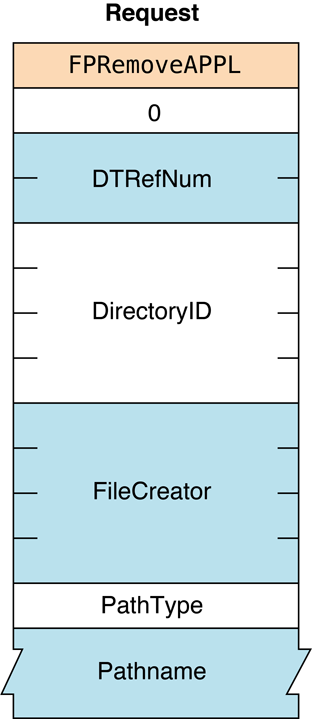
Figure 67 Request and reply blocks for the FPRemoveAPPL command
Availability#
- Deprecated in OS X v.10.6.
FPRemoveComment#
Removes a comment from a volume’s Desktop database.
uint8_t CommandCode
uint8_t Pad
int16_t DTRefNum
int32_t DirectoryID
uint8_t PathType
string PathnameParameters#
CommandCodekFPRemoveComment (57).
Pad
Pad byte.
DTRefNum
Desktop database reference number.
DirectoryID
Ancestor Directory ID.
PathType
Type of names in Pathname. See “Path Type Constants”
for possible values.
Pathname
Pathname to the CNode whose comment is being removed (cannot be null).
Pathname is a string if it contains Short or Long Names or an AFPName
if it contains a UTF-8–encoded path. See the Character Encoding section
of “Apple Filing Protocol Concepts” in Apple Filing Protocol Programming Guide for
additional details about the UTF-8 encoding used by AFP.
ResultkFPNoErr if no error occurred. See Table 61 for the possible
result codes.
ReplyBlock
None.
Discussion#
If the comment is associated with directory that is not empty, the user must have search access to all ancestors, including the parent directory, plus write access to the parent directory. If the comment is associated with an empty directory, the user must have search or write access to all ancestors, including the parent directory, plus write access to the parent directory.
If the comment is associated with a file that is not empty, the user must have search access to all ancestors, except the parent directory, plus read and write access to the parent directory. If the comment is associated with an empty file, the user must have search or write access to all ancestors, except the parent directory, plus write access to the parent directory.
The user must have previously called FPOpenDT for the corresponding volume.
Table 61 lists the result codes for theFPRemoveComment command.
| Result code | Explanation |
|---|---|
kFPAccessDenied | User does not have the access privileges required to use this command. |
kFPItemNotFound | Comment was not found in the Desktop database. |
kFPMiscErr | Non-AFP error occurred. |
kFPObjectNotFound | Input parameters do not point to an existing file or directory. |
kFPParamErr | Session reference number, Desktop database reference number, or pathname type is unknown; pathname is invalid. |
Table 61 Result codes for the FPRemoveComment command
Figure 68 shows the request and reply
blocks for the FPRemoveComment command.
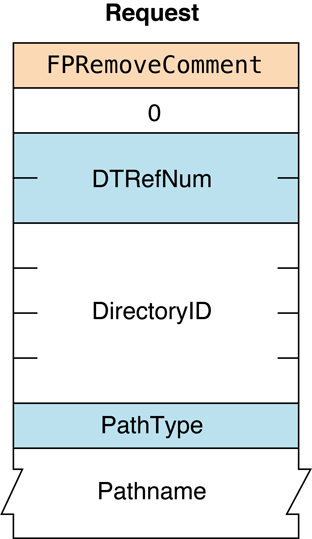
Figure 68 Request and reply blocks for the FPRemoveComment command
Availability#
- Deprecated in OS X v.10.6.
FPRemoveExtAttr#
Removes an extended attribute.
uint8_t CommandCode
uint8_t Pad
int16_t VolumeID
int32_t DirectoryID
uint16_t Bitmap
uint8_t PathType
string Pathname
uint8_t Pad
uint16_t NameLength
string NameParameters#
CommandCodekFPRemoveExtAttr (71).
Pad
Pad byte.
VolumeID
Volume identifier.
DirectoryID
Directory identifier.
Bitmap
Bitmap specifying the desired behavior when removing an extended
attribute. For this command, kAttrDontFollow is the only valid bit.
For details, see “Extended Attributes Bitmap”.
PathType
Type of names in Pathname. See “Path Type Constants”
for possible values.
Pathname
Pathname to desired file or directory. Pathname is a string if it
contains Short or Long Names or an AFPName if it contains a
UTF-8–encoded path.
Pad
Optional pad byte if needed to pad to an even boundary.
NameLength
Length in bytes of the extended attribute name that follows.
Name
UTF-8–encoded name of the extended attribute that is to be removed.
ResultkFPNoErr if no error occurred. See Table 62 for other possible result codes.
Discussion#
This command removes the specified extended attribute.
Support for this command, as well as FPGetExtAttr, FPListExtAttrs, and
FPSetExtAttr is required in order
to support extended attributes. UTF-8 support is also required in order
to support extended attributes. See the Character Encoding section of
“Apple Filing Protocol Concepts” in Apple Filing Protocol Programming Guide for
additional details about the UTF-8 encoding used by AFP.
Table 62 lists the possible result codes for the FPRemoveExtAttr command.
| Result code | Explanation |
|---|---|
kFPAccessDenied | User does not have the access privileges required to remove an extended attribute for the specified file or directory. |
kFPBitmapErr | Bitmap is null or specifies a value that is invalid for this command. |
kFPMiscErr | Non-AFP error occurred. |
kFPObjectNotFound | Input parameters do not point to an existing file or directory. |
kFPParamErr | A parameter is invalid. |
Table 62 Result codes for the FPRemoveExtAttr command
Figure 69 shows the request block for the FPRemoveExtAttr command.
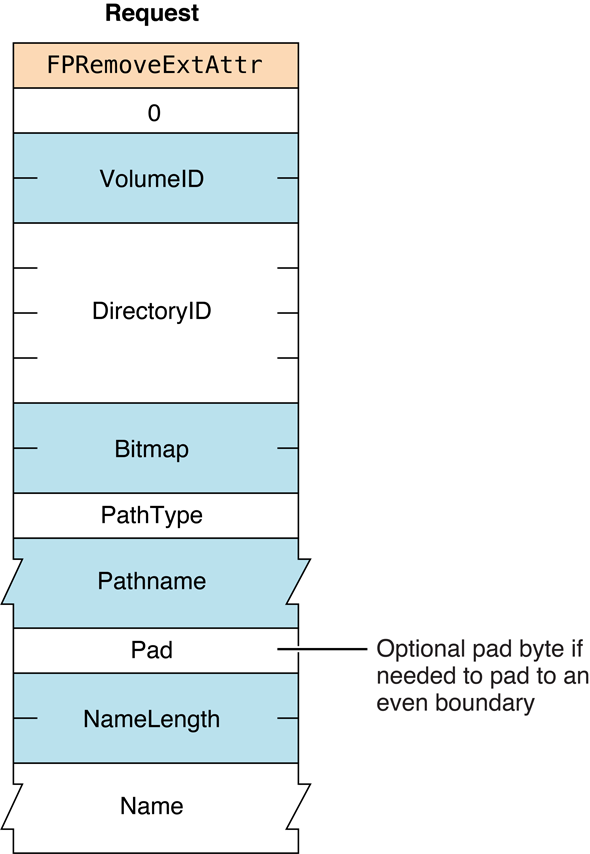
Figure 69 Request block for the FPRemoveExtAttr command
Version Notes#
Introduced in AFP 3.2.
FPRename#
Renames a file or directory.
uint8_t CommandCode
uint8_t Pad
int16_t VolumeID
int32_t DirectoryID
uint8_t PathType
string Pathname
uint8_t NewType
string NewNameParameters#
CommandCodekFPRename (28).
Pad
Pad byte.
VolumeID
Volume ID.
DirectoryID
Ancestor Directory ID.
PathType
Type of names in Pathname. See “Path Type Constants”
for possible values.
Pathname
Pathname to the CNode whose name is being changed (cannot be null).
Pathname is a string if it contains Short or Long Names or an AFPName
if it contains a UTF-8–encoded path.
NewType
Type of names in NewName. See “Path Type Constants”
for possible values.
NewName
Pathname to the CNode, including its new name (cannot be null).
NewName is a string if it contains Short or Long Names or an AFPName
if it contains a UTF-8–encoded path.
ResultkFPNoErr if no error occurred. See Table 63 for the possible
result codes.
ReplyBlock
None.
Discussion#
The server assigns the new name to the file or directory. The other name (Long or Short) is generated as described in the section “Catalog Node Names” in Chapter 1. The modification date of the parent directory is set to the server’s clock.
To rename a directory, the user must have search access to all ancestors. including the CNode’s parent directory, as well as write access to the parent directory. To rename a file, the user must have search access to all ancestors, except the CNode’s parent directory, as well as read and write access to the parent directory.
See the Character Encoding section of “Apple Filing Protocol Concepts” in Apple Filing Protocol Programming Guide for additional details about the UTF-8 encoding used by AFP.
Table 63 lists the result codes for the FPRename command.
| Result code | Explanation |
|---|---|
kFPAccessDenied | User does not have the access privileges required to use this command. |
kFPCantRename | Attempt was made to rename a volume or root directory. |
kFPMiscErr | Non-AFP error occurred. |
kFPObjectExists | File or directory having the name specified by NewName already exists. |
kFPObjectLocked | File or directory is marked RenameInhibit. |
kFPObjectNotFound | Input parameters do not point to an existing file or directory. |
kFPParamErr | Session reference number, Volume ID, or pathname type is unknown; pathname or NewName is invalid. |
kFPVolLocked | Volume is ReadOnly |
Table 63 Result codes for the FPRename command
Figure 70 shows the request block for the FPRename command.
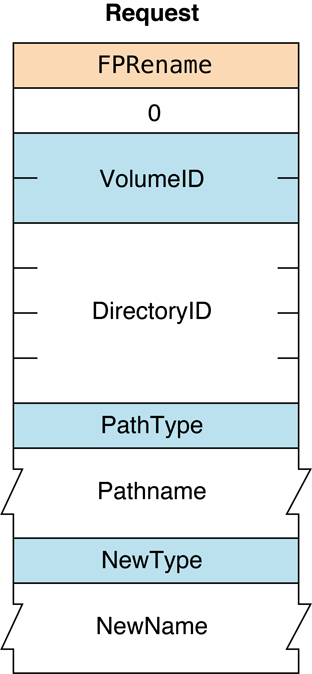
Figure 70 Request block for the FPRename command
FPResolveID#
Gets parameters for a file by File ID.
uint8_t CommandCode
uint8_t Pad
int16_t VolumeID
int32_t FileID
int16_t BitmapParameters#
CommandCodekFPResolveID (41).
Pad
Pad byte.
VolumeID
Volume ID.
FileID
File ID to be resolved.
Bitmap
Bitmap describing the parameters to return. Set the bit that corresponds
to each desired parameter. This bitmap is the same as the FileBitmap
parameter of the FPGetFileDirParms command.
For bit definitions for the this bitmap, see
“File and Directory Bitmap.”
ResultkFPNoErr if no error occurred. See Table 64 for the possible
result codes.
ReplyBlock
If the result code is kFPNoErr, the server returns a reply
block. See Table 65 for the format of the reply block.
Discussion#
The parameters returned by this command can be any parameter specified
in the FPGetFileDirParms
command.
The user must have the Read Only or the Read & Write privilege to use this command.
Table 64 lists the result codes for
the FPResolveID command.
| Result code | Explanation |
|---|---|
kFPAccessDenied | User does not have the access privileges required to use this command. |
kFPBadIDErr | File ID is not valid. |
kFPCallNotSupported | Server does not support this command. |
kFPIDNotFound | File ID was not found. (No file thread exists.) |
kFPMiscErr | Non-AFP error occurred. |
kFPParamErr | Session reference number, Volume ID, or File ID is unknown. |
Table 64 Result codes for the FPResolveID command
Table 65 describes the reply block for the FPResolveID command.
| Name and size | Data |
|---|---|
Bitmap (int16_t) | Copy of the input bitmap. |
FileParameters | Requested file parameters. |
Table 65 Reply block for the FPResolveID command
Figure 70 shows the request and reply blocks for the FPResolveID command.
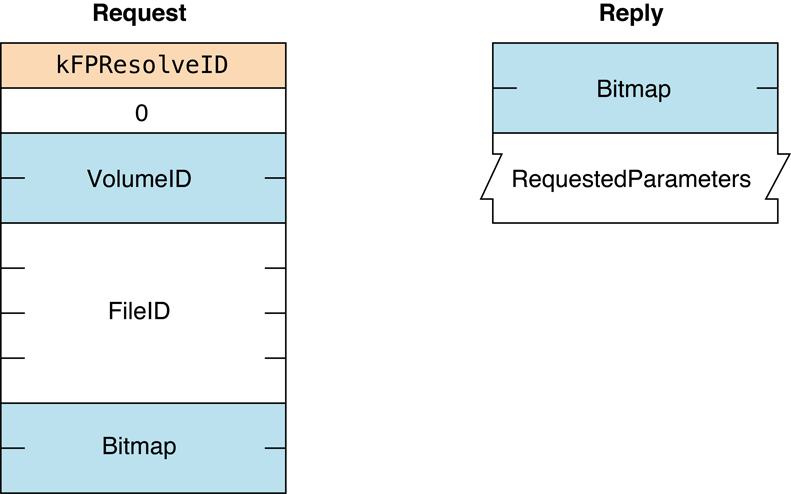
Figure 71 Request and reply blocks for the FPResolveID command
FPSetACL#
Sets the UUID, Group UUID, and ACL for a file or directory and removes an ACL from a file or directory.
uint8_t CommandCode
uint8_t Pad
int16_t VolumeID
int32_t DirectoryID
uint16_t Bitmap
uint8_t Pathtype
string Pathname
uint8_t Pad
AdditionalInformationParameters#
CommandCodekFPSetACL (74).
Pad
Pad byte.
VolumeID
Volume identifier.
DirectoryID
Directory identifier.
Bitmap
Bits that specify the values that are to be set. Specify
kFileSec_UUID to set the UUID of the
specified file or directory. Specify
kFileSec_GRPUUID to set the Group UUID
of the specified file or directory. Specify
kFileSec_ACL to set the ACL of the
specified file or directory or
kFileSec_REMOVEACL to remove the file or
directory’s ACL.
If sending this command is part of the creation of a new item, set the
kFileSec_Inherit bit. When the server
receives an FPSetACL command in which the
kFileSec_Inherit bit is set in its
Bitmap parameter, the server scans the current item looking for access
control entries (ACEs) in which the KAUTH_ACE_INHERITED bit is set in
the ace_flags field. The server copies any currently inherited ACEs to
the end of the incoming list of ACEs and sets the ACL on the item. For
declarations of these constants, see “Access Control List Bitmap.”
PathType
Type of names in Pathname. See “Path Type Constants”
for possible values.
Pathname
Pathname of the Open Directory domain for which UAMs are to be obtained.
Pathname is a string if it contains Short or Long Names or an AFPName
if it contains a UTF-8–encoded path. See the Character Encoding section
of “Apple Filing Protocol Concepts” in Apple Filing Protocol Programming Guide for
additional details about the UTF-8 encoding used by AFP.
Pad
Pad byte if needed to pad to an even boundary.
AdditionalInformation
If kFileSec_UUID is set in the Bitmap
parameter, the first item in this parameter is the UUID that is to be
set. If kFileSec_GRPUUID is set, the next item
in this parameter is the Group UUID that is to be set. If
kFileSec_ACL is set, the next item in
this parameter is a kauth_acl structure. For information on this
structure, see the section
Access Control List Structure. If
kFileSec_REMOVEACL is set in the
Bitmap parameter, this parameter does not contain a kauth_acl
structure.
ResultkFPNoErr if no error occurred. See Table 66 for other possible result
codes.
Discussion#
Depending on the bits that are set in the Bitmap parameter, this
command sets the UUID, Group UUID, and ACL for the specified file or
directory or removes the ACL of the specified file or directory.
Support for this command, as well as FPAccess and
FPGetACL is required in order to
support access control lists (ACLs). Support for UTF-8 and UUIDs is also
required in order to support ACLs. See the Character Encoding section of
“Apple Filing Protocol Concepts” in Apple Filing Protocol Programming Guide for
additional details about the UTF-8 encoding used by AFP.
Table 66 lists the result codes for the FPSetACL command.
| Result code | Explanation |
|---|---|
kFPAccessDenied | User does not have the access rights required to set the ACL for the specified file or directory. |
kFPMiscErr | Non-AFP error occurred. |
kFPObjectNotFound | Input parameters do not point to an existing file or directory. |
kFPParamErr | A parameter is invalid. |
Table 66 Result codes for the FPSetACL command
Figure 36 shows the request block for the FPSetACL command.
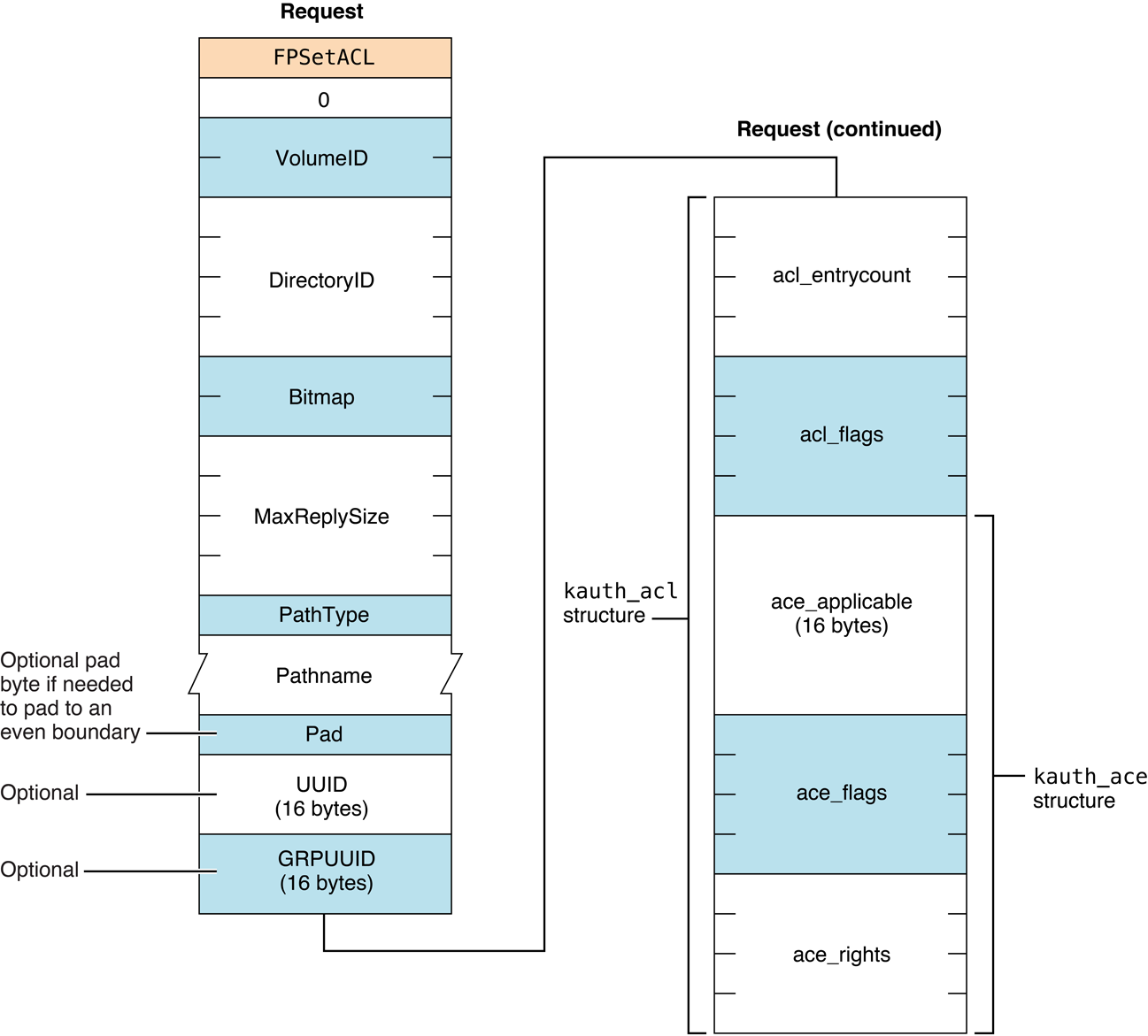
Figure 72 Request block for the FPSetACL command
Version Notes#
Introduced in AFP 3.2.
FPSetDirParms#
Sets parameters for a directory.
uint8_t CommandCode
uint8_t Pad
int16_t VolumeID
int32_t DirectoryID
int16_t Bitmap
uint8_t PathType
string Pathname
DirectoryParametersParameters#
CommandCodekFPSetDirParms (29).
Pad
Pad byte.
VolumeID
Volume ID.
DirectoryID
Ancestor Directory ID.
Bitmap
Bitmap describing the parameters to set. Set the bit that corresponds to
each desired parameter. This bitmap is the same as the DirectoryBitmap
parameter of the FPGetFileDirParms command.
For bit definitions for this bitmap, see “File and Directory Bitmap.”
PathType
Type of name in Pathname. See “Path Type Constants”
for possible values.
Pathname
Pathname to the desired directory. Pathname is a string if it contains
Short or Long Names or an AFPName if it contains a UTF-8–encoded path.
See the Character Encoding section of “Apple Filing Protocol Concepts” in Apple Filing Protocol Programming Guide for
additional details about the UTF-8 encoding used by AFP.
DirectoryParameters
Parameters to be set, packed in bitmap order.
ResultkFPNoErr if no error occurred. See Table 67 for the possible
result codes.
ReplyBlock
None.
Discussion#
This command sets or clears certain parameters and attributes that are common to both files and directories. The parameters are the Invisible and System attributes, Creation Date, Modification Date, Backup Date, Finder Info, and UNIX privileges.
The parameters must be packed, in bitmap order, in the request block. Variable-length parameters, such as Long Name and Short Name, must be kept at the end of the block. To do this, variable-length parameters are represented in bitmap order as fixed-length offsets (integers). These offsets are measured from the start of the parameters to the start of the variable-length parameters. The actual variable-length parameters are then packed after all fixed-length parameters.
Changing a directory’s access rights immediately affects other open
sessions. If the user does not have the access rights to set one of the
parameters, a kFPAccessDenied result code is returned
and no parameters are set.
To set a directory’s access privileges, Owner ID, Group ID, or to change the DeleteInhibit, RenameInhibit, WriteInhibit, or Invisible attributes, the user must have search or write access to all ancestors, including this directory’s parent directory, and the user must be the owner of the directory. To set any parameter other than the ones mentioned above for an empty directory, the user must have search or write access to all ancestors, except the parent directory, as well as write access to the parent directory. To set any parameter other than the ones mentioned above for a directory that is not empty, the user must have search access to all ancestors, including the parent directory, as well as write access to the parent directory.
This command cannot be used to set a directory’s name; instead, use
FPRename. This command cannot be used
to set a directory’s Parent Directory ID; instead, use
FPMoveAndRename. This command
cannot be used to set a directory’s Directory ID or Offspring Count.
Table 67 lists the result codes for the FPSetDirParms command.
| Result code | Explanation |
|---|---|
kFPAccessDenied | User does not have the access privileges required to use this command. |
kFPBitmapErr | Attempt was made to set a parameter that cannot be set by this command; bitmap is null. |
kFPMiscErr | Non-AFP error occurred. |
kFPObjectNotFound | Input parameters do not point to an existing directory. |
kFPObjectTypeErr | Input parameters point to a file. |
kFPParamErr | Session reference number, Volume ID, or pathname type is unknown; pathname, Owner ID, or Group ID is invalid. |
kFPVolLocked | Volume is ReadOnly. |
Table 67 Result codes for the FPSetDirParms command
Figure 73 shows the request block for the FPSetDirParms command.
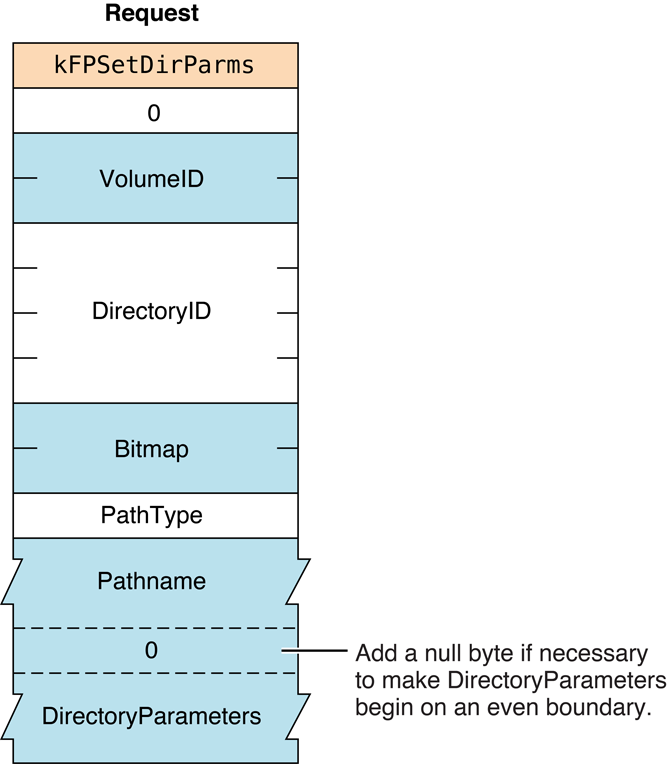
Figure 73 Request block for the FPSetDirParms command
FPSetExtAttr#
Sets the value of an extended attribute.
uint8_t CommandCode
uint8_t Pad
int16_t VolumeID
int32_t DirectoryID
uint16_t Bitmap
int64_t Offset
uint8_t PathType
string Pathname
uint8_t Pad
uint16_t NameLength
string Name
uint32_t AttributeDataLength
string AttributeDataParameters#
CommandCodekFPSetExtAttr (70).
Pad
Pad byte.
VolumeID
Volume identifier.
DirectoryID
Directory identifier.
Bitmap
Bitmap specifying the desired behavior when setting the value of an
extended attribute. For details, see “Extended Attributes Bitmap”
for details.
Offset
Always zero; reserved for future use.
PathType
Type of names in Pathname. See “Path Type Constants”
for possible values.
Pathname
Pathname to desired file or directory. Pathname is a string if it
contains Short or Long Names or an AFPName if it contains a
UTF-8–encoded path.
Pad
Optional pad byte if needed to pad to an even boundary.
NameLength
Length in bytes of the extended attribute name that follows.
Name
UTF-8–encoded name of the extended attribute that is to be set.
AttributeDataLength
Length in bytes of the extended attribute data that follows.
AttributeData
Value to which the extended attribute is to be set.
ResultkFPNoErr if no error occurred. See Table 68 for other possible result
codes.
Discussion#
This command sets the value of the specified extended attribute. If the extended attribute does not already exist, it is created.
Support for this command, as well as FPGetExtAttr, FPListExtAttrs and
FPRemoveExtAttr is required in
order to support extended attributes. UTF-8 support is also required in
order to support extended attributes. See the Character Encoding section
of “Apple Filing Protocol Concepts” in Apple Filing Protocol Programming Guide for
additional details about the UTF-8 encoding used by AFP.
Note: The maximum attribute length that the FPGetExtAttr and
FPSetExtAttr commands can handle is the lesser of the server’s quantum
size (see DSIOpenSession and
“AFP Over TCP”) and the maximum extended
attribute length that the backing filesystem can handle.
For example, if the AFP Server is sharing part of an HFS+ volume, the maximum length of the extended attribute is either the AFP server quantum size or the HFS+ maximum extended attribute length, whichever is smaller.
Table 68 lists the possible result codes for the FPSetExtAttr command.
| Result code | Explanation |
|---|---|
kFPAccessDenied | User does not have the access privileges required to set an extended attribute for the file or directory. |
kFPBitmapErr | Bitmap is null or specifies a value that is invalid for this command. |
kFPMiscErr | Non-AFP error occurred. |
kFPObjectNotFound | Input parameters do not point to an existing file or directory. |
kFPParamErr | A parameter is invalid. |
Table 68 Result codes for the FPSetExtAttr command
Figure 74 shows the request block for the FPSetExtAttr command.
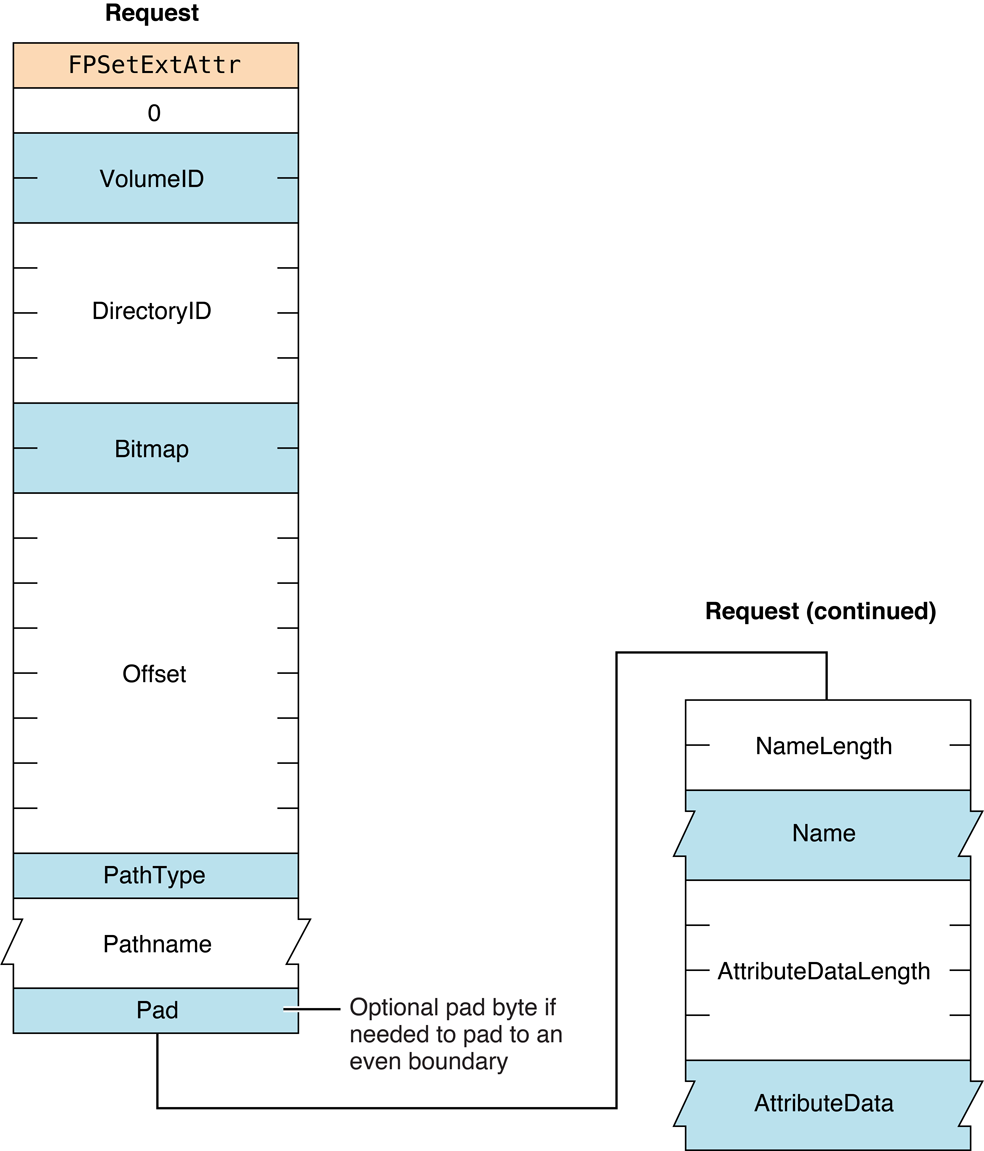
Figure 74 Request block for the FPSetExtAttr command
Version Notes#
Introduced in AFP 3.2.
FPSetFileDirParms#
Sets parameters for a file or a directory.
uint8_t CommandCode
uint8_t Pad
int16_t VolumeID
int32_t DirectoryID
int16_t Bitmap
uint8_t PathType
string Pathname
FileDirParametersParameters#
CommandCodekFPSetFileDirParms (35).
Pad
Pad byte.
VolumeID
Volume ID.
DirectoryID
Ancestor Directory ID.
Bitmap
Bitmap describing the parameters to set. Set the bit that corresponds to
each desired parameter. This bitmap can be the same as the
DirectoryBitmap or the FileBitmap parameter of the
FPGetFileDirParms command,
but this command can only set the parameters that are common to both
bitmaps. For bit definitions for this bitmap, see
“File and Directory Bitmap.”
PathType
Type of name in Pathname. See “Path Type Constants”
for possible values.
Pathname
Pathname to the desired file or directory. Pathname is a string if it
contains Short or Long Names or an AFPName if it contains a
UTF-8–encoded path. See the Character Encoding section of
“Apple Filing Protocol Concepts” in Apple Filing Protocol Programming Guide for
additional details about the UTF-8 encoding used by AFP.
FileDirParameters
Parameters to be set, packed in bitmap order.
ResultkFPNoErr if no error occurred. See Table 69 for the possible
result codes.
ReplyBlock
None.
Discussion#
This command sets or clears certain parameters and attributes that are common to both files and directories. The parameters are the Invisible and System attributes, Creation Date, Modification Date, Backup Date, Finder Info, and UNIX privileges.
The parameters must be packed, in bitmap order, in the request block. Variable-length parameters, such as Long Name and Short Name, must be kept at the end of the block. To do this, variable-length parameters are represented in bitmap order as fixed-length offsets (integers). These offsets are measured from the start of the parameters to the start of the variable-length parameters. The actual variable-length parameters are then packed after all fixed-length parameters.
If necessary, a null byte must be added between Pathname and
DirectoryParameters in the request block to make DirectoryParameters
begin on an even boundary.
If the Attributes parameter is included, the Set/Clear bit indicates that the specified attributes are to be set (1) or cleared (0). Therefore, it is not possible to set some attributes and clear other attributes in the same command.
If this command changes the CNode’s attributes or sets the CNode’s dates (except modification date), Finder Info, or UNIX privileges, the modification date of the CNode is set to the server’s clock. If this command changes the CNode’s Invisible attribute, the modification date of the CNode’s parent directory is set to the server’s clock.
To set the parameters for a directory that is not empty, the user needs search access to all ancestors, including the parent directory, as well as write access to the parent directory. To set parameters for an empty directory, the user needs search or write access to all ancestors, except the parent directory, as well as write access to the parent directory.
To set parameters for a file that is not empty, the user needs search access to all ancestors, except the parent directory, as well as write access to the parent directory. To set parameters for an empty file, the user needs search or write access to all ancestors, except the parent directory, as well as write access to the parent directory.
For files, call FPSetFileParms
to set parameters and attributes that FPSetFileDirParms cannot set.
For directories, call FPSetDirParms to set parameters
and attributes that FPSetFileDirParms cannot set.
Table 69 lists the result codes for the FPSetFileDirParms command.
| Result code | Explanation |
|---|---|
kFPAccessDenied | User does not have the access privileges required to use this command. |
kFPBitmapErr | Attempt was made to set a parameter that cannot be set by this command; bitmap is null. |
kFPMiscErr | Non-AFP error occurred. |
kFPObjectNotFound | Input parameters do not point to an existing file or directory. |
kFPParamErr | Session reference number, Volume ID, or pathname type is unknown; pathname is invalid. |
kFPVolLocked | Volume is ReadOnly. |
Table 69 Result codes for the FPSetFileDirParms command
Figure 75 shows the request block for the FPSetFileDirParms command.
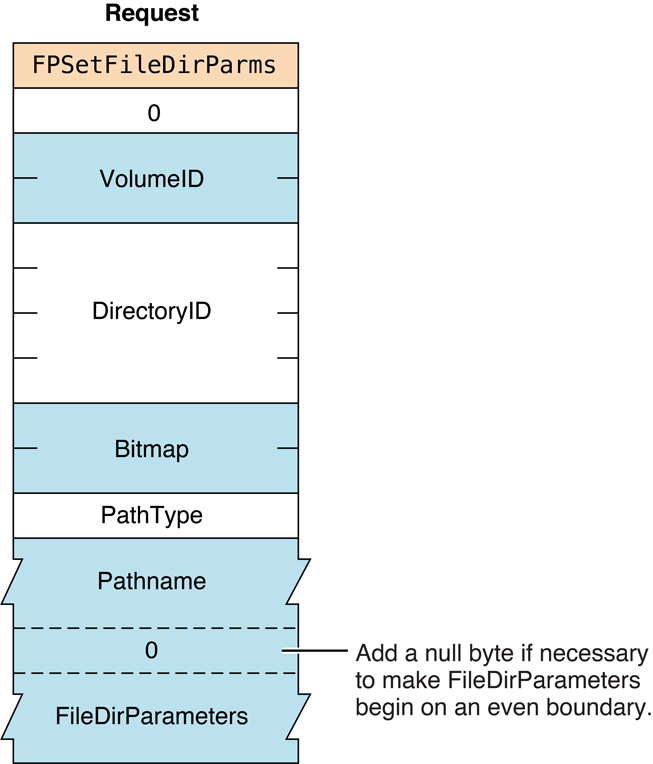
Figure 75 Request block for the FPSetFileDirParms command
FPSetFileParms#
Sets parameters for a file.
uint8_t CommandCode
uint8_t Pad
int16_t VolumeID
int32_t DirectoryID
int16_t Bitmap
uint8_t PathType
string Pathname
FileParametersParameters#
CommandCodekFPSetFileParms (30).
Pad
Pad byte.
VolumeID
Volume ID.
DirectoryID
Ancestor Directory ID.
Bitmap
Bitmap describing the parameters to set. Set the bit that corresponds to
each desired parameter. This bitmap can be the same as the FileBitmap
parameter of the FPGetFileDirParms command.
For bit definitions for this bitmap, see “File and Directory Bitmap.”
PathType
Type of name in Pathname. See “Path Type Constants”
for possible values.
Pathname
Pathname to the desired file or directory. Pathname is a string if it
contains Short or Long Names or an AFPName if it contains a
UTF-8–encoded path. See the Character Encoding section of
“Apple Filing Protocol Concepts” in Apple Filing Protocol Programming Guide for
additional details about the UTF-8 encoding used by AFP.
FileParameters
Parameters to be set, packed in bitmap order.
ResultkFPNoErr if no error occurred. See Table 70 for the possible
result codes.
ReplyBlock
None.
Discussion#
The parameters must be packed, in bitmap order, in the request block. Variable-length parameters must be kept at the end of the block. To do this, variable-length parameters are represented in bitmap order as fixed-length offsets (integers). These offsets are measured from the start of the parameters to the start of the variable-length parameters. The actual variable-length parameters are then packed after all fixed-length parameters.
If necessary, a null byte must be added between Pathname and
FileParameters in the request block to make FileParameters begin on
an even boundary.
The following parameters may be set or cleared: Attributes (all
attributes except DAlreadyOpen, RAlreadyOpen, and CopyProtect),
Creation Date, Modification Date, Backup Date, Finder Info, and UNIX
privileges.
If the Attributes parameter is included, the Set/Clear bit indicates that the specified attributes are to be set (1) or cleared (0). Therefore, it is not possible to set some attributes and clear other attributes in the same call.
If this command changes the file’s Invisible attribute, the modification date of the file’s parent directory is set to the server’s clock. If this command changes the file’s Attributes or sets any dates (except modification date), or Finder Info, the file’s modification date is set to the server’s clock.
If the file is empty (both forks are zero length), the user must have search or write access to all ancestors, except this file’s parent directory, as well as write access to the parent directory. If either fork is not empty, the user must have search access to all ancestors except the parent directory, as well as read and write access to the parent directory.
This command cannot be used to set a file’s name; instead, use
FPRename. This command cannot be used
to set the file’s Parent Directory ID; instead, use
FPMoveAndRename. This command
cannot be used to set a file’s fork lengths; instead, call
FPSetForkParms. This command
cannot be used to set a file’s Node ID.
Table 70 lists the result codes for the FPSetFileParms command.
| Result code | Explanation |
|---|---|
kFPAccessDenied | User does not have the access privileges required to use this command. |
kFPBitmapErr | Attempt was made to set a parameter that cannot be set by this command; bitmap is null. |
kFPMiscErr | Non-AFP error occurred. |
kFPObjectNotFound | Input parameters do not point to an existing file. |
kFPObjectTypeErr | Input parameters point to a directory. |
kFPParamErr | Session reference number, Volume ID, or pathname type is unknown; pathname is invalid or null. |
Table 70 Result codes for the FPSetFileParms command
Figure 76 shows the request block for the FPSetFileParms command.
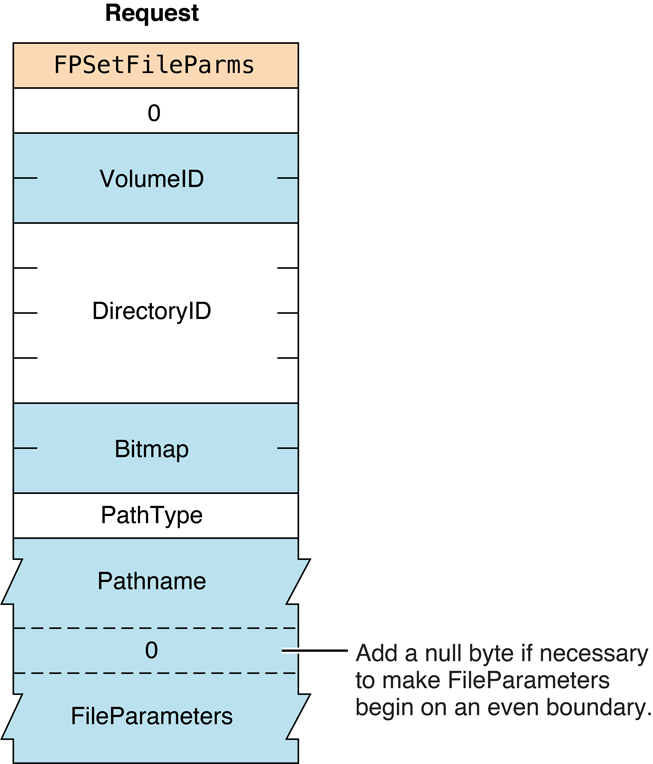
Figure 76 Request block for the FPSetFileParms command
FPSetForkParms#
Sets the length of a fork.
uint8_t CommandCode
uint8_t Pad
int16_t OForkRefNum
int16_t Bitmap
int32_t or int64_t ForkLenParameters#
CommandCodekFPSetForkParms (31).
Pad
Pad byte.
OForkRefNum
Open fork reference number.
Bitmap
Bitmap describing the parameters to set. Set the bit that corresponds to
each desired parameter. This bitmap is the same as the FileBitmap of
the FPGetFileDirParms
command, but only the Data Fork Length, Resource Fork Length, Extended
Data Fork Length, and Extended Resource Fork Length parameters can be
set. For bit definitions for this bitmap, see
“File and Directory Bitmap.”
ForkLen
New end-of-fork value. This value is either 32 bits or 64 bits in
length, depending on whether you are setting the length or extended
length parameter.
ResultkFPNoErr if no error occurred. See Table 71 for the possible
result codes.
ReplyBlock
None.
Discussion#
The Bitmap and ForkLen parameters are passed to the server, which
changes the length of the fork specified by OForkRefNum. The server
returns a kFPBitmapErr result code if the command
tries to set the length of the file’s other fork or if it tries to set
any other file parameter.
The server returns a kFPLockErr result code if an attempt is
made to truncate the fork in a way that would eliminate a range or part
of a range that is locked by another user.
The fork must be open for writing by the user.
This command cannot set a file’s name; instead, use
FPRename. This command cannot set a
file’s Parent Directory ID; instead, use
FPMoveAndRename. This command
cannot set a file’s file number.
Table 71 lists the result codes for the FPSetForkParms command.
| Result code | Explanation |
|---|---|
kFPAccessDenied | User does not have the access privileges required to use this command. |
kFPBitmapErr | Attempt was made to set a parameter that cannot be set by this command; bitmap is null. |
kFPDiskFull | No more space exists on the volume. |
kFPLockErr | Range lock conflict exists. |
kFPMiscErr | Non-AFP error occurred. |
kFPParamErr | Session reference number or fork reference number is invalid. |
kFPVolLocked | Volume is ReadOnly. |
Table 71 Result codes for the FPSetForkParms command
Figure 77 shows the request block for the FPSetForkParms command.
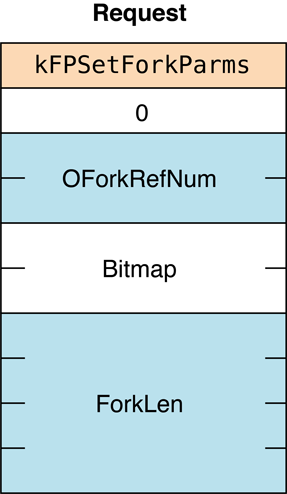
Figure 77 Request block for the FPSetForkParms command
FPSetVolParms#
Sets a volume’s backup date.
uint8_t CommandCode
uint8_t Pad
int16_t VolumeID
int16_t Bitmap
Date BackupDateParameters#
CommandCodekFPSetVolParms (32).
Pad
Pad byte.
VolumeID
Volume ID.
Bitmap
Bitmap describing the parameters to be set. This parameter is the same
as the Bitmap parameter for the FPGetVolParms command, but only
the Backup Date bit can be set. For bit definitions for this bitmap, see
“Volume Bitmap.”
BackupDate
New backup date.
ResultkFPNoErr if no error occurred. See Table 72 for the possible result
codes.
ReplyBlock
None.
Discussion#
This command sets a volume’s backup date.
Table 72 lists the result codes for the FPSetVolParms command.
| Result code | Explanation |
|---|---|
kFPAccessDenied | User does not have the access privileges required to use this command. |
kFPBitmapErr | Attempt was made to set a parameter that cannot be set by this command; bitmap is null. |
kFPMiscErr | Non-AFP error occurred. |
kFPParamErr | |
kFPVolLocked | Volume is ReadOnly. |
Community Archive Annotation.
The correction for the kFPParamErr result code description is taken from the AFP 3.1 Reference (October 16, 2003).
AFP 3.2 and later claim that only reference number is unknown,
but it seems more likely that an invalid volume identifier would also cause this error.
Table 72 Result codes for the FPSetVolParms command
Figure 78 shows the request block for the FPSetVolParms command.
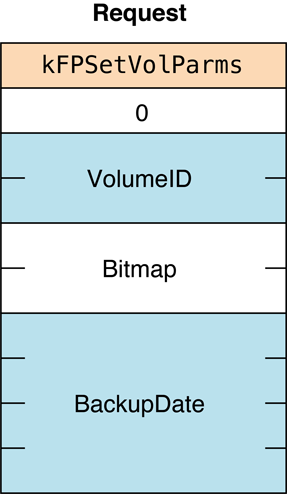
Figure 78 Request block for the FPSetVolParms command
FPSpotlightRPC#
Spotlight RPC command.
Discussion#
This command (command code 76) is a private command used by Spotlight searching on the AFP server. This command is not documented.
FPSyncDir#
Force changes to a directory to be flushed to disk.
uint8_t funcCode;
uint8_t pad;
int16_t volID;
int32_t dirID;Parameters#
funcCodekFPSyncDir (78)
pad
Alignment pad.
volID
The volume ID of the volume containing the directory to flush.
dirID
The directory ID to flush.
Return Value#
The reply block indicates whether the call succeeded or not. It can
return kFPNoErr (success),
kFPObjectNotFound (invalid volID for
sharepoint or directory is not inside that sharepoint),
kFPParamErr (invalid dirID specified),
or kFPAccessDenied (insufficient
permissions).
Discussion#
FPSyncDir commits to stable storage any data and metadata associated with files and directories contained in the hierarchy rooted at the directory specified.
A successful reply to this command indicates that prior changes are durable (as in the “D” of ACID semantics). This call is required to support Time Machine over AFP.
FPSyncFork#
Force changes to a file to be flushed to disk.
uint8_t funcCode;
uint8_t pad;
int16_t forkRefNum;Parameters#
funcCodekFPSyncFork (79)
pad
Alignment pad.
forkRefNum
The reference number of the open fork to flush.
Return Value#
The reply block indicates whether the call succeeded or not. It can
return kFPNoErr (success),
kFPObjectNotFound (invalid sharepoint
volume ID or file is not inside that sharepoint),
kFPParamErr (invalid forkRefNum
specified or too many forks open), or
kFPAccessDenied (insufficient
permissions).
Discussion#
FPSyncFork should ensures that all prior writes to the specified fork (including file metadata) are complete and written to stable storage.
A successful reply to this command indicates that prior changes are durable (as in the “D” of ACID semantics). This call is required to support Time Machine over AFP.
FPWrite#
Writes a block of data to an open fork.
uint8_t CommandCode
uint8_t Flag
int16_t OForkRefNum
int32_t Offset
int32_t ReqCount
ForkDataParameters#
CommandCodekFPWrite (33).
Flag
Bit 7 is the StartEndFlag bit, and it indicates whether Offset is
relative to the beginning or end of the fork. A value of zero indicates
that the start is relative to the beginning of the fork; a value of 1
indicates that the start is relative to the end of the fork.
OForkRefNum
Open fork reference number.
Offset
Byte offset from the beginning or the end of the fork indicating where
the write is to begin; a negative value indicates a byte within the fork
relative to the end of the fork.
ReqCount
Number of bytes to be written.
ForkData
Data to be written.
As a historical footnote, in legacy ASP (non-TCP) versions, this field was not a part of the request block. Instead, the data was transmitted to the server in an intermediate exchange of ASP packets.
ResultkFPNoErr if no error occurred. See Table 73 for the possible
result codes.
ReplyBlock
If the result code is kFPNoErr, the server returns a reply
block consisting of an int32_t, called LastWritten, containing the
number of the byte just past the last byte written.
Discussion#
The server writes data to the open fork, starting at the number of bytes
from the beginning or end of the fork as specified by Offset. The
StartEndFlag bit indicates whether the block of data is to be written
at an offset relative to the beginning or the end of the fork. When the
offset is relative to the end of the fork, data can be written without
knowing the exact end of the fork, which is useful when multiple writers
modify a fork concurrently. The server returns the number of the byte
just past the last byte written.
This command differs from the FPWriteExt command in that the
FPWriteExt command is prepared to handle the large values that may be
required for writing to files that reside in volumes larger than 4 GB in
size.
If the block of data to be written extends beyond the end of the fork,
the fork is extended. If part of the range is locked by another user,
the server returns a kFPLockErr result code and does not
write any data to the fork.
The file’s Modification Date is not changed until the fork is closed.
The fork must be open for writing by the user sending this command.
Lock the range before sending this command. The underlying transport mechanism may force the request to be broken into multiple smaller requests. If the range is not locked when this command begins execution, it is possible for another user to lock some or all of the range before this command completes, causing the write to succeed partially.
Table 73 lists the result codes for the FPWrite command.
| Result code | Explanation |
|---|---|
kFPAccessDenied | Fork is not open for writing by this user. |
kFPDiskFull | No space exists on the volume. |
kFPLockErr | Some or all of the requested range is locked by another user. |
kFPMiscErr | Non-AFP error occurred. |
kFPParamErr | Session reference number or open fork reference number is unknown. |
Table 73 Result codes for the FPWrite command
Figure 79 shows the request and reply blocks for the FPWrite command.
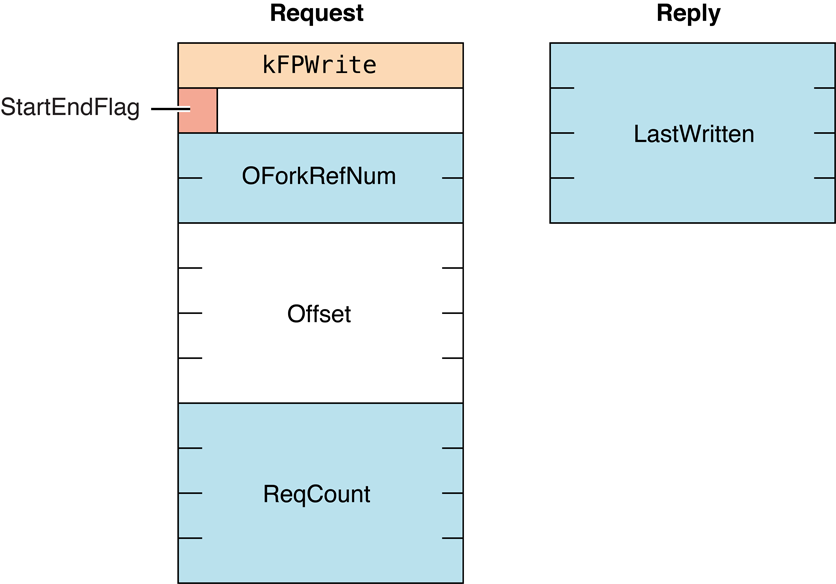
Figure 79 Request and reply blocks for the FPWrite command
Availability#
- Deprecated. Use
FPWriteExtinstead.
FPWriteExt#
Writes a block of data to an open fork.
uint8_t CommandCode
uint8_t Flag
int16_t OForkRefNum
int64_t Offset
int64_t ReqCount
ForkDataParameters#
CommandCodekFPWriteExt (61).
Flag
Bit 7 of the Flag parameter is the StartEndFlag bit, and it
indicates whether Offset is relative to the beginning or end of the
fork. A value of zero indicates that the start is relative to the
beginning of the fork; a value of 1 indicates that the start is relative
to the end of the fork.
OForkRefNum
Open fork reference number.
Offset
Byte offset from the beginning or the end of the fork indicating where
the write is to begin; a negative value indicates a byte within the fork
relative to the end of the fork.
ReqCount
Number of bytes to be written.
ForkData
Data to be written.
As a historical footnote, in legacy ASP (non-TCP) versions, this field was not a part of the request block. Instead, the data was transmitted to the server in an intermediate exchange of ASP packets.
ResultkFPNoErr if no error occurred. See Table 74 for the possible
result codes.
ReplyBlock
If the result code is kFPNoErr, the server returns a reply
block consisting of an int32_t, called LastWritten, containing the
number of the byte just past the last byte written.
Discussion#
The server writes data to the open fork, starting at the number of bytes
from the beginning or end of the fork as specified by Offset.
This command differs from the FPWrite
command in that this command is prepared to handle the large values that
may be required for writing to files that reside in volumes larger than
4 GB in size.
The StartEndFlag bit indicates whether the block of data is to be
written at an offset relative to the beginning or the end of the fork.
When the offset is relative to the end of the fork, data can be written
without knowing the exact end of the fork, which is useful when multiple
writers modify a fork concurrently. The server returns the number of the
byte just past the last byte written.
If the block of data to be written extends beyond the end of the fork,
the fork is extended. If part of the range is locked by another user,
the server returns a kFPLockErr result code and does not
write any data to the fork.
The file’s Modification Date is not changed until the fork is closed.
The fork must be open for writing by the user sending this command.
Lock the range before sending this command. The underlying transport mechanism may force the request to be broken into multiple smaller requests. If the range is not locked when this command begins execution, it is possible for another user to lock some or all of the range before this command completes, causing the write to success partially.
Table 74 lists the result codes for the FPWriteExt command.
| Result code | Explanation |
|---|---|
kFPAccessDenied | Fork is not open for writing by this user. |
kFPDiskFull | No space exists on the volume. |
kFPLockErr | Some or all of the requested range is locked by another user. |
kFPMiscErr | Non-AFP error occurred. |
kFPParamErr | Session reference number or open fork reference number is unknown. |
Table 74 Result codes for the FPWriteExt command
Figure 80 shows the request and reply blocks for the FPWriteExt command.
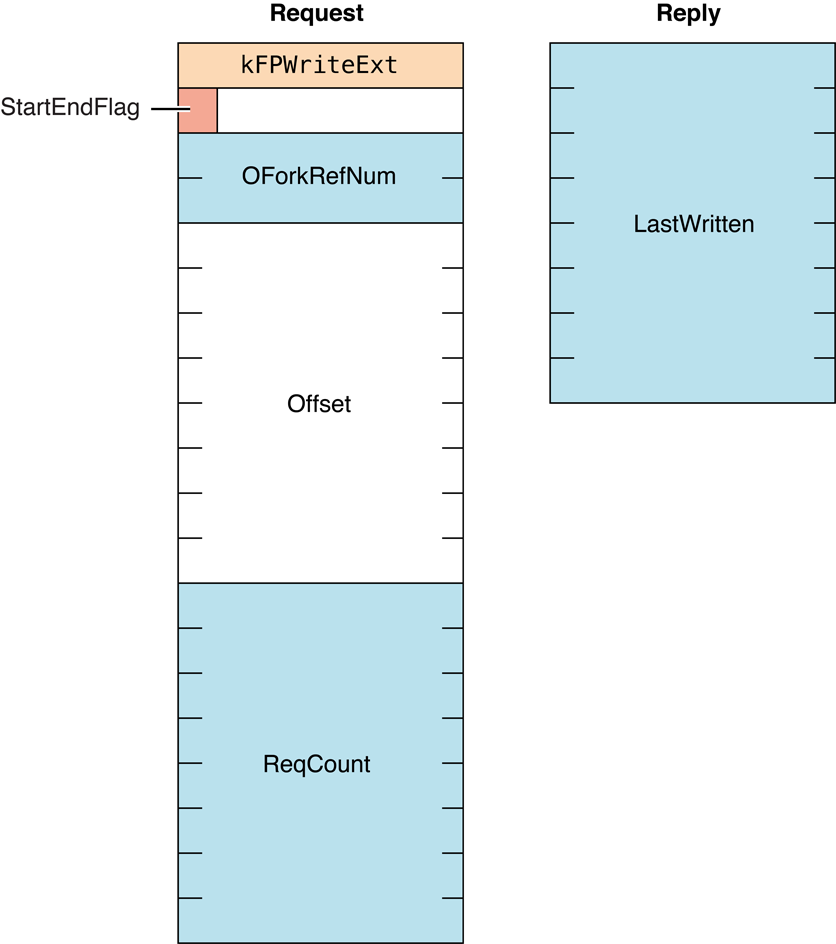
Figure 80 Request and reply blocks for the FPWriteExt command
FPZzzzz#
Notifies the server that the client is going to sleep.
uint8_t CommandCode
uint8_t Pad
uint32_t FlagsParameters#
CommandCodekFPZzzzz (122).
Flags
Reserved.
ReplyBlock
None.
Discussion#
If an AFP sharepoint is mounted when the client goes to sleep (for
example, an idle sleep or a demand sleep such as when the lid of a
PowerBook is closed), the client sends the FPZzzzz command. This
command notifies the AFP server that the client is going to sleep and
that the server should not send any more packets to the client. When the
client is awakens, it will send AFP packets to the server, which
notifies the server that the client is now awake.
The AFP server should have a setting for the maximum time that a client can sleep — typically 24 hours. If a client has been asleep longer than the maximum sleep time, the server assumes that the client has been disconnected and may free client-related resources on the server.
The FPZzzzz command is supported by AFP 2.3 and later over AFP/TCP
only.
Figure 81 shows the request block for the FPZzzzz command.
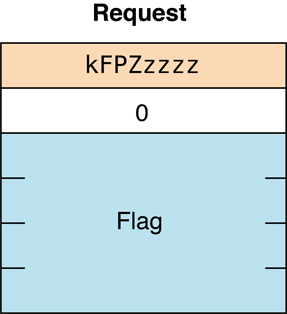
Figure 81 Request block for the
FPZzzzz commandIf the server supports extended sleep information (kSupportsExtSleep in
server flags bitmap—see “Server Flags Bitmap”),
then before the client goes to sleep, it sends the FPZzzzz command
with the Flag field set to 1. When the server receives this command
with Flag set to 1, it should disable its tickle timers and tickle
monitoring.
Important: This message indicates that the client is about to go to sleep. However, more AFP packets may be sent after this message. Such packets do not indicate that the client woke up; in many cases the client is still preparing to go to sleep.
When the client wakes up, it sends another FPZzzzz command, this time
with the Flag field set to 2. This indicates to the server that the
client is now awake. When the server receives this sleep command with
Flag set to 2, it should reenable its tickle timers and tickle
monitoring.
Data Types#
AFP Protocol Data Types#
FPUnixPrivs#
A structure the describes UNIX privileges for files and directories that reside on a volume that supports UNIX privileges.
struct FPUnixPrivs {
   uint32_t uid;
   uint32_t gid;
   uint32_t permissions;
   uint32_t ua_permissions;
};Fields#
uid
User ID of the file or directory’s owner.
gid
Group ID of the file or directory’s owner.
permissions
The complete set of file or directory permission bits, including execute
bits. This bitmap is used when the client is changing the permissions on
the server. (It can also be used to detect symbolic links by using the
S_IFMT bits described in <sys/stat.h>.)
ua_permissions
User’s access rights to the file or directory. This bitmap is in the
same format as the AFP access rights. See “Access Rights Bitmap”
for more information.
Discussion#
A FPUnixPrivs structure is returned when you call
FPGetFileDirParms and specify
that you want to get the UNIX privileges for a file or directory.
Note: If kFPUnixPrivsBit is set for a volume, UNIX privileges must
be supported for both directories and files.
Access Control List Structure#
Structure that describes a file or directory’s access control list (ACL).
struct kauth_acl {
   u_int32_t acl_entrycount;
   u_int32_t acl_flags;
   struct kauth_ace acl_ace[];
};Fields#
acl_entrycount
Number of acl_ace structures.
acl_flags
See the Core Foundation ACL documentation for definitions.
acl_ace
An acl_ace structure. See the Core Foundation ACL documentation for a
description of this structure.
Discussion#
The Access Control List structure is returned by the
FPGetACL command and set by the
FPSetACL command.
DSI Transport Layer Data Types#
DSIHeader#
The DSI prepends the DSI header shown in Figure 82 to every AFP request and reply packet.
struct {
   uint8_t flags;
   uint8_t command;
   uint16_t requestID;
   union {
      uint32_t errorCode;
      uint32_t writeOffset;
   };
   uint32_t totalDataLength;
   uint32_t reserved;
};Fields#
flags
An 8-bit value that allows an AFP server to determine the packet type.
The following packet types are defined:
0x00= request0x01= reply
command
An 8-bit value containing a value that represents a DSI command.
requestID
A 16-bit value containing a request ID on a per connection (session)
basis. A request ID is generated by the host that issued the request. In
reply packets, the request ID is used to locate the corresponding
request.
Request IDs must be generated in sequential order and can be from 0 to
65535 in value. The request ID after 65535 wraps to 0. The client
generates the initial request ID and sends it to the server in a
DSIOpenSession command. The server uses
the following algorithm to anticipate the client’s next request ID:
if (LastReqID == 65536) LastReqID = 0;
else LastReqID = LastReqID + 1;
ExpectedReqID = LastReqID;
Servers begin generating request IDs at zero (0).
writeOffset
In request packets, this field is ignored by the server for all commands
except DSIWrite. For future compatibility,
clients should set this field to zero for all commands except
DSIWrite.
In request packets in which the command is
DSIWrite, this field contains a data
offset that is the number of bytes in the packet representing AFP
command information. The server uses this information to collect the AFP
command part of the packet before it accepts the actual data to write.
For example, when a client sends an
FPWrite command to write data on the
server, the enclosed data offset should be 12.
errorCode
In reply packets, this field contains an error code.
totalDataLength
A 32-bit unsigned value that specifies the total length of the data that
follows the DSI header.
reserved
A 32-bit field reserved for future use. Clients should set this field to
zero.
Discussion#
Figure 82 gives a visual representation of the header format.
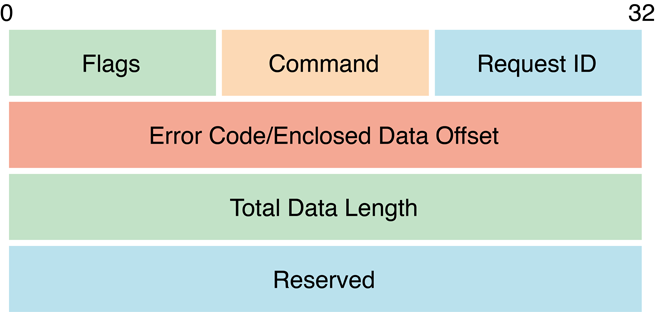
Figure 82 DSI header format
Constants#
AFP Protocol Constants#
Access Control List Bitmap#
Bitmap for getting and setting access control lists (ACLs).
enum {
   kFileSec_UUID = 0x01,
   kFileSec_GRPUUID = 0x02,
   kFileSec_ACL = 0x04,
   kFileSec_REMOVEACL = 0x08,
   kFileSec_Inherit = 0x10
};Constants#
kFileSec_UUID
Set this bit to get or set a UUID.
kFileSec_GRPUUID
Set this bit to get or set a Group UUID.
kFileSec_ACL
Set this bit to get or set an ACL.
kFileSec_REMOVEACL
Set this bit to remove an ACL. This bit is not valid when used with the
FPGetACL.
kFileSec_Inherit
Set this bit on any access control entries (ACEs) that have already been
inherited. This constant is used only with the FPSetACL command.
Discussion#
Use the Access Control List bitmap with the FPGetACL and
FPSetACL commands to control the behavior of those commands.
AFP Version Strings#
Strings that identify different AFP versions.
#define kAFPVersion_2_1 "AFPVersion 2.1"
#define kAFPVersion_2_2 "AFP2.2"
#define kAFPVersion_2_3 "AFP2.3"
#define kAFPVersion_3_0 "AFPX03"
#define kAFPVersion_3_1 "AFP3.1"
#define kAFPVersion_3_2 "AFP3.2"
#define kAFPVersion_3_3 "AFP3.3"Constants#
kAFPVersion_2_1
AFP version 2.1.
kAFPVersion_2_2
AFP version 2.2.
kAFPVersion_2_3
AFP version 2.3. Indicates support for
FPZzzzz command.
kAFPVersion_3_0
AFP version 3.0. OS X v.10.0 and 10.1.
kAFPVersion_3_1
AFP version 3.1. OS X v.10.2 and 10.3.
kAFPVersion_3_2
AFP version 3.2. OS X v.10.4 and 10.5.
kAFPVersion_3_3
AFP version 3.3. Indicates support for the replay cache on the server
and support for FPSyncDir and FPSyncFork.
Discussion#
AFP Version strings are returned by the FPGetSrvrInfo command. AFP
clients sent an AFP Version string as a parameter to the
FPLogin and FPLoginExt commands.
AFP UAM Strings#
Strings that identify different UAM versions.
#define kNoUserAuthStr "No User Authent"
#define kClearTextUAMStr "Cleartxt Passwrd"
#define kRandNumUAMStr "Randnum Exchange"
#define kTwoWayRandNumUAMStr "2-Way Randnum"
#define kDHCAST128UAMStr "DHCAST128"
#define kDHX2UAMStr "DHX2"
#define kKerberosUAMStr "Client Krb v2"
#define kReconnectUAMStr "Recon1"Constants#
kNoUserAuthStr
UAM that does not require user authentication.
kClearTextPwdStr
Cleartext Password UAM.
kRandNumUAMStr
Random Number Exchange UAM. (Deprecated. Obsolete. No longer
supported in OS X.)
kTwoWayRandNumUAMStr
Two-Way Random Number Exchange UAM.
kDHCAST128UAMStr
Diffie-Hellman Exchange UAM.
kDHX2UAMStr
Diffie-Hellman Exchange 2 UAM.
kKerberosUAMStr
Kerberos UAM.
kReconnectUAMStr
Reconnect UAM.
Discussion#
AFP UAM strings are returned by the FPGetSrvrInfo command. AFP
clients sent an AFP UAM string as a parameter to the
FPLogin and FPLoginExt commands.
FPGetSessionToken Types#
Values for the Type parameter of the FPGetSessionToken command.
enum {
   kLoginWithoutID = 0,
   kLoginWithID = 1,
   kReconnWithID = 2,
   kLoginWithTimeAndID = 3,
   kReconnWithTimeAndID = 4,
   kRecon1Login = 5,
   kRecon1ReconnectLogin = 6,
   kRecon1RefreshToken = 7,
   kGetKerberosSessionKey = 8
};Constants#
kLoginWithoutID
The FPGetSessionToken parameter block does not contain an ID
parameter; specified by AFP clients that support a version of AFP prior
to AFP 3.1.
kLoginWithID
Deprecated. Use kLoginWithTimeAndID instead.
kReconnWithID
Deprecated. Use kReconnWithTimeAndID instead.
kLoginWithTimeAndID
The FPGetSessionToken parameter block contains an ID and a time
stamp parameter. The command is sent to indicate that the client wants
its old session to be discarded.
kReconnWithTimeAndID
The FPGetSessionToken parameter block contains an ID and a time
stamp parameter. The command is sent to indicate that the client has
successfully reconnected and wants the session to be updated with the
new value of ID.
kRecon1Login
Used after logging in to get a credential that can be used to reconnect
using the Reconnect UAM. Specifying kRecon1Login tells the server to
destroy any old sessions that may be associated with the ID parameter
to the FPGetSessionToken command.
kRecon1ReconnectLogin
Used to get a new reconnect token after reconnecting using the Reconnect
UAM.
kRecon1RefreshToken
Used to get a new credential when the current credential is about to
expire.
kGetKerberosSessionKey
Used to get a Kerberos v5 session key.
Discussion#
The value of the Type parameter determines the behavior of the server
when it receives theFPGetSessionToken command.
FPGetSrvrMsg Bitmap#
Values used for the MessageBitmap parameter of the
FPGetSrvrMsg command.
kSrvrMsg = 0x1
kUTF8SrvrMsg = 0x2Constants#
kSrvrMsg
Indicates that ServerMessage field contains a server message. (If this
bit is clear, the ServerMessage field contains a login message.)
kUTF8SrvrMsg
Indicates that ServerMessage field is in UTF-8 encoding. Introduced in
AFP 3.0. See the Character Encoding section of
“Apple Filing Protocol Concepts” in Apple Filing Protocol Programming Guide for
additional details about the UTF-8 encoding used by AFP.
FPMapID Constants#
Values used in the Subfunction parameter of the
FPMapID command.
enum {
   kUserIDToName = 1,
   kGroupIDToName = 2,
   kUserIDToUTF8Name = 3,
   kGroupIDToUTF8Name = 4,
   kUserUUIDToUTF8Name = 5,
   kGroupUUIDToUTF8Name = 6
};Constants#
kUserIDToName
Causes FPMapID to map the specified User ID to its respective
Macintosh Roman user name.
kGroupIDToName
Causes FPMapID to map the specified Group ID to its respective
Macintosh Roman group name.
kUserIDToUTF8Name
Causes FPMapID to map the specified User ID to its respective user
name in UTF-8 encoding.
kGroupIDToUTF8Name
Causes FPMapID to map the specified Group ID to its respective group
name in UTF-8 encoding.
kUserUUIDToUTF8Name
Causes FPMapID to map the specified User UUID to its respective user
name in UTF-8 encoding.
kGroupUUIDToUTF8Name
Causes FPMapID to map the specified Group UUID to its respective group
name in UTF-8 encoding.
Discussion#
These constants are used with the FPMapID command to indicate the way
in which mapping is to occur. See the Character Encoding section of
“Apple Filing Protocol Concepts” in Apple Filing Protocol Programming Guide for
additional details about the UTF-8 encoding used by AFP.
FPMapName Constants#
Values used in the Subfunction parameter of the FPMapID command.
enum {
   kNameToUserID = 1,
   kNameToGroupID = 2,
   kUTF8NameToUserID = 3,
   kUTF8NameToGroupID = 4,
   kUTF8NameToUserUUID = 5,
   kUTF8NameToGroupUUID = 6
};Constants#
kNameToUserID
Causes FPMapName to map the specified Macintosh Roman user name to its
respective User ID.
kNameToGroupID
Causes FPMapName to map the specified Macintosh Roman Group name to
its respective Group ID.
kUTF8NameToUserID
Causes FPMapName to map the specified UTF-8-encoded user name to its
respective User ID.
kUTF8NameToGroupID
Causes FPMapName to map the specified UTF-8-encoded group name to its
respective Group ID.
kUTF8NameToUserUUID
Causes FPMapName to map the specified UTF-8-encoded user name to its
respective user UUID.
kUTF8NameToGroupUUID
Causes FPMapName to map the specified UTF-8-encoded user name to its
respective Group UUID.
Discussion#
These constants are used with the FPMapName command to indicate the
way in which mapping is to occur. See the Character Encoding section of
“Apple Filing Protocol Concepts” in Apple Filing Protocol Programming Guide for
additional details about the UTF-8 encoding used by AFP.
Path Type Constants#
Constants indicating the type of names in a Pathname parameter
enum {
   kFPShortName = 1,
   kFPLongName = 2,
   kFPUTF8Name = 3
};Constants#
kFPShortName
Indicates that a Pathname parameter contains Short Names.
kFPLongName
Indicates that a Pathname parameter contains Long Names.
kFPUTF8Name
Indicates that a Pathname parameter contains an AFPName, which
consists of a four-byte text encoding hint followed a two-byte length,
followed by a UTF-8–encoded pathname.
Discussion#
These constants are used in the PathType parameter for many AFP
commands to specify the type of names that appear in an associated
Pathname parameter. See the Character Encoding section of
“Apple Filing Protocol Concepts” in Apple Filing Protocol Programming Guide for
additional details about the UTF-8 encoding used by AFP.
File Creation Constants#
Constants used when creating files.
enum {
   kFPSoftCreate = 0,
   kFPHardCreate = 0x80
};Constants#
kFPSoftCreate
Indicates soft creation.
kFPLongCreate
Indicates indicates hard creation.
Discussion#
These constants are used in the Flag parameter for the
FPCreateFile command.
ACL Access Rights#
Access rights bit definitions.
   #define KAUTH_VNODE_READ_DATA             (1<<1)
   #define KAUTH_VNODE_LIST_DIRECTORY        KAUTH_VNODE_READ_DATA
   #define KAUTH_VNODE_WRITE_DATA            (1<<2)
   #define KAUTH_VNODE_ADD_FILE              KAUTH_VNODE_WRITE_DATA
   #define KAUTH_VNODE_EXECUTE               (1<<3)
   #define KAUTH_VNODE_SEARCH                KAUTH_VNODE_EXECUTE
   #define KAUTH_VNODE_DELETE                (1<<4)
   #define KAUTH_VNODE_APPEND_DATA           (1<<5)
   #define KAUTH_VNODE_ADD_SUBDIRECTORY      KAUTH_VNODE_APPEND_DATA
   #define KAUTH_VNODE_DELETE_CHILD          (1<<6)
   #define KAUTH_VNODE_READ_ATTRIBUTES       (1<<7)
   #define KAUTH_VNODE_WRITE_ATTRIBUTES      (1<<8)
   #define KAUTH_VNODE_READ_EXTATTRIBUTES    (1<<9)
   #define KAUTH_VNODE_WRITE_EXTATTRIBUTES   (1<<10)
   #define KAUTH_VNODE_READ_SECURITY         (1<<11)
   #define KAUTH_VNODE_WRITE_SECURITY        (1<<12)
   #define KAUTH_VNODE_CHANGE_OWNER          (1<<13)
   #define KAUTH_VNODE_SYNCHRONIZE           (1<<20)
   #define KAUTH_VNODE_GENERIC_ALL           (1<<21)
   #define KAUTH_VNODE_GENERIC_EXECUTE       (1<<22)
   #define KAUTH_VNODE_GENERIC_WRITE         (1<<23)
#define KAUTH_VNODE_GENERIC_READ (1<<24)Constants#
KAUTH_VNODE_READ_DATA
For a file, the right to read a file’s data; for a directory, the right
to list the contents of a directory.
KAUTH_VNODE_LIST_DIRECTORY
For a directory, the same as KAUTH_VNODE_LIST_DIRECTORY, which is the
right to list the contents of a directory.
KAUTH_VNODE_WRITE_DATA
For a file, the right to write to a file; for a directory, the right to
create a file in a directory.
KAUTH_VNODE_ADD_FILE
For a file, the same as KAUTH_VNODE_WRITE_DATA; the right to write to
a file.
KAUTH_VNODE_EXECUTE
Right to execute a program.
KAUTH_VNODE_SEARCH
Same as KAUTH_VNODE_EXECUTE.
KAUTH_VNODE_DELETE
Right to delete a file.
KAUTH_VNODE_APPEND_DATA
For a file, the right to append data to a file; for a directory, the
right to create a subdirectory in a directory.
KAUTH_VNODE_ADD_SUBDIRECTORY
For a directory, the same as kAUTH_VNODE_APPEND_DATA, which is the
right to create a subdirectory in a directory.
KAUTH_VNODE_DELETE_CHILD
Right to delete a directory and all the files it contains.
KAUTH_VNODE_READ_ATTRIBUTES
Right to read a file’s hidden attributes, such as hidden, read-only,
system, and archive.
KAUTH_VNODE_WRITE_ATTRIBUTES
Right to write a file’s attributes, such as hidden, read-only, system,
and archive.
KAUTH_VNODE_READ_EXTATTRIBUTES
Right to read a file or directory’s extended attributes.
KAUTH_VNODE_WRITE_EXTATTRIBUTES
Right to write extended attributes.
KAUTH_VNODE_READ_SECURITY
Right to get a file or directory’s access rights.
KAUTH_VNODE_WRITE_SECURITY
Right to set a file or directory’s access rights.
KAUTH_VNODE_CHANGE_OWNER
Right to change the owner of a file or directory.
KAUTH_VNODE_SYNCHRONIZE
Right to block until the file or directory is put in the signaled state;
provided for Windows interoperability.
KAUTH_VNODE_GENERIC_ALL
Windows NT right that includes all rights specified by
KAUTH_VNODE_GENERIC_EXECUTE, KAUTH_VNODE_GENERIC_WRITE, and
KAUTH_VNODE_GENERIC_READ.
KAUTH_VNODE_GENERIC_EXECUTE
Windows NT right that in Windows 2000 became the right to read
attributes, read permissions, traverse folders, and execute files.
KAUTH_VNODE_GENERIC_WRITE
Windows NT right that in Windows 2000 became right to read access
rights, create a subdirectory in a directory, write data in a file,
create files in a directory, append data to a file, write attributes,
and write extended attributes.
KAUTH_VNODE_GENERIC_READ
Windows NT right that in Windows 2000 became right to list directories,
read file data, read attributes, read extended attributes, and read
access rights.
Discussion#
These definitions are made in kauth.h. Use these definitions to
specify access rights when calling FPAccess, to parse the access rights
returned by FPGetACL, and to set access rights when calling FPSetExtAttr.
Access Rights Bitmap#
A 32-bit value whose bits indicate the ability of the directory’s Owner, Group, and Everyone to read, write, and search a directory.
enum {
   kSPOwner =            0x1,
   kRPOwner =            0x2,
   kWROwner =            0x4,

   kSPGroup =          0x100,
   kRPGroup =          0x200,
   kWRGroup =          0x400,

   kSPOther =        0x10000,
   kRPOther =        0x20000,
   kWROther =        0x40000,

   kSPUser =       0x1000000,
   kRPUser =       0x2000000,
   kWRUser =       0x4000000,
   kBlankAcess =  0x10000000,
   kUserIsOwner = 0x80000000
};Constants#
kSPOwner
Originally stood for search permission. In OS X, this bit is used for
execute permission for the owner.
kRPOwner
Read permission for the owner.
kWPOwner
Write permission for the owner.
kSPGroup
Originally stood for search permission. In OS X, this bit is used for
execute permission for the owning group.
kRPGroup
Read permission for the owning group.
kWPGroup
Write permission for the owning group.
kSPOther
Originally stood for search permission. In OS X, this bit is used for
execute permission for users who are neither the owner nor in the owning
group.
kRPOther
Read permission for users who are neither the owner nor in the owning
group.
kWPOther
Write permission for users who are neither the owner nor in the owning
group.
kSPUser
Originally stood for search permission. In OS X, this bit is used for
execute permission for the currently logged in user.
kRPUser
Read permission for the currently logged in user.
kWPUser
Write permission for the currently logged in user.
kBlankAcess
When the blank access privileges bit is set for a directory, its other
access privilege bits are ignored, and the access privilege bits of the
directory’s parent apply to the directory, including the parent’s group
affiliation.
Note: Inherited access privileges are deprecated and are replaced by
kDefaultPrivsFromParent in the FPGetVolParms attributes.
kUserIsOwner
Set to 1 if the current user is the owner of the file or directory. Also
set to 1 if if the file or directory is not owned by a registered user.
Discussion#
Call FPGetFileDirParms to get the Access Rights bitmap.
Figure 83 shows the Access Rights bitmap.
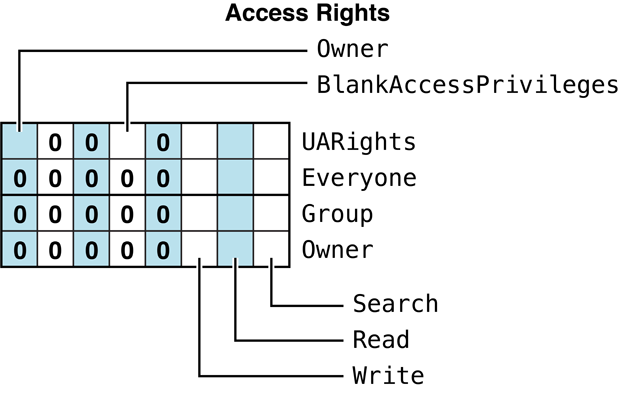
Figure 83 Access Rights bitmap
File and Directory Bitmap#
A 16-bit value whose bits are used to get and set file and directory parameters.
enum {
   kFPAttributeBit = 0x1,
   kFPParentDirIDBit = 0x2,
   kFPCreateDateBit = 0x4,
   kFPModDateBit = 0x8,
   kFPBackupDateBit = 0x10,
   kFPFinderInfoBit = 0x20,
   kFPLongNameBit = 0x40,
   kFPShortNameBit = 0x80,
   kFPNodeIDBit = 0x100,

   /* Bits that apply only to directories: */
   kFPOffspringCountBit = 0x0200,
   kFPOwnerIDBit = 0x0400,
   kFPGroupIDBit = 0x0800,
   kFPAccessRightsBit = 0x1000,

   /* Bits that apply only to files (same bits as previous group): */
   kFPDataForkLenBit = 0x0200,
   kFPRsrcForkLenBit = 0x0400,
   kFPExtDataForkLenBit = 0x0800, // In AFP version 3.0 and later
   kFPLaunchLimitBit = 0x1000,

   /* Bits that apply to everything except where noted: */
   kFPProDOSInfoBit = 0x2000      // Deprecated; AFP version 2.2 and earlier
   kFPUTF8NameBit = 0x2000,       // AFP version 3.0 and later
   kFPExtRsrcForkLenBit = 0x4000, // Files only; AFP version 3.0 and later
   kFPUnixPrivsBit = 0x8000       // AFP version 3.0 and later
   kFPUUID = 0x10000              // Directories only; AFP version 3.2 and later (with ACL support)
};
Community Archive Annotation.
The enum block above is introduced as “a 16-bit value,”
and every bit from kFPAttributeBit (0x1) through kFPUnixPrivsBit (0x8000) fits that constraint.
However, kFPUUID = 0x10000 (added in AFP 3.2 for ACL support) is bit 16 —
one position past the end of a 16-bit field (max 0xFFFF) —
and cannot be encoded in the same word as the others.
In practice, directory/file UUIDs are retrieved via the FPGetACL/FPSetACL command pair with its own distinct bitmap.
Owner/group UUID name resolution similarly goes through FPMapID subfunctions.
In conclusion, kFPUUID is likely grouped in this enum for documentation convenience
(it’s conceptually “a thing you can get/set on a directory”)
but was never intended to be OR’d into the actual 16-bit FPGetFileDirParms/FPSetFileDirParms wire bitmap.
Constants#
kFPAttributeBit
If the item is a file and the kFPAttributeBit is set in the request,
the reply contains a uint16_t value containing bits defined by the
file attributes bitmap.. If the item is a directory and the
kFPAttributeBit is set in the request, the reply contains a uint16_t
value containing bits defined by the directory attributes bitmap. These
bitmaps are described in “File and Directory Attributes Bitmap.”
kFPParentDirIDBit
Gets the unique ID of the enclosing directory (a uint32_t value).
kFPCreateDateBit
Gets the creation date in Macintosh date format (uint32_t containing
the number of seconds since midnight on 01/01/1904). See
“Date-Time Values” in Apple Filing Protocol Programming Guide for more
information.
kFPModDateBit
Gets the date of last modification in Macintosh date format (uint32_t
containing the number of seconds since midnight on 01/01/1904). See
“Date-Time Values” in Apple Filing Protocol Programming Guide for more
information.
kFPBackupDateBit
Gets the date of last backup in Macintosh date format (uint32_t
containing the number of seconds since midnight on 01/01/1904). See
“Date-Time Values” in Apple Filing Protocol Programming Guide for more
information.
kFPFinderInfoBit
Gets the Finder info data (32 bytes). This data is available for files
and directories on HFS or HFS+ volumes. It is not interpreted by the AFP
server or client software in any way.
kFPLongNameBit
Gets the long name. (Format is Pascal string of up to 32 characters.)
See “Catalog Node Names” in Apple Filing
Protocol Programming
Guide
for more information.
kFPShortNameBit
Gets the short name. (Format is Pascal string of up to 12 characters.)
See “Catalog Node Names” in Apple Filing
Protocol Programming
Guide
for more information.
kFPNodeIDBit
Gets the node ID (a uint32_t value). (In OS X, this is obtained by
calling PBGetCatInfoSync
or PBGetCatInfoAsync.)
kFPOffspringCountBit
For directories, gets the number of files and folders in the directory
(a uint32_t value). For files, this bit is kFPDataForkLenBit.
kFPOwnerIDBit
For directories, gets the owner ID (a uint32_t value). See
“AFP File Server Security” in Apple Filing
Protocol Programming
Guide
for more information.
For files, this bit is kFPRsrcForkLenBit.
kFPGroupIDBit
For directories, gets the group ID (a uint32_t value). See
“AFP File Server Security” in Apple Filing
Protocol Programming
Guide
for more information.
For files, this bit is kFPExtDataForkLenBit.
kFPAccessRightsBit
For directories, gets the access rights bitmap, a uint32_t value that
describes the access rights for the directory’s owner, group
affiliation, and Everyone. This bitmap also includes the UARights
summary byte. For files, this bit is kFPLaunchLimitBit. For more
information, see “Access Rights Bitmap.”
kFPDataForkLenBit
For files, gets the data fork length (in a uint32_t). If the data
fork’s length is greater than 4 GB, specifying this bit returns the
actual length of the data fork. If the data fork’s length is greater
than 4 GB, specifying this bit returns 4 GB.
For directories, this bit is kFPOffspringCountBit.
kFPRsrcForkLenBit
For files, gets the resource fork length (in a uint32_t). If the
resource fork’s length is greater than 4 GB, specifying this bit returns
the actual length of the data fork. If the data fork’s length is greater
than 4 GB, specifying this bit returns 4 GB.
For directories, this bit is kFPOwnerIDBit.
kFPExtDataForkLenBit
For files, gets the data fork length (in a uint64_t). For directories,
this bit is kFPGroupIDBit.
kFPLaunchLimitBit
Obsolete. For files, used to limit the number of concurrent copies of an
application. Not supported in OS X. For directories, this bit is
kFPAccessRightsBit.
kFPProDOSInfoBit
For AFP versions 2.2 and earlier, used by the Apple II series to obtain
the ProDOS name for a file. This flag has been reused in AFP 3.0 and
later for kFPUTF8NameBit. The AFP server in OS X does not support this
flag or ProDOS clients.
kFPUTF8NameBit
Gets the filename in UTF-8 encoding. Replaces the obsolete
kFPProDOSInfoBit flag. See “Catalog Node Names” in Apple Filing
Protocol Programming
Guide
for more information.
kFPExtRsrcForkLenBit
For files, gets the resource fork length (in a uint64_t). Not valid
for directories.
kFPUnixPrivsBit
Gets the UNIX privileges for the directory. This value is a 16-byte
FPUnixPrivs structure.
kFPUUID
For directories, gets the UUID for the directory. Not valid for files.
Discussion#
The File and Directory bitmap differs slightly in behavior depending on whether it is applied to a file or to a directory. The two meanings for each bit are illustrated by the following figures.
The File bitmap is used when calling FPGetFileDirParms to indicate
the file parameters you want to get. It is also used when calling
FPSetFileParms and FPSetFileDirParms to set file parameters.
Figure 84 describes the File bitmap.
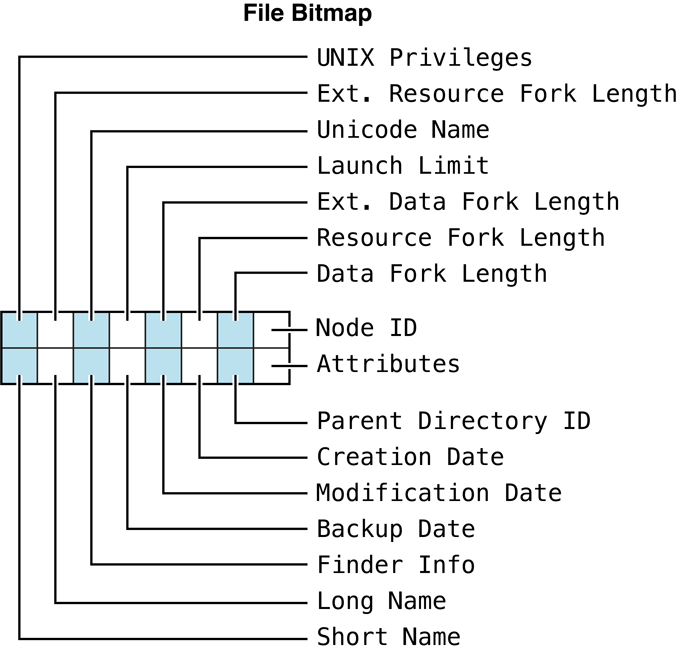
Figure 84 File bitmapThe Directory bitmap is used when calling
FPGetFileDirParms to indicate
the directory parameters you want to get. It is also used when calling
FPSetDirParms and FPSetFileDirParms to set directory parameters.
Figure 85 describes the Directory bitmap.
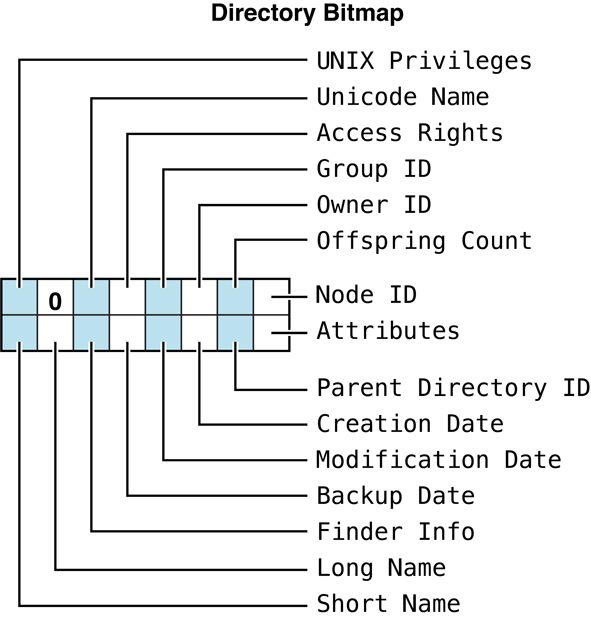
Figure 85 Directory bitmap
Note: Node IDs must be unique for all files and directories on a
share point. These IDs are used for the FPResolveID call and as a unique
identifier in various parts of the AFP stack.
File and Directory Attributes Bitmap#
A 16-bit value whose bits provide additional information about a file.
enum {
   kFPInvisibleBit = 0x01,

   kFPMultiUserBit = 0x02,    // for files
   kAttrIsExpFolder = 0x02,   // for directories

   kFPSystemBit = 0x04,

   kFPDAlreadyOpenBit = 0x08, // for files
   kAttrMounted = 0x08,       // for directories

   kFPRAlreadyOpenBit = 0x10, // for files
   kAttrInExpFolder = 0x10,   // for directories

   kFPWriteInhibitBit = 0x20,
   kFPBackUpNeededBit = 0x40,
   kFPRenameInhibitBit = 0x80,
   kFPDeleteInhibitBit = 0x100,
   kFPCopyProtectBit = 0x400,
   kFPSetClearBit = 0x8000
};Constants#
kFPInvisibleBit
The file or directory should not be made visible to the user. This bit
is get and set using the finderInfo data structure as kInvisible
(0x4000). It is sent in AFP using the attributes field of
FPSetFileDirParms.
kAttrIsExpFolder
The directory is a share point. This directory, and all directories
within it, indicate to the user that access privileges are valid (for
example, by displaying tabbed folders or drop-box folder icons or by
enabling the Sharing menu item). None of the directories outside the
shared (exported) area show access privileges on local computers,
although they may still have valid access privilege information that
only an administrator can see or modify. This bit is a read only bit. It
cannot be set by FPSetFileDirParms.
This bit is ignored by OS X clients. OS X Server does set this bit if a directory is a share point.
kFPMultiUserBit
Tells the client that multiple users may launch an application from
multiple AFP clients at the same time. Although still supported in the
client, this bit is primarily of historical interest for Mac OS 9
applications. This bit is get and set using the kIsShared (0x0040)
bit of the finderInfo data structure, and is sent in AFP using the
attributes field. In OS X Server, this flag is ignored and is always set
to true (1).
kFPSystemBit
Indicates that the folder is a system directory or file; the definition
of “system directory or file” is left to the local computer. Ignored in
Mac OS 9 and later.
kAttrMounted
The directory is mounted by a user who is not an administrator. The icon
for such a folder indicates to the user of the local computer that this
directory is a share point, and that a remote user currently has it
mounted. This bit is a read only bit. It cannot be set by
FPSetFileDirParms.
This bit is ignored by OS X clients. OS X Server does set this bit if a mount point is open by multiple clients..
kAttrInExpFolder
The directory is in a shared area. This directory, and all directories
within this directory, indicate to the user that access privileges are
valid. This directory cannot be shared because a share point cannot
exist within another share point. This bit is a read only bit. It cannot
be set by FPSetFileDirParms.
This bit is ignored by OS X clients. OS X Server does set this bit if a directory is within a sharepoint.
kFPDAlreadyOpenBit
Data fork is already open. OS X’s client implementation ignores this
flag, but Mac OS 9 clients may not. OS X Server does set this bit if a
file’s data fork is open by multiple clients. This data is obtained from
the nodeFlags field of FSCatalogInfo.
kFPRAlreadyOpenBit
Resource fork is already open. OS X’s client implementation ignores
these flags, but Mac OS 9 clients may not. OS X Server does set this bit
if a file’s resource fork is open by multiple clients. This data is
obtained from the nodeFlags field of FSCatalogInfo.
kFPWriteInhibitBit
Indicates that the file cannot be written to. This is set if the
SF_IMMUTABLE (super-user immutable) or UR_IMMUTABLE (owner
immutable) flags are set. (Delete inhibit and rename inhibit are also
set if these flags are set.)
kFPBackUpNeededBit
Obsolete. Indicates that the file or directory needs to be backed up.
This bit is set whenever the directory’s modification date-time is
modified.
This bit is ignored by OS X clients and is not supported in AppleShare Client 3.8 and later or in OS X.
kFPRenameInhibitBit
The directory cannot be renamed. This is set if the SF_IMMUTABLE
(super-user immutable) or UR_IMMUTABLE (owner immutable) flags are
set. (Write inhibit and delete inhibit are also set if these flags are
set.)
kFPDeleteInhibitBit
The directory cannot be deleted. This is set if the SF_IMMUTABLE
(super-user immutable) or UR_IMMUTABLE (owner immutable) flags are
set. (Write inhibit and rename inhibit are also set if these flags are
set.)
kFPCopyProtectBit
Obsolete. Indicated that copying the file should not be allowed. Not
supported in OS X.
kFPSetClearBit
When calling FPSetDirParms and FPSetFileDirParms, if this
bit is set to 1, the attributes associated with any 1 bits in the bitmap
are set. If this bit is set to 0, the attributes associated with any 1
bits in the bitmap are cleared. It is not possible to set some
attributes and clear other attributes in the same call.
Discussion#
Use the bits in the File Attributes bitmap to inhibit writing, renaming
or deleting the file. Other bits in the File Attributes bitmap indicate
whether the file needs to be backed up, whether the file can be copied,
whether the file is invisible or a system file, whether the file’s data
or resource fork is open, and whether the file can be opened at the same
time by multiple users. When calling FPSetFileParms and
FPSetFileDirParms to set File
Attributes, use the Set/Clear bit (bit 15) to indicate whether you are
setting or clearing a file attribute.
Figure 86 describes the Attributes bitmap for a file.
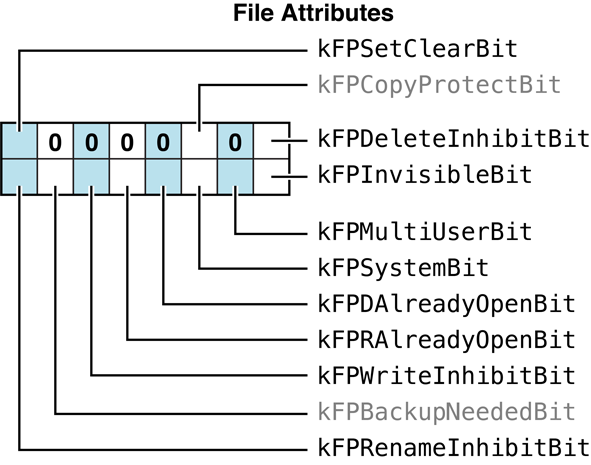
Figure 86 File attributes bitmap
Use the bits in the Directory Attributes bitmap to inhibit renaming or
deleting the directory. Other bits in the Directory Attributes bitmap
indicate whether the directory needs to be backed up, whether the
directory is mounted by a user, whether the directory is invisible or a
system directory, and whether the directory is in a shared area or is a
share point. When calling FPSetDirParms and FPGetFileDirParms to set
Directory Attributes, use the Set/Clear bit (bit 15) to indicate whether
you are setting or clearing a directory attribute.
Figure 87 describes the Attributes bitmap for a directory.
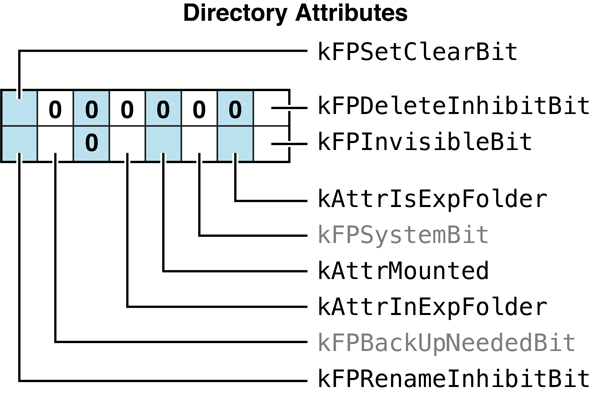
Figure 87 Directory attributes bitmap
Extended Attributes Bitmap#
Constants that control the behavior when setting extended attributes.
enum {
   kXAttrNoFollow = 0x1,
   kXAttrCreate = 0x2,
   kXAttrReplace = 0x4
};Constants#
kXAttrNoFollow
If set, do not follow symbolic links.
kXAttrCreate
If set, FPSetExtAttr fails if the
extended attribute already exists.
kXAttrReplace
If set, FPSetExtAttr fails if the
extended attribute does not exist.
Discussion#
Use these constants in the Bitmap parameter of the FPGetExtAttr,
FPSetExtAttr, and FPRemoveExtAttr commands to
get, set, and remove extended attributes.
Server Flags Bitmap#
A 16-bit value that describes server capabilities.
enum {
   kSupportsCopyfile = 0x01,
   kSupportsChgPwd = 0x02,
   kDontAllowSavePwd = 0x04,
   kSupportsSrvrMsg = 0x08,
   kSrvrSig = 0x10,
   kSupportsTCP = 0x20,
   kSupportsSrvrNotify = 0x40,
   kSupportsReconnect = 0x80,
   kSupportsDirServices = 0x100,
   kSupportsUTF8SrvrName = 0x200,
   kSupportsUUIDs = 0x400,
   kSupportsExtSleep = 0x800,
   kSupportsSuperClient = 0x8000
};Constants#
kSupportsCopyfile
Indicates that the server supports
FPCopyFile.
kSupportsChgPwd
Indicates that the server allows the user to change passwords through
AFP (using FPChangePassword).
kDontAllowSavePwd
Obsolete. Set if the client should not allow the user to save his or her
password for volumes mounted at system startup. The item-selection
dialog box may still allow the user to save his or her name. However,
when this bit is set, the button offering that option is not displayed.
Not used in OS X.
kSupportsSrvrMsg
Indicates that the server supports server messages (using
FPGetSrvrMsg).
kSrvrSig
Indicates that the server supports the optional ServerSignature
parameter in FPGetSrvrInfo used for identifying the
server. A server signature is a 16-byte number that uniquely identifies
the server. The client uses this signature to determine if it is already
logged into the server. (This feature is important when the server is
configured for multihoming.)
kSupportsTCP
Indicates that the server supports AFP over TCP/IP.
kSupportsSrvrNotify
Server supports sending DSI Attention packets with the “Server
Notification” pattern (0011). See DSIAttention for more information.
kSupportsReconnect
Indicates that the server supports the reconnect UAM and the
FPGetSessionToken and FPDisconnectOldSession commands. See
“Reconnect”
in Apple Filing Protocol Programming
Guide
and “Reconnecting Sessions” in Apple Filing Protocol Programming Guide for more
information about reconnecting.
kSupportsDirServices
Indicates that the server supports using a directory service (usually
Kerberos).
kSupportsUTF8SrvrName
Indicates that the server supports server names in UTF-8 encoding. If
this flag is set, the FPGetSrvrInfo reply packet is in UTF-8
encoding.
kSupportsUUIDs
Indicates that the server supports Universally Unique Identifiers
(UUIDs).
kSupportsExtSleep
Indicates that the server supports the extended sleep functionality. See
FPZzzzz for more information.
kSupportsSuperClient
Obsolete. (Prior to OS X, this indicated that the server could handle
multiple outstanding requests.)
Discussion#
The Server Flags bitmap is returned by the FPGetSrvrInfo command.
Volume Bitmap#
A 16-bit value whose bits are used to get and set volume parameters.
enum {
   kFPVolAttributeBit = 0x1,
   kFPVolSignatureBit = 0x2,
   kFPVolCreateDateBit = 0x4,
   kFPVolModDateBit = 0x8,
   kFPVolBackupDateBit = 0x10,
   kFPVolIDBit = 0x20,
   kFPVolBytesFreeBit = 0x40,
   kFPVolBytesTotalBit = 0x80,
   kFPVolNameBit = 0x100,
   kFPVolExtBytesFreeBit = 0x200,
   kFPVolExtBytesTotalBit = 0x400,
   kFPVolBlockSizeBit = 0x800
};Constants#
kFPVolAttributeBit
If set to 1, the response block contains a uint16_t value containing
bits defined by the “Volume Attributes Bitmap.”
kFPVolSignatureBit
Returns the volume signature. The volume signature identifies the volume
type (flat, fixed Directory ID, or variable Directory ID).
| Value | Description |
|---|---|
| 1 | Flat (no directories supported) |
| 2 | Fixed Directory ID |
| 3 | Variable Directory ID (deprecated) |
Table 75 Volume types
For more details, see the section “Apple Filing Protocol Concepts” in Apple Filing Protocol Programming Guide.
kFPVolCreateDateBit
The date the volume was created in Macintosh date format (uint32_t
containing the number of seconds since midnight on 01/01/1904). This
parameter cannot be modified by an AFP client.
kFPVolModDateBit
The date the volume was last modified in Macintosh date format
(uint32_t containing the number of seconds since midnight on
01/01/1904). This parameter cannot be modified by an AFP client.
kFPVolBackupDateBit
The date the volume was last backed up in Macintosh date format
(uint32_t containing the number of seconds since midnight on
01/01/1904). Set by backup programs each time the volume’s contents are
backed up. When a volume is created, the Backup Date is set to
0x80000000 (the earliest representable date-time value). This parameter
cannot be modified by an AFP client.
kFPVolIDBit
The volume ID (uint32_t). For each session between the server and an
AFP client, the server assigns a Volume ID to each of its volumes. This
value is unique among the volumes of a given server for that session.
This parameter cannot be modified by an AFP client.
kFPVolBytesFreeBit
The number of free bytes on the AFP volume as a uint32_t value. If a
volume is more than 4 GB, this value may not reflect the actual free
space. In general, you should use kFPVolExtBytesFreeBit instead. This
value is maintained by the server and cannot be modified by an AFP
client. This parameter cannot be modified by an AFP client.
kFPVolBytesTotalBit
The total number of bytes (free + used ) on the AFP volume as a
uint32_t value. If a volume is more than 4 GB, this value may not
reflect the actual total space. In general, you should use
kFPVolExtBytesTotalBit instead. This parameter cannot be modified by
an AFP client.
kFPVolNameBit
The volume name as a string. The volume name identifies a server volume
to an AFP client user, so it must be unique among all volumes managed by
the server. All eight-bit ASCII characters, except null (0x00) and colon
(0x3A), are permitted in a volume name. This name is not used directly
to specify files and directories on the volume. Instead, the AFP client
sends an AFP command to obtain a particular volume identifier, which it
then uses when sending subsequent AFP commands. For more information,
see “Apple Filing Protocol Concepts” in Apple Filing Protocol Programming Guide.
kFPVolExtBytesFreeBit
The number of free bytes on the AFP volume as a uint64_t value. This
parameter cannot be modified by an AFP client.
kFPVolExtBytesTotalBit
The total number of bytes (free + used ) on the AFP volume as a
uint64_t value. This parameter cannot be modified by an AFP client.
kFPVolBlockSizeBit
The logical block size of the AFP volume. This parameter cannot be
modified by an AFP client.
Discussion#
The Volume bitmap is used when calling FPGetVolParms to indicate the
volume parameters you want to get. It is also used when calling
FPSetVolParms to set a volume’s
backup date, which is the only Volume parameter that an AFP client can
set.
Figure 88 describes the Volume bitmap.
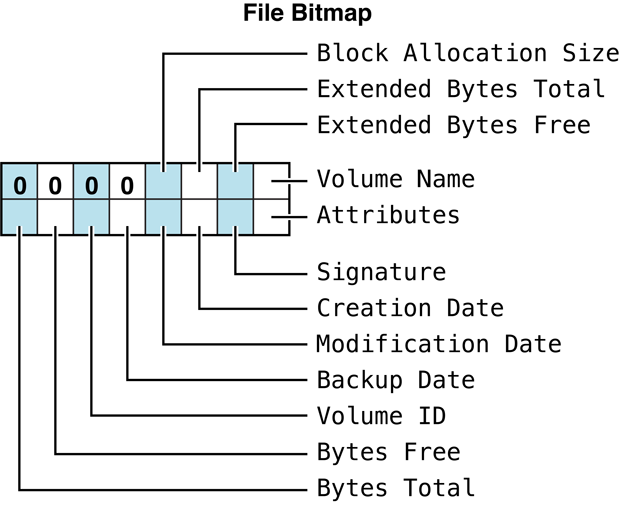
Figure 88 Volume bitmap
Volume Attributes Bitmap#
A 16-bit value whose bits describe how a volume is mounted and whether it supports certain AFP features.
enum {
   kReadOnly = 0x01,
   kHasVolumePassword = 0x02,
   kSupportsFileIDs = 0x04,
   kSupportsCatSearch = 0x08,
   kSupportsBlankAccessPrivs = 0x10,
   kSupportsUnixPrivs = 0x20,
   kSupportsUTF8Names = 0x40,
   kNoNetworkUserIDs = 0x80,
   kDefaultPrivsFromParent = 0x100,
   kNoExchangeFiles = 0x200,
   kSupportsExtAttrs = 0x400,
   kSupportsACLs = 0x800,
   kCaseSensitive = 0x1000,
   kSupportsTMLockSteal = 0x2000
};Constants#
kReadOnly
Volume is a read-only volume.
kHasVolumePassword
Volume has a password. This bit is the same as the HasPassword bit
returned for each volume by FPGetSrvrParms.
kSupportsFileIDs
Volume supports obtaining file IDs. In general, if file IDs are
supported on one volume, they are supported on all volumes, but this bit
allows the server to be more selective, if necessary.
kSupportsCatSearch
Volume supports searching the catalog tree with the
FPCatSearch and
FPCatSearchExt commands. Support for
FPCatSearch and FPCatSearchExt is optional. This bit allows the
server to make this capability available on a per-volume basis.
kSupportsBlankAccessPrivs
If set, the volume has a Supports Blank Access Privileges bit that, when
set for a directory, causes the directory to inherit its access
privileges from its parent directory.
Note: This bit is deprecated and is replaced by
kDefaultPrivsFromParent in the FPGetVolParms attributes.
kSupportsUnixPrivs
Volume supports the UNIX (owner/group/other) permissions model.
kSupportsUTF8Names
Volume supports UTF-8–encoded user names, group names, and pathnames.
kNoNetworkUserIDs
If this is set by the server, the client will always use mapped
privileges. See “AFP File Server Security” in Apple Filing Protocol Programming Guide for more
information about privilege mapping.
kDefaultPrivsFromParent
Newly created directories inherit default privileges from the parent
directory.
kNoExchangeFiles
Volume does not support the
FPExchangeFiles AFP command.
kSupportsExtAttrs
Volume supports extended attributes.
kSupportsACLs
Volume supports access control lists.
kCaseSensitive
Volume supports case-sensitive filenames.
kSupportsTMLockSteal
Volume supports Time Machine lock stealing. See Time Machine Network Interface Specification (TMNIS) for more information.
Discussion#
Figure 89 describes the Attributes bitmap for a volume.
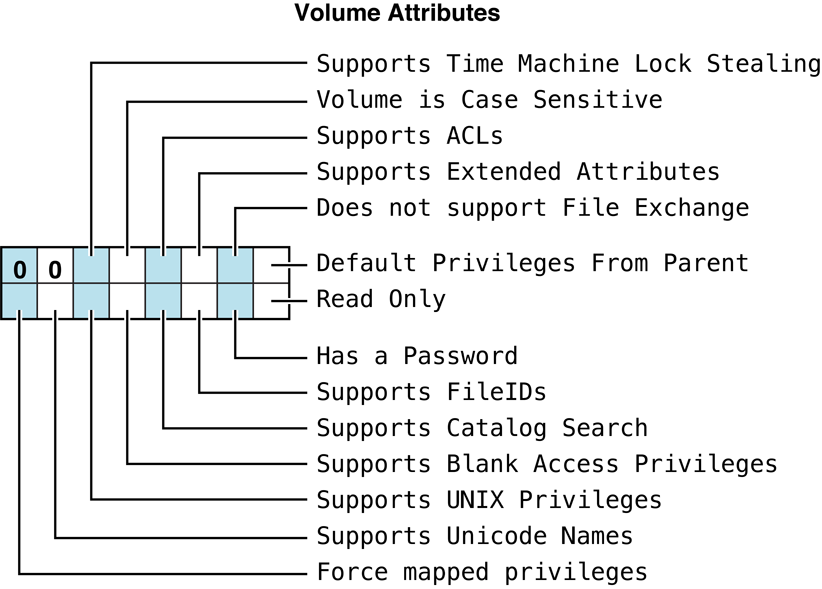
Figure 89 Volume attributes bitmap
See the Character Encoding section of “Apple Filing Protocol Concepts” in Apple Filing Protocol Programming Guide for additional details about the UTF-8 encoding used by AFP.
AFP Text Encodings#
The text encodings supported by AFP.
enum {
   kTextEncodingMacRoman = 0,
   kTextEncodingMacJapanese = 1,
   kTextEncodingMacChineseTrad = 2,
   kTextEncodingMacKorean = 3,
   kTextEncodingMacArabic = 4,
   kTextEncodingMacHebrew = 5,
   kTextEncodingMacGreek = 6,
   kTextEncodingMacCyrillic = 7,
   kTextEncodingMacDevanagari = 9,
   kTextEncodingMacGurmukhi = 10,
   kTextEncodingMacGujarati = 11,
   kTextEncodingMacOriya = 12,
   kTextEncodingMacBengali = 13,
   kTextEncodingMacTamil = 14,
   kTextEncodingMacTelugu = 15,
   kTextEncodingMacKannada = 16,
   kTextEncodingMacMalayalam = 17,
   kTextEncodingMacSinhalese = 18,
   kTextEncodingMacBurmese = 19,
   kTextEncodingMacKhmer = 20,
   kTextEncodingMacThai = 21,
   kTextEncodingMacLaotian = 22,
   kTextEncodingMacGeorgian = 23,
   kTextEncodingMacArmenian = 24,
   kTextEncodingMacChineseSimp = 25,
   kTextEncodingMacTibetan = 26,
   kTextEncodingMacMongolian = 27,
   kTextEncodingMacEthiopic = 28,
   kTextEncodingMacCentralEurRoman = 29,
   kTextEncodingMacVietnamese = 30,
   kTextEncodingMacExtArabic = 31,
   kTextEncodingMacSymbol = 33,
   kTextEncodingMacDingbats = 34,
   kTextEncodingMacTurkish = 35,
   kTextEncodingMacCroatian = 36,
   kTextEncodingMacIcelandic = 37,
   kTextEncodingMacRomanian = 38,
   kTextEncodingMacCeltic = 39,
   kTextEncodingMacGaelic = 40,
   kTextEncodingMacKeyboardGlyphs = 41,
   kTextEncodingMacUnicode = 126,
   kTextEncodingMacFarsi = 140,
   kTextEncodingMacUkrainian = 152,
   kTextEncodingMacInuit = 236,
   kTextEncodingMacVT100 = 252,
   kTextEncodingMacHFS = 255,
   kTextEncodingUnicodeDefault = 256,
   kTextEncodingUnicodeV1_1 = 257,
   kTextEncodingISO10646_1993 = 257,
   kTextEncodingUnicodeV2_0 = 259,
   kTextEncodingUnicodeV2_1 = 259,
   kTextEncodingUnicodeV3_0 = 260,
   kTextEncodingISOLatin1 = 513,
   kTextEncodingISOLatin2 = 514,
   kTextEncodingISOLatin3 = 515,
   kTextEncodingISOLatin4 = 516,
   kTextEncodingISOLatinCyrillic = 517,
   kTextEncodingISOLatinArabic = 518,
   kTextEncodingISOLatinGreek = 519,
   kTextEncodingISOLatinHebrew = 520,
   kTextEncodingISOLatin5 = 521,
   kTextEncodingISOLatin6 = 522,
   kTextEncodingISOLatin7 = 525,
   kTextEncodingISOLatin8 = 526,
   kTextEncodingISOLatin9 = 527,
   kTextEncodingDOSLatinUS = 1024,
   kTextEncodingDOSGreek = 1029,
   kTextEncodingDOSBalticRim = 1030,
   kTextEncodingDOSLatin1 = 1040,
   kTextEncodingDOSGreek1 = 1041,
   kTextEncodingDOSLatin2 = 1042,
   kTextEncodingDOSCyrillic = 1043,
   kTextEncodingDOSTurkish = 1044,
   kTextEncodingDOSPortuguese = 1045,
   kTextEncodingDOSIcelandic = 1046,
   kTextEncodingDOSHebrew = 1047,
   kTextEncodingDOSCanadianFrench = 1048,
   kTextEncodingDOSArabic = 1049,
   kTextEncodingDOSNordic = 1050,
   kTextEncodingDOSRussian = 1051,
   kTextEncodingDOSGreek2 = 1052,
   kTextEncodingDOSThai = 1053,
   kTextEncodingDOSJapanese = 1056,
   kTextEncodingDOSChineseSimplif = 1057,
   kTextEncodingDOSKorean = 1058,
   kTextEncodingDOSChineseTrad = 1059,
   kTextEncodingWindowsLatin1 = 1280,
   kTextEncodingWindowsANSI = 1280,
   kTextEncodingWindowsLatin2 = 1281,
   kTextEncodingWindowsCyrillic = 1282,
   kTextEncodingWindowsGreek = 1283,
   kTextEncodingWindowsLatin5 = 1284,
   kTextEncodingWindowsHebrew = 1285,
   kTextEncodingWindowsArabic = 1286,
   kTextEncodingWindowsBalticRim = 1287,
   kTextEncodingWindowsVietnamese = 1288,
   kTextEncodingWindowsKoreanJohab = 1296,
   kTextEncodingUS_ASCII = 1536,
   kTextEncodingJIS_X0201_76 = 1568,
   kTextEncodingJIS_X0208_83 = 1569,
   kTextEncodingJIS_X0208_90 = 1570
};
DSI Transport Layer Constants#
AFPUserBytes Definitions#
The AFPUserBytes bytes make up the 2-byte attention code sent in a DSI
Attention packet to the AFP client. This section describes the
AFPUserBytes values.
enum {
   kShutDownNotifyMask = 0x8000,
   kAllowReconnectMask = 0x4000,
   kMsgNotifyMask = 0x2000,
   kDisconnectNotifyMask = 0x1000,
};Constants#
kShutDownNotifyMask
Bit 15: Shutdown or Attention bit. This bit is used when the server is
being shut down or one or more users are being disconnected.
kAllowReconnectMask
Bit 14: Server Crash bit. The server has detected an internal error, and
the session will close immediately with minimal flushing of files. There
may be some data loss. This condition is never accompanied by a server
message and is highly unlikely to occur.
kMsgNotifyMask
Bit 13: Server Message bit. There is a server message that the client
should request by calling FPGetSrvrMsg with a MsgType of “Server.” For
more information, see the section “FPGetSrvrMsg” (page 55). The client
should request the message as soon as possible after receiving this
attention code. Otherwise, the server message it receives could be out
of date.
kDisconnectNotifyMask
Bit 12: Don’t Reconnect bit. This bit is set when the user is
disconnected, so that the client’s reconnect code does not attempt to
reconnect the session. This bit is not set for normal server shutdowns
and is not set when the server loses power or when there is a break in
network cabling. This mechanism allows administrators to shut down the
server for backup purposes, bring the server up, and allow disconnected
clients to reconnect transparently. This bit is ignored when the number
of minutes is any value other than zero.
Discussion#
The AFPUserBytes bitfield layout is shown in Figure 90.

Figure 90 AFPUserBytes bitfield layout
Figure 91 shows how the attention code bits for the AFPUserBytes bytes are defined.
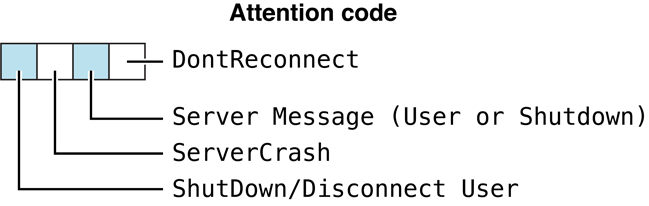
Figure 91 AFPUserBytes attention code bits
Table 76 lists valid combinations for the attention code bits.
| Combination | Meaning |
|---|---|
| 1000 | The server is shutting down in the designated number of minutes, or the user will be disconnected in the designated number of minutes. No message accompanies this shutdown. This attention code may be used when the server shuts down (that is, when the administrator quits file service). |
| 1001 | The server is shutting down, or the user will be disconnected in the designated number of minutes. No message accompanies this shutdown. This attention code is used upon user disconnection (for example, when the administrator detects an intruder and disconnects him or her). |
| 1010 | The server is shutting down, or the user will be disconnected in the designated number of minutes. A message accompanies this shutdown. The workstation should immediately submit an FPGetSrvrMsg command to receive and display the message. This attention code can be used upon server shutdown (that is, when the administrator quits file service). |
| 0100 | The server is shutting down immediately, possibly due to an internal error, and can perform only minimal flushing. A message never accompanies this attention code. |
| 1011 | The server is shutting down, or the user will be disconnected in the designated number of minutes. A message accompanies this shutdown. The workstation should immediately submit an FPGetSrvrMsg command to receive and display the message. This is one of the codes used upon user disconnection (for example, when the administrator detects an intruder and disconnects him or her). |
| 0100 | The server is going down immediately (possibly because of an internal error) and can perform only minimal flushing. Number of minutes is ignored. No message ever accompanies such an attention code. |
| 0010 | The server has a server message available for this workstation. The workstation should immediately submit an FPGetSrvrMsg command to receive and display the message. The extended bitmap is reserved for Apple Computer’s use only. |
| 0011 | Server Notification (introduced in AFP 2.2). The server is notifying the client of an event relating to the current session. Bit 0 in the extended bitmap indicates that the modification date of one of the volumes mounted from the server has changed. The client should issue an FPGetVolParms command for each volume mounted from the server. |
| 0001 | Reserved. The extended bitmap is reserved for Apple Computer’s use only. |
| 0000 | Reserved. The extended bitmap is reserved for Apple Computer’s use only. |
Table 76 Valid combinations for the AFPUserBytes Attention Code
bits
Note that for some of the valid bit patterns, the lower 12 bits of
AFPUserBytes are interpreted as the number of minutes before the
action described by the bit pattern will take place. This value can be a
number in the range 0 to 4094 ($FFE) inclusive. A value of 4095 ($FFF)
means that the action is being canceled.
Result Codes#
The result codes specific to the Apple Filing Protocol are listed in the table below.
| Result Code | Value | Description |
|---|---|---|
kFPNoErr | 0 | No error (success). |
kFPNoMoreSessions | -1068 | Server cannot handle additional sessions. This error usually indicates that the server limits the maximum number of concurrent clients, and that this maximum number would be exceeded by honoring this login request. |
kASPSessClosed | -1072 | ASP session closed. |
kFPAccessDenied | -5000 | User does not have the access privileges required to use the command. |
kFPAuthContinue | -5001 | Authentication is not yet complete. |
kFPBadUAM | -5002 | Specified UAM is unknown. |
kFPBadVersNum | -5003 | Server does not support the specified AFP version. |
kFPBitmapErr | -5004 | Attempt was made to get or set a parameter that cannot be obtained or set with this command, or a required bitmap is null. |
kFPCantMove | -5005 | Attempt was made to move a directory into one of its descendent directories. |
kFPDenyConflict | -5006 | Specified fork cannot be opened because of a deny modes conflict. |
kFPDirNotEmpty | -5007 | Directory is not empty. |
kFPDiskFull | -5008 | No more space exists on the volume. |
kFPEOFErr | -5009 | No more matches or end of fork reached. |
kFPFileBusy | -5010 | When attempting a hard create, the file already exists and is open. |
kFPFlatVol | -5011 | Volume is flat and does not support directories. |
kFPItemNotFound | -5012 | Specified APPL mapping, comment, or icon was not found in the Desktop database; specified ID is unknown. Beginning in AFP 3.4, the POSIX error code ENOATTR maps onto this error code. In prior AFP versions, the ENOATTR error was mapped on to the “kFPMiscErr” error code. |
kFPLockErr | -5013 | Some or all of the requested range is locked by another user; a lock range conflict exists. |
kFPMiscErr | -5014 | Non-AFP error occurred. |
kFPNoMoreLocks | -5015 | Server’s maximum lock count has been reached. |
kFPNoServer | -5016 | Server is not responding. |
kFPObjectExists | -5017 | File or directory already exists. |
kFPObjectNotFound | -5018 | Input parameters do not point to an existing directory, file, or volume. |
kFPParamErr | -5019 | Session reference number, Desktop database reference number, open fork reference number, Volume ID, Directory ID, File ID, Group ID, or subfunction is unknown; byte range starts before byte zero; pathname is invalid; pathname type is unknown; user name is null, exceeds the UAM’s user name length limit, or does not exist, MaxReplySize is too small to hold a single offspring structure, ThisUser bit is not set, authentication failed for an undisclosed reason, specified user is unknown or the account has been disabled due to too many login attempts; ReqCount or Offset is negative; NewLineMask is invalid. |
kFPRangeNotLocked | -5020 | Attempt to unlock a range that is locked by another user or that is not locked at all. |
kFPRangeOverlap | -5021 | User tried to lock some or all of a range that the user has already locked. |
kFPSessClosed | -5022 | Session is closed. |
kFPUserNotAuth | -5023 | UAM failed (the specified old password doesn’t match); no user is logged in yet for the specified session; authentication failed; password is incorrect. |
kFPCallNotSupported | -5024 | Server does not support this command. |
kFPObjectTypeErr | -5025 | Input parameters point to the wrong type of object. |
kFPTooManyFilesOpen | -5026 | Server cannot open another fork. |
kFPServerGoingDown | -5027 | Server is shutting down. |
kFPCantRename | -5028 | Attempt was made to rename a volume or root directory. |
kFPDirNotFound | -5029 | Input parameters do not point to an existing directory. |
kFPIconTypeError | -5030 | New icon’s size is different from the size of the existing icon. |
kFPVolLocked | -5031 | Volume is Read Only. |
kFPObjectLocked | -5032 | File or directory is marked DeleteInhibit; directory being moved, renamed, or moved and renamed is marked RenameInhibit; file being moved and renamed is marked RenameInhibit; attempt was made to open a file for writing that is marked WriteInhibit; attempt was made to rename a file or directory that is marked RenameInhibit. |
kFPContainsSharedErr | -5033 | Directory contains a share point. |
kFPIDNotFound | -5034 | File ID was not found. (No file thread exists.) |
kFPIDExists | -5035 | File already has a File ID. |
kFPDiffVolErr | -5036 | Wrong volume. |
kFPCatalogChanged | -5037 | Catalog has changed. |
kFPSameObjectErr | -5038 | Two objects that should be different are the same object. |
kFPBadIDErr | -5039 | File ID is not valid. |
kFPPwdSameErr | -5040 | User attempted to change his or her password to the same password that is currently set. |
kFPPwdTooShortErr | -5041 | User password is shorter than the server’s minimum password length, or user attempted to change password to a password that is shorter than the server’s minimum password length. |
kFPPwdExpiredErr | -5042 | User’s password has expired. |
kFPInsideSharedErr | -5043 | Directory being moved contains a share point and is being moved into a directory that is shared or is the descendent of a directory that is shared. |
kFPInsideTrashErr | -5044 | Shared directory is being moved into the Trash; a directory is being moved to the trash and it contains a shared folder. |
kFPPwdNeedsChangeErr | -5045 | User’s password needs to be changed. |
kFPPwdPolicyErr | -5046 | New password does not conform to the server’s password policy. |
kFPDiskQuotaExceeded | -5047 | Disk quota exceeded. |
Copyright © 2012 Apple Inc. All Rights Reserved. | Updated: 2012-12-13
DISCLAIMER: This website is not affiliated with Apple Inc. in any way. The information in this section is a mirror of the content published at Apple Developer and presented here strictly for archival purposes.